Chapter 6: Programming Examples 6-3
Owner’s Guide 0300199-01 Rev. D
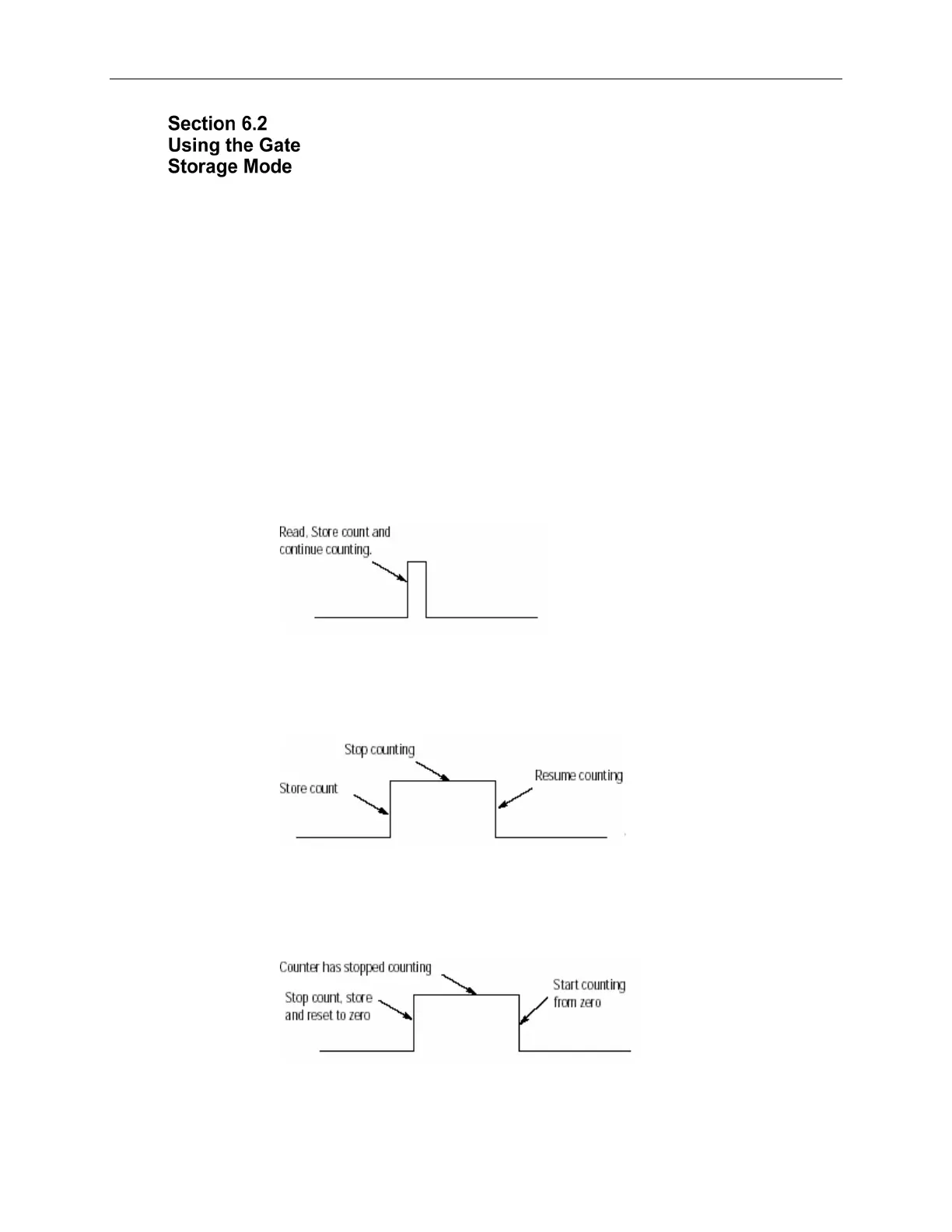
The gate storage mode allows you to configure the external gate to react in
several ways. The StorageMode[x] tag has 5 valid configurations:
StorageMode[x]
This mode determines how the gate behavior effects counter behavior:
0 = no store mode.
1 = store and continue mode.
2 = store, wait, and resume mode.
3 = store, reset, wait, and start mode.
4 = store, reset, and start mode.
StorageMode = 1 - Read, Store count, and continue counting
This mode could be used in a cutting operation to determine the length of the cut
material. When the gate is triggered, the current count value is stored, and the
counter continues to count. The length of the material would then be determined
by subtracting the correct count value from the stored value.
The gate behavior:
StorageMode = 2 - Store/Wait/Resume
This mode may be used in a situation where accumulated count is important, but
the process may stop. For instance, if you are running filling line and want to
know the daily production, a flowmeter will measure the total quantity even
through start/stop cycles.
StorageMode = 3 - Store-Reset/Wait/Start
This mode could be used in a bottle-filling line when you want to control the
precise amount being dispensed. The fill occurs, the enable is triggered, and the
bottle moves. The next bottle comes into place and the fill starts at zero.
StorageMode = 4 - Store-Reset/Start
This mode could be used for a meter proving line when there are two trigger


 To Next Page