FC Wireless Conguration
This feature is for ight controllers without Bluetooth conguration
capabilities, with specic soldering instructions as follows.
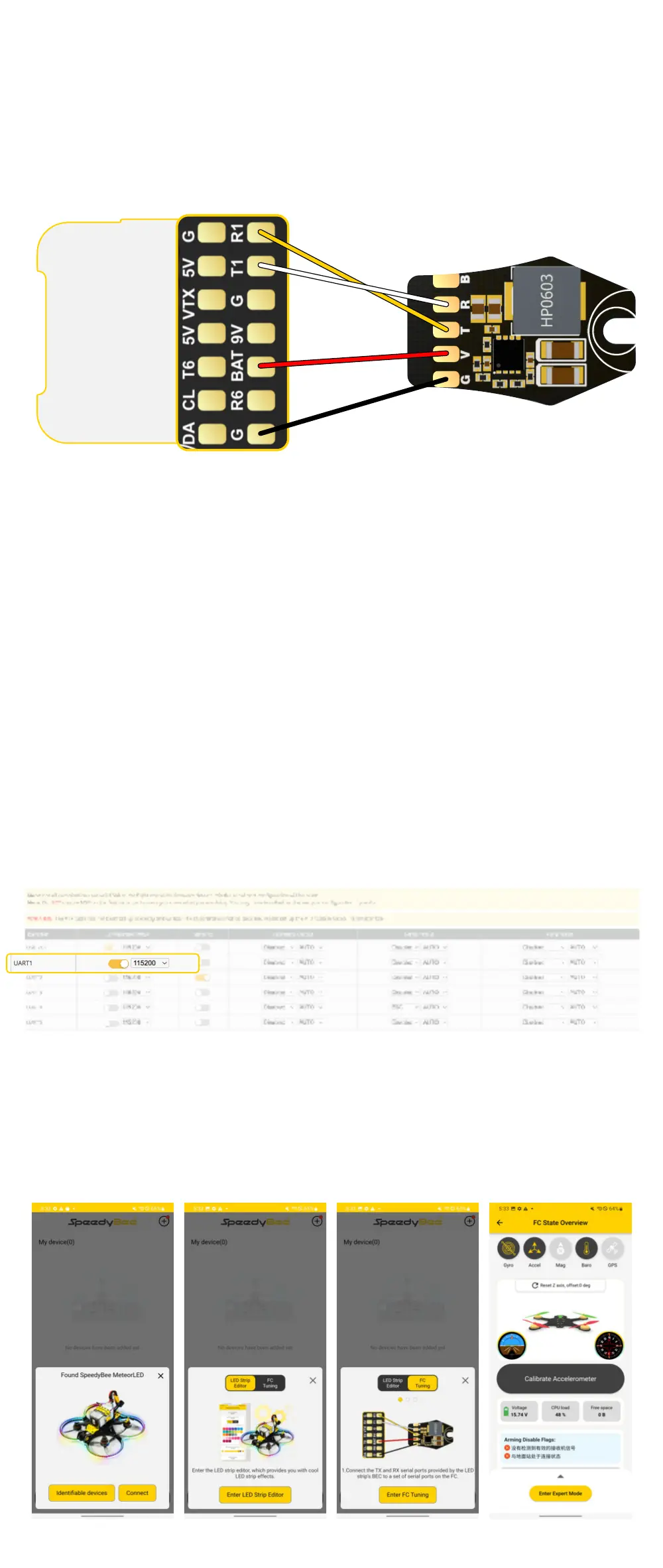
①Solder the red wire to the BAT pad on the ight controller or to the
positive pole of the power cable. The input voltage range should be
for a 2-6S lithium batte.
② Solder the black wire to the GND pad on the ight controller or to
the negative pole of the power cable.
③ Find a set of unused UART on the ight controller. Solder the yellow
wire to the RX pad of the UART and the white wire to the TX pad
of the UART. For example, using UART 1.
④ Connect the ight controller to the congurators on the computer.
Navigate to the pos page, enable the MSP for the relevant UART
connected to the Meteor LED, and set the baud rate to 115200.
Then click 'Save and Reboot' in the bottom right corner.
⑤ With all soldering and settings complete, power up the drone and
open the SpeedyBee APP. Click the plus sign at the bottom,
select 'SpeedyBee MeteorLED'. Once connected,
click on 'FC Tuning' for wireless Conguration.


 To Next Page
 Loading...