B
A
B
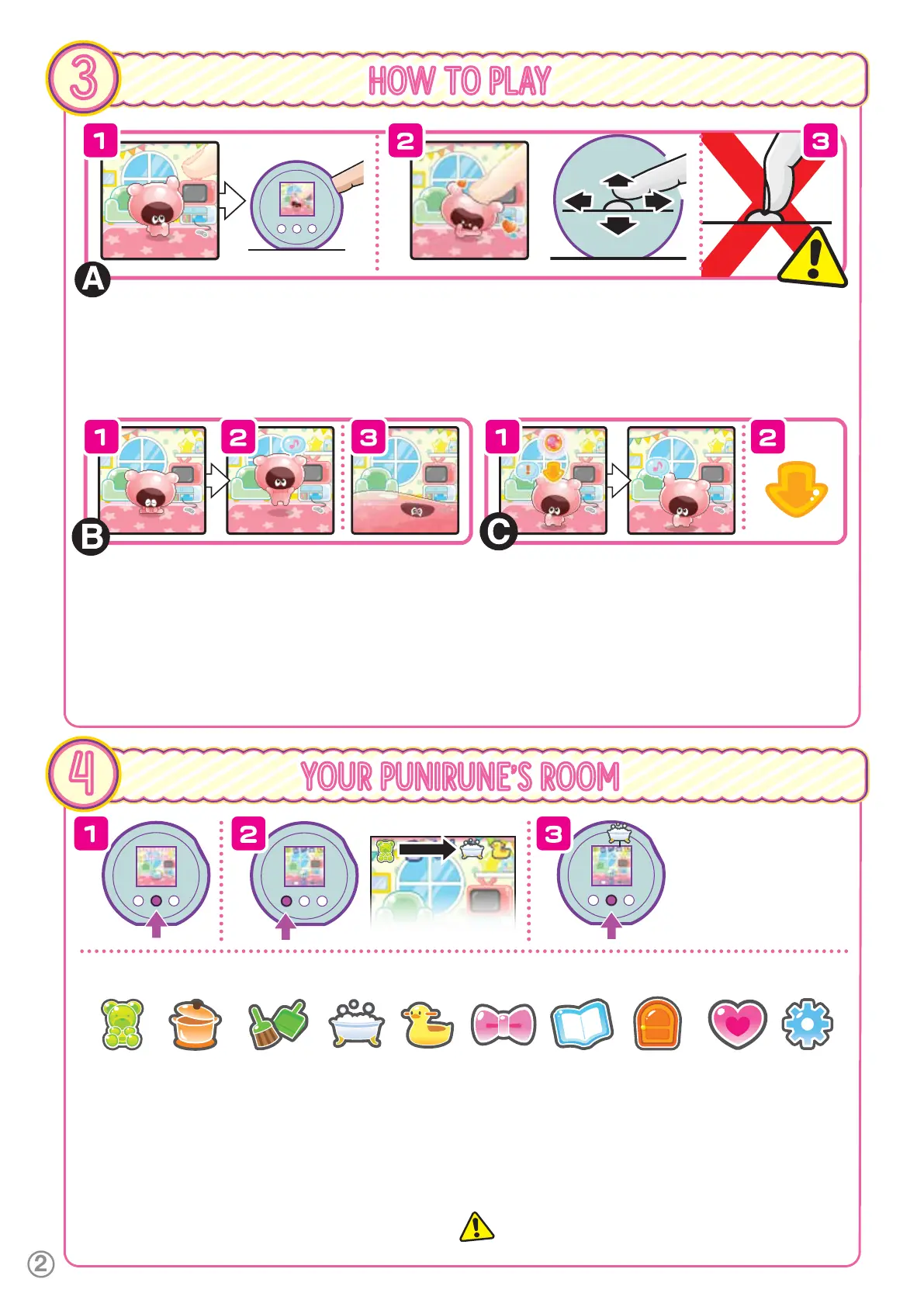
USE THE SQUISHY BUTTON TO GIVE THEM A SQUISH!
1.
The Squishy Button can be pressed forward and backward, left and right, and wiggled around. Hold down the Squishy Button, then let go
to jump up. Hold down the Squishy Button and move it left or right as you let it go to jump in the direction you moved the button.
2. Press the Squishy Button a lot while on the Room Screen to give your Punirunes a lot of squishes and make them happy!
3.
a
NOTE: Avoid scratching the Squishy Button with your nails or pulling it too hard. Just squish it gently with your fingertips!
(The button is made of soft materials, so you could scratch the surface.)
MAKE SURE TO PLAY WITH THEM OFTEN
1.
If you leave your Punirunes alone without giving them a squish, or
leave them hungry, they’ll start to feel sad. Help them recover by
giving them a squish!
2.
Give them food or take care of them, and they’ll jump with joy. You’ll
know your Punirunes are happy when you see the music note.
3.
If left alone, Punirunes get sad and might even melt! If Punirunes melt,
you won’t be able to choose certain options from the Care Menu.
Give them a squish to get them back to normal.
WHEN A SEED SHOWS UP
1.
After some time, a Seed will appear in the room. Jump to collect
it!
Seeds are used to make food, create Dress-Up items, and
help your Punirunes grow up. There are 3 types: Red, Blue and
Yellow Seeds.
2.
When the Arrow appears, hold down the Squishy Button, then
let go to jump up. NOTE: If you keep your finger on the Squishy
Button, you may not be able to use the A, B and C buttons. If
this happens, just remove your finger.
CARE MENU
1.
Pressing B on the
Room Screen opens
the Care Menu.
2.
Press A to cycle through
Play Modes.
3.
Press B to select a mode.
HOW TO PLAY
3
YOUR PUNIRUNE’S ROOM
4
1
FOOD - Give your Punirunes the food you made in the Kitchen.
2
KITCHEN - Make food for your Punirunes with items purchased
from the Market.
3
CLEANING - Use your Punirunes to pick up dust around the room.
4
BATH - Wash dust bunnies off your Punirunes.
5
BATHROOM - Flush away your Punirune’s poop.
6
ITEMS - Dress up your Punirunes with different items, or decorate
their room.
7
BOOKSHELF - Check on the Punirunes you raised or the Gifts
they gave you.
8
GOING OUT - Go to the Theme Park to play games and win
Coins. Go to the Market to spend coins on food, accessories, and
decor. Visit theForest,where you can say goodbye to your
Punirunes when they become anAdult.
9
CHECK FRIENDSHIP - Check your Punirune’s friendliness and
fullness, and how many Coins you have, among other things.
0
SETTINGS - Set the date, time, volume and screen brightness, or
delete your play data up to this point.
NOTE: When your Punirunes are asleep (8:00 PM to 5:59 AM) you
may not be able to play with them in certain ways
(you can only enter Bookshelf, Check Friendship and Settings).
1 2 3 4 5 6 7 8 9 0



 To Next Page