OPERATING INSTRUCTIONS
Auto Start/Stop
Monitor automatically starts when exercise begins and automatically turns o 4 minutes after
exercise stops at which time all exercise data willl be erased.
Countdown Timer
• If desired, the exercise interval can be set using time or distance.
• If no exercise interval is set then ride time and distance will count up from zero.
Setting Countdown Functions
Time
• Select Mode “M” key once (time will be ashing).
• Use ▲ or ▼ arrows to set time, ▲ arrow will add time in 5-minute increments and ▼ arrow
will subtract time in 5-minute increments to set time.
• Once desired time is achieved, select Mode “M” key again.
• Once exercise begins, time will count down from selected time to zero.
Distance
• Select Mode “M” key twice (distance will be ashing).
• ▲ arrow will add 1 mile to distance and ▼ arrow will subtract 1 mile from distance.
• Once desired distance is achieved, select Mode “M” key again.
• Once exercise begins, distance will count down from selected distance to zero.
Alternating Display Between Speed and Distance
During exercise pushing the ▼ button will alternate the third line of the display between speed
and distance.
Max/Avg/Current RPM and Speed
During exercise the ▲ arrow can be used to toggle the RPM and speed displays to show
maximum, average and current as desired.
Auto Start/Stop
Monitor automatically starts when exercise begins and automatically turns o 4 minutes after
exercise stops at which time all exercise data willl be erased.
Countdown Timer
• If desired, the exercise interval can be set using time or distance.
• If no exercise interval is set then ride time and distance will count up from zero.
Setting Countdown Functions
Time
• Select Mode “M” key once (time will be ashing).
• Use ▲ or ▼ arrows to set time, ▲ arrow will add time in 5-minute increments and ▼ arrow
will subtract time in 5-minute increments to set time.
• Once desired time is achieved, select Mode “M” key again.
• Once exercise begins, time will count down from selected time to zero.
Distance
• Select Mode “M” key twice (distance will be ashing).
• ▲ arrow will add 1 mile to distance and ▼ arrow will subtract 1 mile from distance.
• Once desired distance is achieved, select Mode “M” key again.
• Once exercise begins, distance will count down from selected distance to zero.
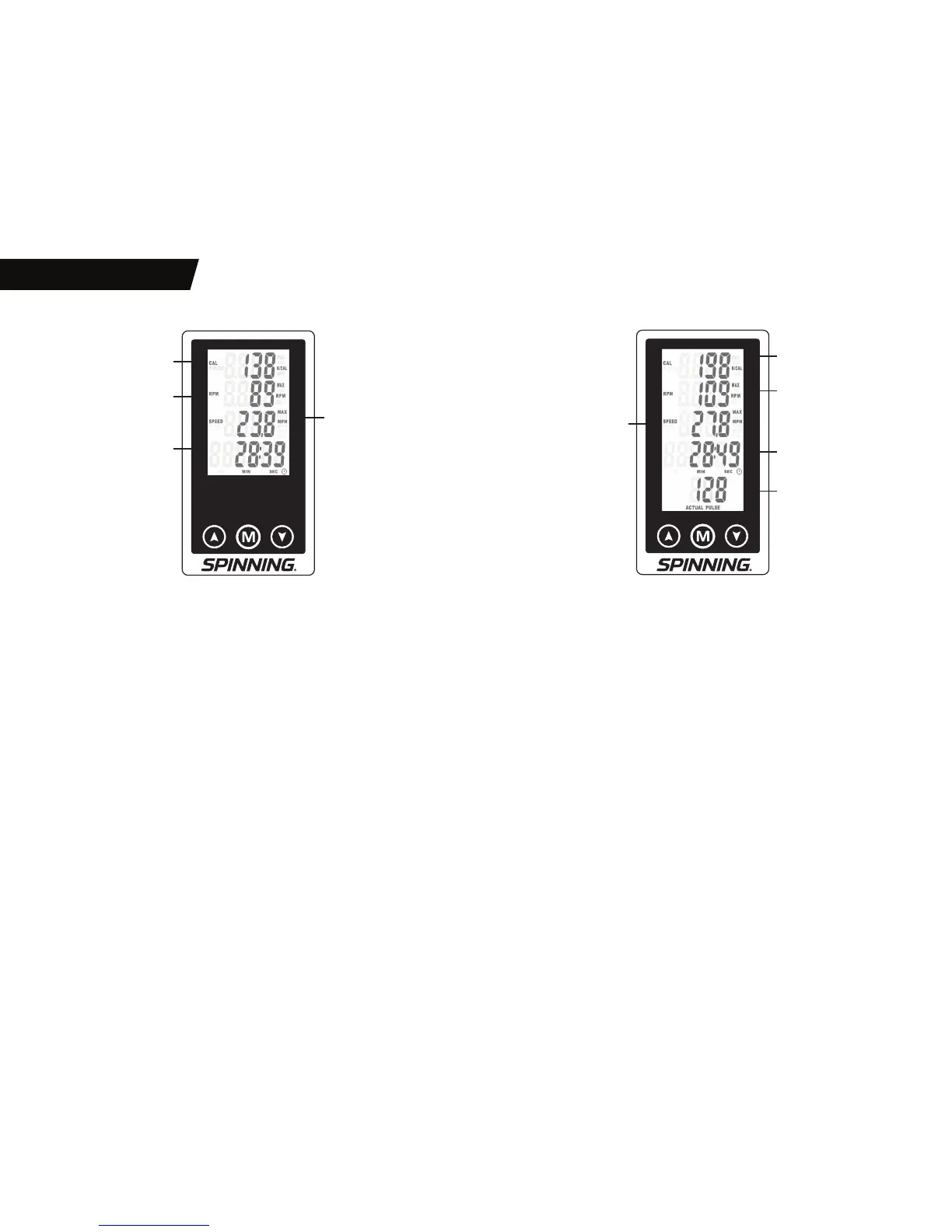
Alternating Display Between Cal/Pulse and Speed/Distance
During exercise pushing the ▼ arrow will toggle the rst and third lines of the display between
1-Cal/3-Speed and 1-Pulse/3-Distance respectively.
MAX/Avg/Current RPM, Speed and Pulse
• If Cal and Speed are displayed on the rst and third line respectively then the ▲ arrow can be
used to toggle RPM and Speed displays between Max/Avg/Current respectively.
• If Pulse and Distance are displayed on the rst and third line respectively then the ▲ arrow
can be used to toggle the Pulse and RPM display between MAX/AVG/Current respectively.
CALORIES (KCAL)
CALORIES (KCAL)
PULSE (HR)
CURRENT → MAX → AVG
RPM (CADENCE)
CURRENT → MAX → AVG
RPM (CADENCE)
CURRENT → MAX → AVG
SPEED
CURRENT → MAX → AVG
DISTANCE
CURRENT → COUNTDOWN
TIME
TIME OF RIDE → COUNTDOWN
TIME
TIME OF RIDE → COUNTDOWN
BIO™ BIO HR™
SPEED
CURRENT → MAX → AVG
DISTANCE
CURRENT → COUNTDOWN
PULSE (HR)
CURRENT


 To Next Page
 Loading...