Director – Quickstart Director – Quickstart
RISK OF ELE CTRIC SH OCK
DO NOT OPE N
CAUTION
RISQUE DE CHOC ÉLECTRIQUE
NE PAS OUVRIR
ATTENTION
USB
AES
OPTICAL
COAX
IR
L
R
L
R
L
12
ANALOG < SOURCES > DIGITAL
1 ON: RCA D irect Out
2 ON: XLR D irect Out
5 ON: Ref +15dB
6 ON: Ref +18dB
3 ON: Zero f lag auto- mute enabled
4 ON: RCA I n -10dBV to 0dBuON BOTTOM SIDE:
DIP SWITCHES
Made in
Germany
OUT OUT R OUT L
R
B
A
Voltage S election: 1 . Remove Fuse Hol der
2. Exch ange Fuses 3. F lip Over 4. Rei nstall
~115 V AC/~230 V AC, 50 Hz/60 Hz, P ma x. 45 W
Fuses: 2 30 V: T 500mA L 250V, 115 V: T 1 A L 250V
AMP CTL
IR
PGM
IR
PGM
SOURCE
VOLUME
Refer to
Manual
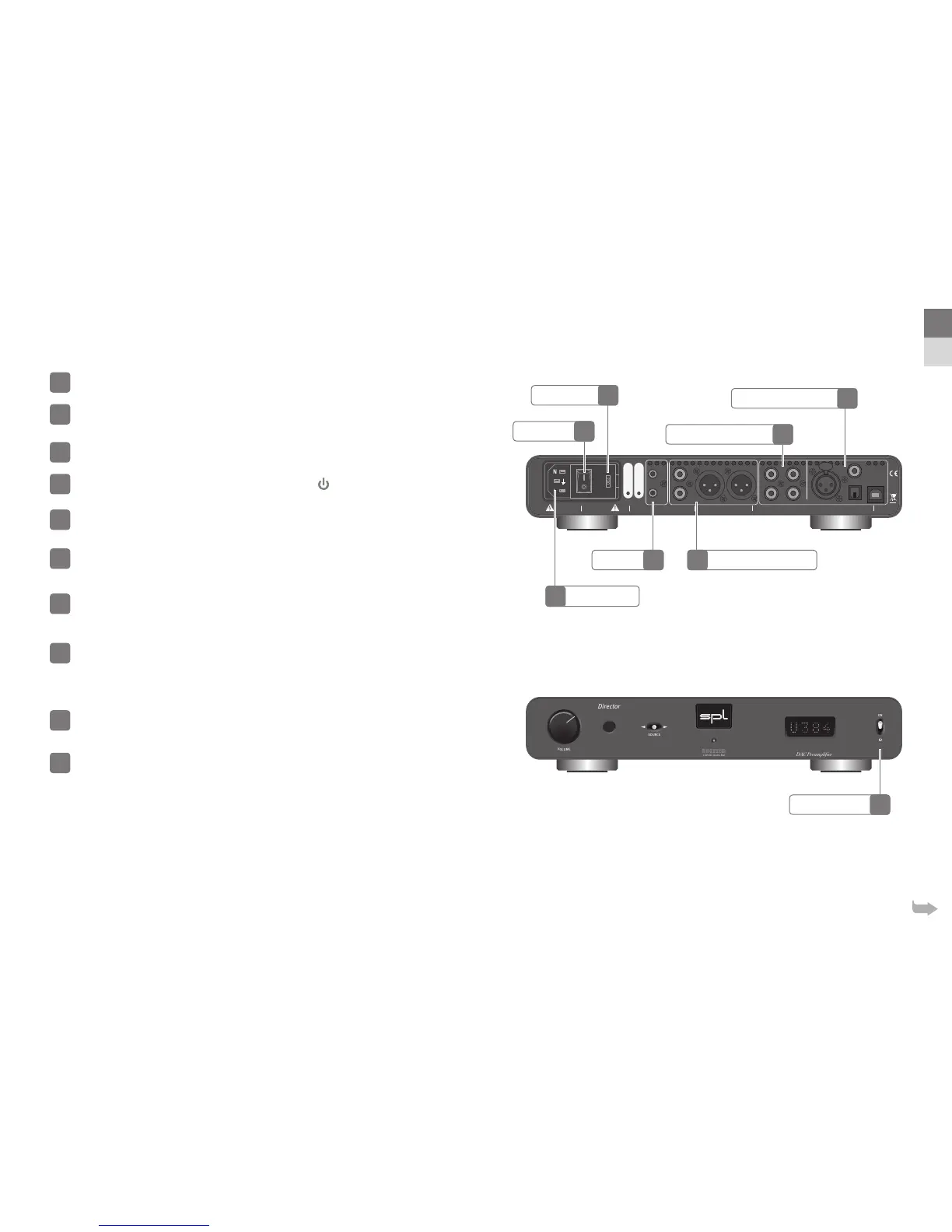
Start up
Read the security advices on page !
Make sure that the selected mains voltage of the Director is according to the
mains voltage of your region.
Make sure that the mains switch on the rear of the Director is set to O
(O=O/On = I).
The standby switch on the front panel has to be set to .
Connect the supplied power cord to the director and to an appropriate mains
socket outlet.
If the supplied power cord does not match your mains socket outlet, please contact your dealer.
Turn o all devices you wish to connect to the Director.
Connect the outputs of your analog sources (e.g. CD Player, Phonos) to the
analog inputs of the Director. Please use appropriate audio cables (RCA).
Audio cables not included in the scope of delivery.
Connect the outputs of your digital sources (e.g. Mac, PC or CD Player) to the
digital inputs of the Director. Please use appropiate audio cables (AES, USB,
coaxial, optical).
Digital audio cables not included in the scope of delivery.
For Windows® computers download the latest driver from director.spl.info under the “Driver” tab and have it
installed. Macs, iPhones and iPads do not require a driver since the USB port is Apple-Class compliant.
Connect audio cables (XLR, RCA) between Director and a following amplier.
Audio cables not included in the scope of delivery.
If you own a SPL Performer s power amplier you can connect the AMP CTL
of the Director with a mono mini jack cable to the AMP CTL of the Performer
s to switch both units between standby and operation together.
Mono mini jack cable not included in the scope of delivery.
1
2
3
4
5
6
7
8
9
10
Analog Audio Inputs
Digital Audio Inputs
Standby Switch
Mains Voltage
Mains Switch
Analog Audio OutputsAMP CTL
Mains Connector
7
8
4
2
3
910
EN
DE
5



 To Next Page