!
Control Buttons (Continued)
!
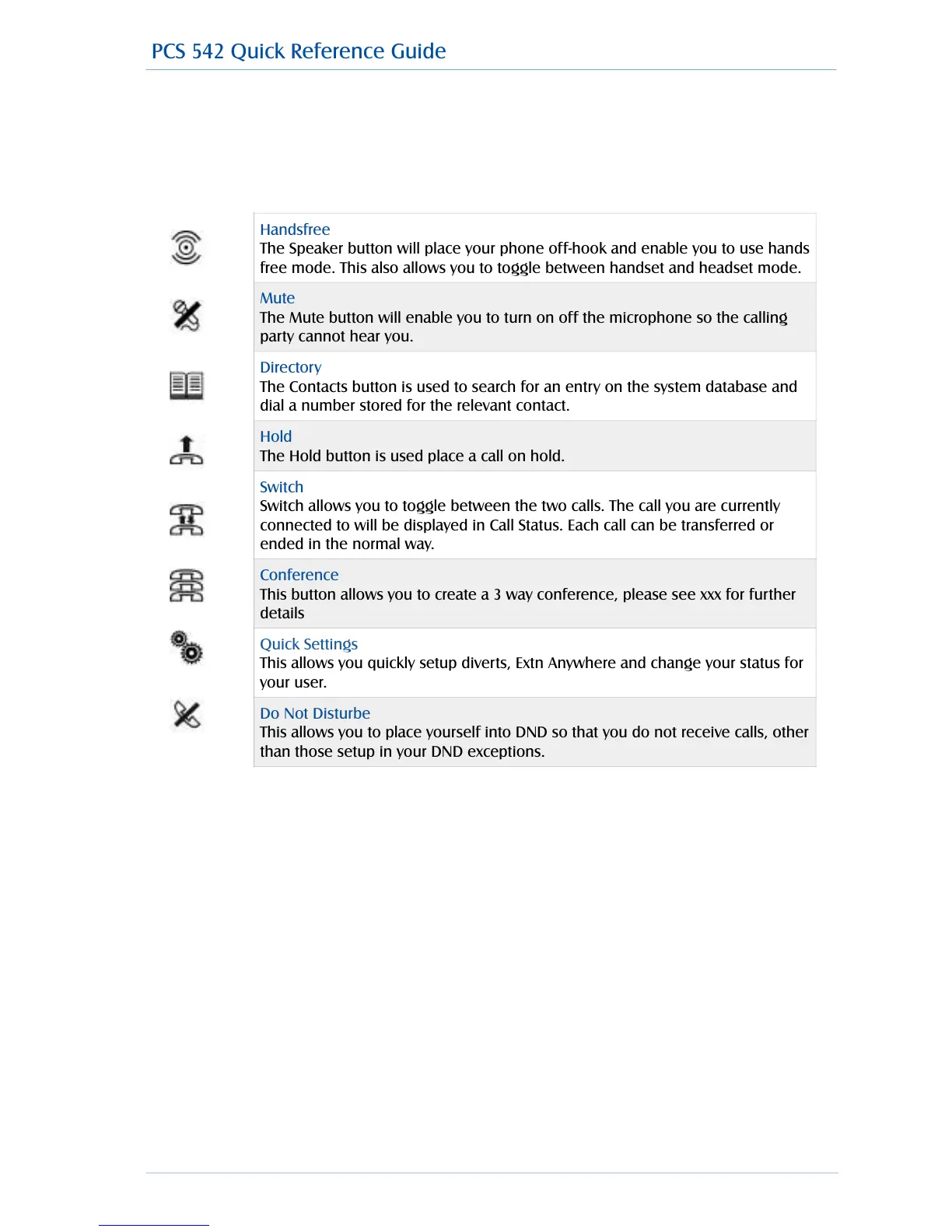
The PCS 542 has 8 grey Function buttons that allow you to perform in call actions such as Hold,
Conference, Divert and Status functions as well as directory searching.
!
!
PCS 542 Quick Reference Guide Version 3.3/0714/1 3
Handsfree
The Speaker button will place your phone off-hook and enable you to use hands
free mode. This also allows you to toggle between handset and headset mode.
Mute
The Mute button will enable you to turn on off the microphone so the calling
party cannot hear you.
Directory
The Contacts button is used to search for an entry on the system database and
dial a number stored for the relevant contact.
Hold
The Hold button is used place a call on hold.
Switch
Switch allows you to toggle between the two calls. The call you are currently
connected to will be displayed in Call Status. Each call can be transferred or
ended in the normal way.
Conference
This button allows you to create a 3 way conference, please see xxx for further
details
Quick Settings
This allows you quickly setup diverts, Extn Anywhere and change your status for
your user.
Do Not Disturbe
This allows you to place yourself into DND so that you do not receive calls, other
than those setup in your DND exceptions.
PCS 542 Quick Reference Guide



 To Next Page