START UP
Simply plug in the panel to activate it. From this point, all switches
SWITCH CUSTOMIZATION
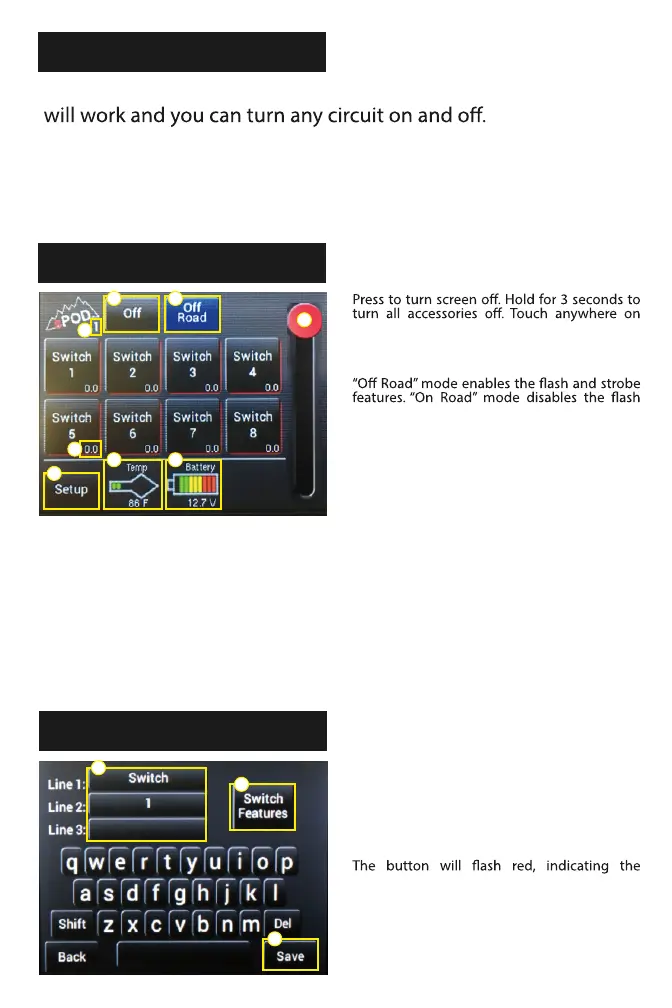
MAIN CONTROL
screen to turn on. NOTE: If system is in low
voltage, screen will not wake up until the
engine is started.
and strobe features.
Slider used for dimming your lights.
Source # indicator.
Current meter. This shows how many amps the
accessory is drawing from the system.
Circuit board temp normal range is between
0*F and 220*. To change to Celsius, hold temp
icon for 5 seconds to toggle between temp
modes.
Battery voltage meter. NOTE: This voltage
reading is only read from the battery that the
system is powered from.
Select to enter programming mode.
Select each line and enter text. Max of 8
characters per line.
Press here to enter into the Switch Features
screen.
When done, press & hold “Save” for 1 second.
changes have been saved.
1 2
4
5
8
6 7
1
2
3
4
5
6
7
8
3
1
2
3
1
2
3
NOTE: The sPOD Touchscreen is a resistive touchscreen – meaning unlike most
smart phones, it works based on pressure. A stronger touch is necessary for it to
respond. This type of touchscreen is very common in industrial electronics, like
what you may nd for many vehicle touchscreens.



 To Next Page