X. Play MP3 Files
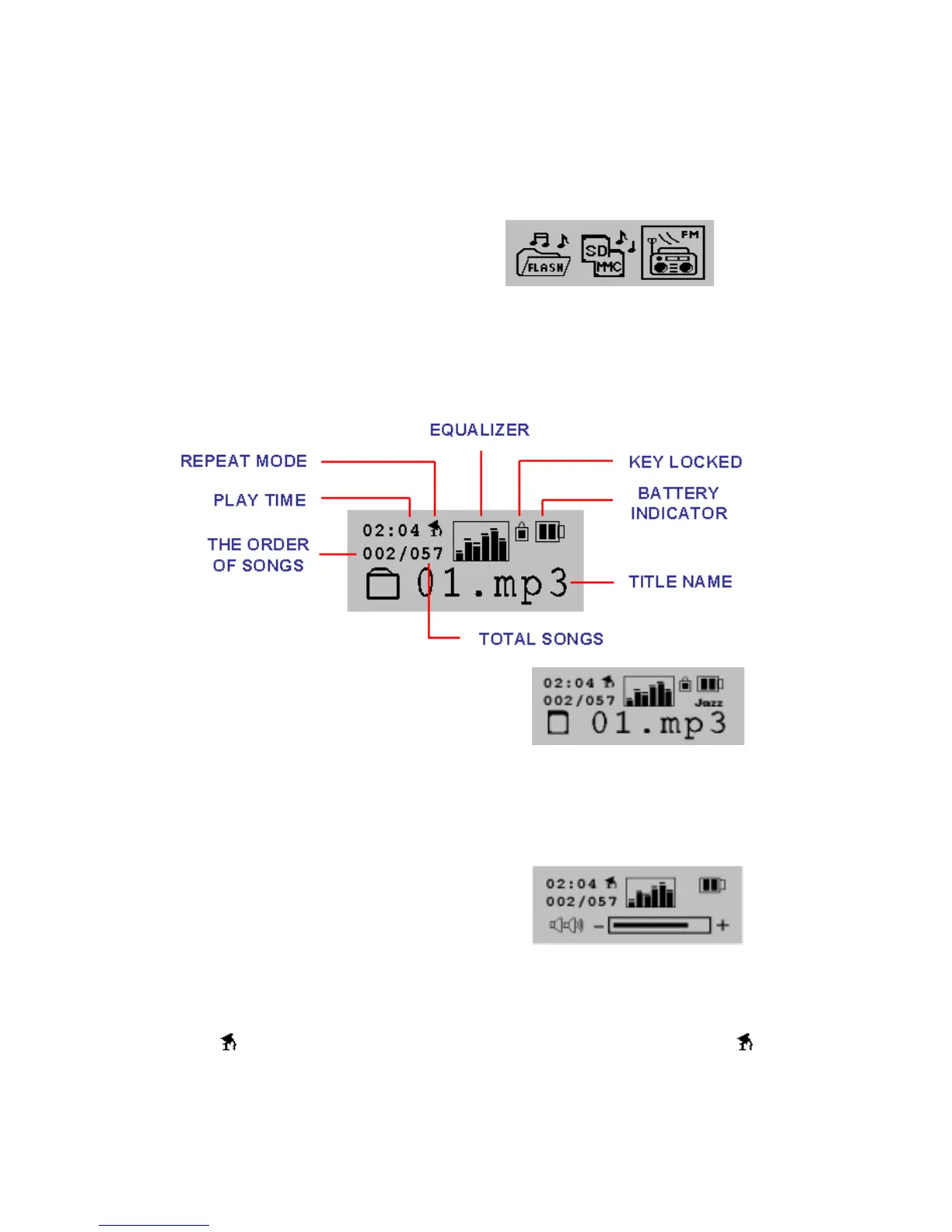
1. After switching on SPORT MP3, or pressing “Function Key”, the three selections
will flash. The first is FLASH, using a built-in memory in SPORT MP3; the second is
playing music files using SD/MMC memory card.
The third is listening to FM radio.
See illustration
2. You can use “<<” or “>>” to play on “FLASH.” After making your choice, press
“MENU” for confirmation, and the following icon will flash. See illustration:
3. If the playing mode is “SD/MMC”,
You’ll see this display:
4. SPORT MP3 will automatically scan for MP3 files and play them according to the
order they are arranged. Press “<<” or “>>” to manually pick your preferred songs.
And press “+” or “-“ to adjust the volume.
See illustration:
5. A luminescent multilingual LCM display panel supports the display of long file
names.
6. Play mode : Press “MENU” and use “<<” or “>>” to move the icon to , and
Press “MENU” for confirmation. Use “<<” or “>>” to decide:
a. Repeat All /b. Random / c. Pre-Play / d. Repeat One
- 8 -


 To Next Page