IMPORTANT: READ THROUGH ALL INSTRUCTIONS BEFORE BEGINNING TO USE YOUR PEDOMETER
BATTERY CAUTION:
• Non-rechargeable batteries are not to be recharged
• Rechargeable batteries must be removed before recharging
• Rechargeable batteries only to be recharged under adult supervision
• Different types of batteries must not be mixed
• New and used batteries not to be mixed
• Exhausted batteries to be removed
• Do not dispose of battery in fire; battery may explode or leak
• Do not dispose of product in fire; battery may explode or leak
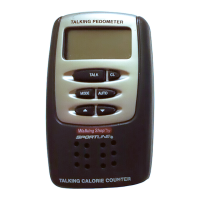
This pedometer is designed to continuously monitor calories burned, distance traveled and the time you actually spend on walking and jogging in daily activity. It also includes a real time clock with an alarm, and a safety alarm which helps you draw
attention in time of need.
FEATURES:
• Manual Voice Announcement – announces the calories burned, number of steps taken, distance traveled and time you have walked or jogged when TALK button is pressed.
• Auto Voice Announcement – automatically announces calories, distance, step-count and elapsed workout time according to a preset interval.
• Intelligent Counting – calculates calories, distance and track time based on actual walking by ignoring false step counts.
• Safety Alarm – gives pulsing alarm sound to help you summon help in case of emergency.
• Clock with Alarm – announces time of day when TALK button is pressed and when the alarm set time is reached.
IMPORTANT INFORMATION ABOUT THE DISPLAYED VALUES
This calorie counter/pedometer detects the up-and-down motions made by the user to count and register the steps. However, in addition to walking and jogging, there are other motions contributing to step-count, such as sitting up and down, jumping
or simply moving around. These non-walking/jogging motions contribute to erroneous step-counts that result in wrong distance, calories and time, which are calculated from the step-count. This is the reason why other pedometers are good only for
use by walkers and joggers, but not for an average person who may want to use the pedometer all day long around the house, in the office or while shopping.
To circumvent this problem, this pedometer has an intelligent counting mechanism which can distinguish step-count of walking/jogging, then use the former to calculate distance, calories and elapsed time.
The displayed step-count on the LCD represents the counts generated from all up-and-down motions including those from non-walking/jogging. The displayed distance, calories and elapsed time represent the actual distance, calories and time from
your walking/jogging.
Depending on your daily activity, you may have a large step-count but a small value for distance, calories and time if your activity at the office or home where most of the step-counts are not from walking.
SELECTING KM/MILE; KG/LBS; INCHES/CMS
1. Press and hold MODE until you hear a "BEEP".
2. Press /ALARM to select KM or MI.
3. Press MODE until you hear two "BEEP's" to return to default mode.
SETTING THE STRIDE LENGTH AND WEIGHT
In order to calculate the distance and calories, the talking pedometer needs your step (stride) length and weight. Follow these steps to obtain and enter your stride length and weight.
1. Measure your stride length toe-to-toe or heel-to-heel. For more accurate results, measure the distance of 10 steps and average them by dividing by 10 to get the step length. For your reference, the average stride length is around 22 inches (55.9 cms).
2. To enter the step length and weight, press and hold down MODE until you hear "Enter your step length". Repeatedly press and to set your step length between 10 inches (25.4 cms) and 80 inches (203.2 cms). Press MODE again
you hear "Enter your weight". Repeatedly press and
,
to set your weight between 40 pounds (18 kg) and 300 pounds (136 kg).
3. Press MODE once, the pedometer returns to normal display mode.
ANNOUNCING CALORIES, NUMBER OF STEPS, DISTANCE AND ACCUMULATED TIME
Press TALK, to set your pedometer to announce the numbers displayed on the LCD. To announce other functions, press MODE repeatedly until you hear the one you want, then press TALK to hear the announcement. For example if you want to hear
the calories announcement, repeatedly press MODE until you see "Calories" on the LCD then press TALK.
To hear the entire announcement at any mode, press and hold down TALK, the unit announces the current displayed number followed by the rest. You can release the TALK button after the unit has started announcing the next number.
USING AUTOMATIC VOICE ANNOUNCEMENT
You can set the unit so it announces the "current" displayed function automatically according to the following table. For example if the unit is displays CALORIE on the LCD, you will hear the calories announcement automatically for every 50 calories
you have burned.
To turn on and off automatic announcement, follow these steps:
a) In any mode, press and hold down MODE until you hear a "BEEP".
b) Press MODE repeatedly untilyou hear a "BEEP" then repeatedly press /ALARM until you hear "Auto report is on". A steady "((.))" appears on the display when returning to the normal operation mode.
c) To turn off, /ALARM again until you hear "Auto report is off" and "((.))" disappears when returning to the normal operation mode.
USING THE PEDOMETER
1.
Press and hold CLEAR until you hear "All clear" to reset all numbers to "O".
2.
Clip the pedometer on your belt. The pedometer must be in a vertical position, otherwise, incorrect readings may result.
3.
Start to walk or jog to begin your normal activities. You can wear the pedometer the entire day and it will accumulate the time,
distance and calories burned over the course of the day.
USING THE SAFETY ALARM
The alarm will activate when the safety alarm pin is pulled from the pedometer.
1.
Pull the cord to detach the pin from the pedometer.
2.
To stop the alarm, simply reconnect the pin to its socket.
NOTE: Test the alarm function every time when you use the pedometer.
344 SAFETY ALARM PEDOMETER
10
9
8
7
6
5
4
3
20
1
Step Distance
Ideal Distance
344 SAFETY ALARM PEDOMETER Instructions Cont…
Function Voice Announcement
Number of Steps
Distance
Calories
Time
Every 1000 steps
Every 0.5 miles
Every 50 Calories (1 Calorie = 1 Kcal)
Every 10 minutes
888.80
MI
Safety Pedometer
344

 Need help?
 General



 To Next Page