7
ELITE E-HACK ATTACK™ BASEBALL MACHINE
Sports Attack, LLC. | 800.717.4251 | www.sportsattack.com
Active Sequences/Modify Pitch
WARNING
PERSONAL
INJURY HAZARD
Carefully read all instructions in
this manual, and all labels and
warnings on ELITE e-Hack Attack
before using this machine.
Use machine only under adult
supervision. Failure to operate
ELITE e-Hack Attack as described
in this manual can result in severe
personal injury or death.
ELECTRICAL
SHOCK HAZARD
The ELITE e-Hack Attack must be
connected to a properly
grounded electrical receptacle.
Do not operate on wet ground.
CAUTION
PERSONAL
INJURY HAZARD
Keep hands away from throwing
wheels anytime the machine is
connected to a power source.
Carefully check the ELITE e-Hack
Attack for completeness and
condition before connecting
to electrical power.
EQUIPMENT
ELECTRICALDAMAGE
Keep hands away from throwing
wheels anytime the machine is
connected to a power source.
Save Pitch in Existing Sequence
Once you have a pitch that you would like to save to a sequence running, select “Add to
Sequence”. Select the desired Named or Empty Sequence. Name the sequence if it is
Empty, then name the pitch. This will name the pitch and save to desired sequence .
Run a Saved Sequence
Touch a SEQUENCE name to be taken to the list of pitches for that SEQUENCE (Active
Sequence page).
Delete a Saved Sequence
Select DELETE. Touch the NAME
of the sequence to be deleted.
Select“OK”intheconrmation
Box to delete the sequence.
This CAN’T BE UNDONE.
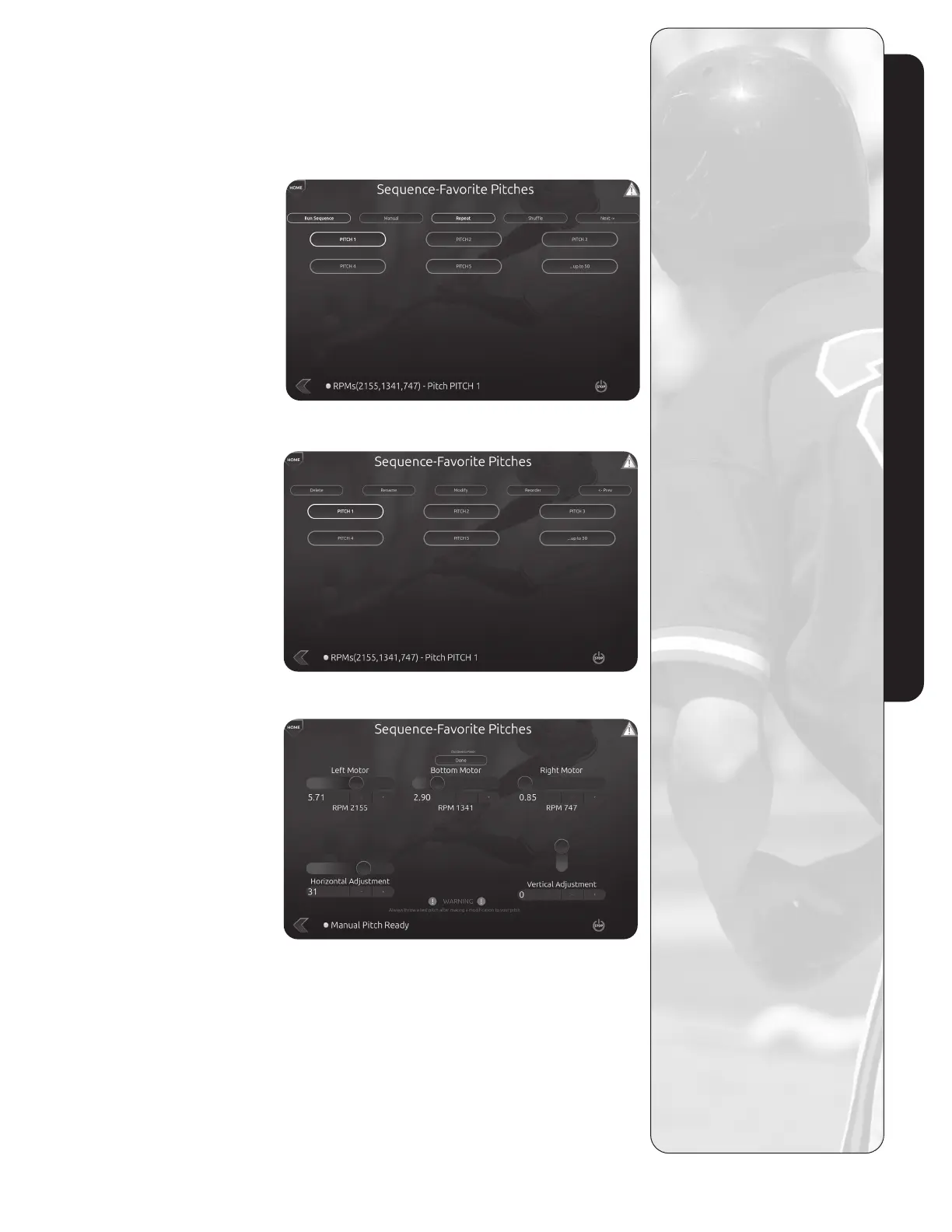
Active Sequences
When you arrive at Active
Sequences to save a pitch you
can:
Edit Pitch Name Before Saving
Touch the text input box to access
the virtual keyboard. Select the
pitch then select “Rename” in
the top command bar Press
ENTER when complete.
Modify Pitch
Select a pitch then select “Modify”
in the Top Command bar. Use the
motor and actutor controls to
modify, then press “Done” when
you are done modifying the pitch.
Save Pitch
Thiswillsaveanewlymodied
pitch under the same name and
in the same location that it was
previously saved. This will
replace the previous version.
Save to Favorites
This will save the pitch to
FAVORITE PITCHES page
with the option to rename.
Add to Sequence
This will save the pitch to
Sequence with the option to
rename. ADD TO SEQUENCE
transfers the pitch to FAVORITE
SEQUENCE page where a
sequence name is selected
for the pitch.
Active Sequences Page 1
Active Sequences Page 1
Modify Pitch Page



 To Next Page