Getting Started
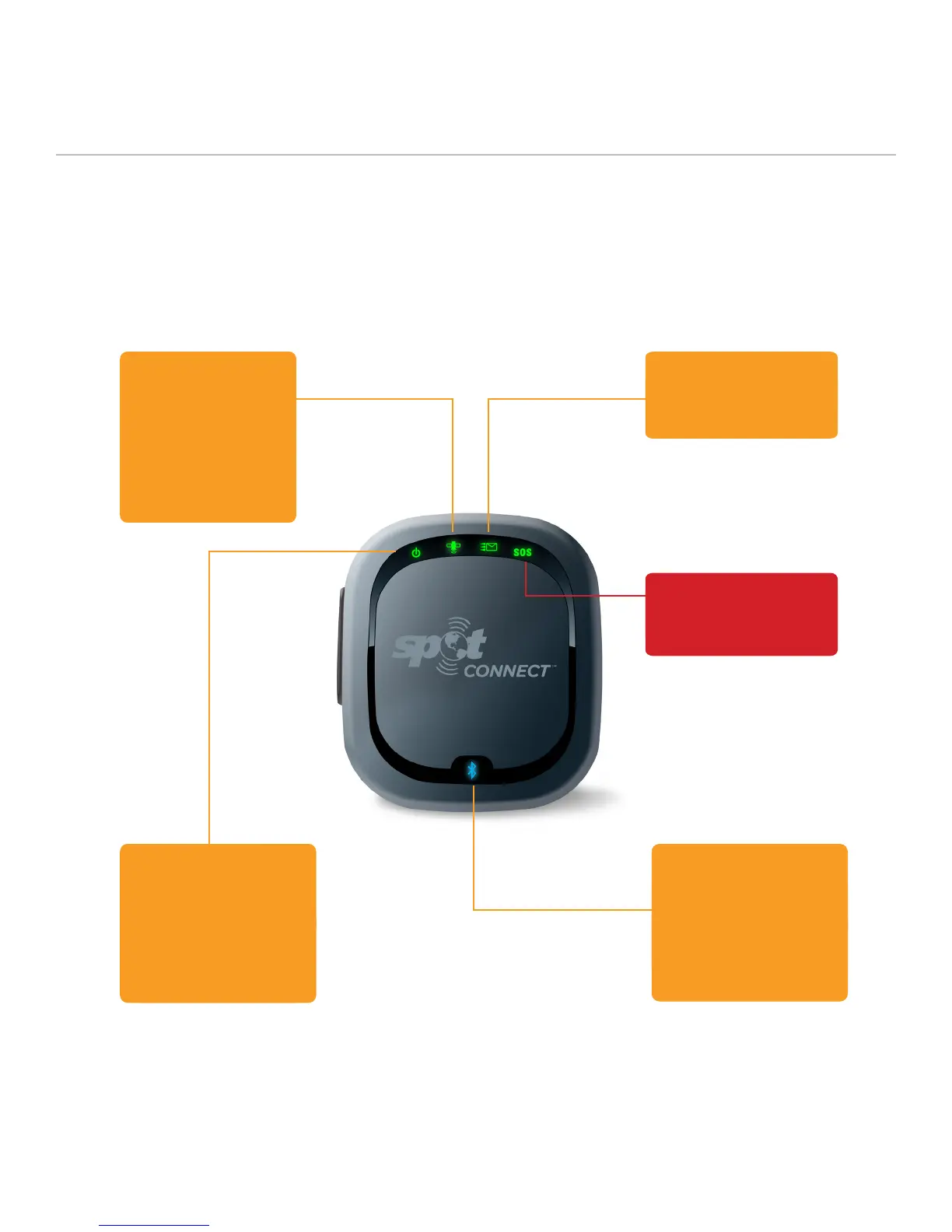
SPOT Connect uses LEDs to tell you what it’s doing. Take a moment
to become familiar with these LEDs. Your SPOT Connect app will also
display the current mode of the device and provide further detail about
its operating status.
SPOT CONNECT USER MANUAL
GPS LED
This LED is Green when SPOT
Connect is providing the GPS fix
to the smartphone and has 3 or
more GPS satellites in view. It is
red when SPOT Connect has less
than 3 satellites in view (no GPS
fix). Blinks for 15 seconds (green or
red depending on GPS acquisition)
when the smartphone provides the
GPS fix and switching from GPS
acquisition to message sending.
WIRELESS CONNECTION LED
This LED blinks every 3 seconds
when a wireless connection is
established between the smartphone
and the SPOT Connect device. The blue
LED goes off if the SPOT Connect has not
heard from the smartphone in 1 minute.
The Wireless Connection LED blinks
rapidly while the smartphone and SPOT
Connect are being paired.
MESSAGE SENDING LED
This LED blinks green when a message
is being sent. This LED blinks red when
a casual message sending attempt
has failed.
POWER LED
This LED blinks green every 3
seconds when the SPOT Connect
device is powered on, and blinks
rapidly during the power off sequence.
If SPOT Connect’s self-test fails,
the Power, GPS, and Message
Sending LEDs simultaneously blink red.
Contact SPOT Customer service for
troubleshooting help if this
should occur.
SOS LED
This LED blinks green every 3 seconds
when in SOS mode, and blinks red
every 3 seconds when SOS mode has
been cancelled.
5



 To Next Page