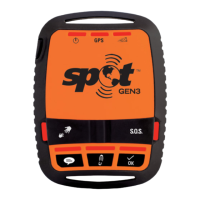
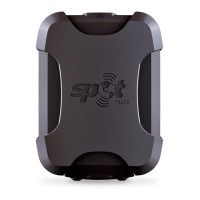
Need help?
Do you have a question about the SPOT GEN3 and is the answer not in the manual?
Steps to test device buttons and LED indicators for functionality.
Instructions for safely installing batteries into the SPOT Gen4.
Guide to setting up your SPOT account and activating the device online.
Locate your device's ESN and Authorization Code for activation.
Using SOS for emergencies and Help/SPOT S.O.V. for non-emergencies or roadside assistance.
Sending status updates, personalized messages, and tracking your progress.
Performing self-tests and initial system tests for messaging functionality.
How to send an SOS alert, what happens when GPS is unavailable, and how to cancel.
How to send a Help message, GPS signal behavior, and cancellation.
Important warnings regarding battery replacement, blasting areas, atmospheres, and pacemakers.
The SPOT Gen4 is a critical, life-saving communication device designed for use beyond reliable cellular service. It allows users to communicate their GPS location and pre-programmed messages to family, friends, colleagues, or emergency responders with the push of a button. This rugged, pocket-sized device is an essential tool for staying connected during outdoor adventures or work in remote areas.
The SPOT Gen4 operates by utilizing GPS satellites to determine its location. Once the GPS location is acquired, it sends this information, along with a pre-programmed message, to communication satellites. These satellites then relay the message to specific satellite antennas around the world, which route the information through a global network. Finally, the location and messages are delivered according to the user's instructions via email, text message, or emergency notification to an emergency response center.
The device offers several key functions:
S.O.S.: This is the highest priority function and should only be used for critical, life-threatening situations. Pressing the S.O.S. button sends an alert directly to 24/7 global search and rescue services, along with the device's GPS location coordinates. The emergency response center then notifies appropriate responders, such as local police, highway patrol, the Coast Guard, or other emergency response teams. Messages are sent every 5 minutes until cancelled or the power runs out. To cancel an S.O.S. message, the button must be pressed and held until the LED blinks red, and the device must remain on to send the cancellation message. Turning off the device does not cancel an S.O.S. message.
HELP/SPOT S.O.V. (Save Our Vehicle): This function is for non-life-threatening situations where help is needed from specific contacts or professional roadside assistance services (additional service plan required for SPOT S.O.V.). When activated, the device sends SMS/text or email messages with GPS coordinates to pre-selected contacts. Email messages also include a link to view the location on SPOT Mapping. Help messages are sent every five minutes for one hour. If no GPS signal is found, the message is sent without GPS location after 4 minutes. To cancel, press and hold the Help button until the LED blinks red, and keep the device on to send the cancellation message.
Check In and Custom Message: These functions allow users to send pre-programmed messages with their GPS location to contacts, letting them know they are OK, have reached a destination, or for other specific purposes. Messages are sent three times over a 20-minute period to ensure reliability. If no GPS signal is found within 4 minutes, the message will not be sent. These messages can be sent while Tracking. To cancel, press and hold the function button until the LED blinks red.
Tracking: This feature allows friends and family to follow the user's progress in near real-time using Shared Views within SPOT Mapping, creating a virtual breadcrumb trail. The device sends tracks as waypoints at user-selectable intervals (2.5, 5, 10, 30, or 60 minutes). Motion-activated tracking conserves battery life by only sending tracks when the device is moving; if stationary for more than five minutes, it enters Suspended Track mode, sends one final track from the resting location, and resumes tracking when movement is detected again. To stop tracking, press and hold the Track button until the LED blinks red or power off the device.
The SPOT Gen4 is designed for ease of use and optimal performance in various environments.
Power On/Off: To turn the device on, press and hold the Power button until the LEDs illuminate green. To turn it off, press and hold the Power button until the Power LED blinks rapidly. The device will automatically turn off after one hour of inactivity to conserve power.
Self-Test: Upon initial power-on, the SPOT Gen4 performs a self-test. All LEDs blink green in a rotating manner during this process. If all visible LEDs flash red, it indicates a self-test failure, and customer relations should be contacted. If the Power and GPS LEDs blink red in unison, it signifies a GPS failure, though S.O.S. or Help/SPOT S.O.V. messages may still be transmitted without GPS location.
Initial System Test: Before each adventure, it is recommended to perform an initial system test. This involves setting up message contacts in the SPOT My Account, going outdoors with a clear view of the sky, turning on the device, pressing and holding the Check In button until its LED blinks green, and leaving the device outdoors to acquire a GPS fix and send a message. Verification of message receipt by contacts and on SPOT Mapping is crucial.
Placement for Optimal Reception: For the best reception, the SPOT Gen4 should always be placed with the logo side up, as the satellite antenna is located directly under the logo. A clear view of the sky is essential for obtaining a GPS signal and transmitting messages. Reception can be inhibited by hills, buildings, metal roofs, or dense foliage. It is also recommended to keep the device at least 12-18 inches away from any navigation equipment or other GPS antennas to prevent interference.
Message Indicators: The device uses various LED indicators to communicate its status:
SPOT Mapping: When messages are sent, they include GPS coordinates and a web link (in emails) to view the location on SPOT Mapping. This allows users to share their adventures and for contacts to monitor their location.
Movement Alerts: These alerts are sent only when the SPOT Gen4 is in Tracking Mode. Enabling Movement Alerts requires a settings update.
Proper care and maintenance ensure the longevity and reliable performance of the SPOT Gen4.
Battery Usage: The device operates on 4 AAA Energizer® Ultimate Lithium 8x batteries (L92) or 4 AAA Energizer® NiMH rechargeable batteries. Lithium batteries are recommended for optimal performance, especially in colder conditions and extreme heat, which can impact battery life. Users should always carry an extra set of batteries. The device cannot charge rechargeable batteries; the USB port is for firmware and settings updates only. If the device is dropped, it is recommended to replace the batteries for optimal performance.
Water Resistance: The SPOT Gen4 is IP68 water resistant, capable of withstanding depths of up to 2 meters for 30 minutes.
Operating Environment: The device is designed for rugged outdoor use and can operate in temperatures ranging from -22°F to +140°F (-30°C to 60°C) and altitudes from -328 ft to 21,320 ft (-100 m to 6,500 m). It is also Humidity and Salt Fog rated. GPS accuracy may degrade if exceeding 700 mph (Mach 1).
Cleaning: To clean the device, ensure the power is off. Use a damp, soft, lint-free cloth and avoid excessive moisture near buttons or openings. Do not use aerosol sprays, solvents, alcohol, or abrasives. Do not attempt to open the SPOT Gen4 case.
Troubleshooting: The device performs a self-diagnostic test upon power-on. It is recommended to send and verify a Check In message before each trip to evaluate the entire messaging system. For further information and support, users can visit the Support section on the FindMeSPOT website.
Safety Warnings:
 General
| Operating Temperature | -4°F to 140°F (-20°C to 60°C) |
|---|---|
| Communication Network | Globalstar Satellite Network |
| Bluetooth | No |
| Weight | 114 grams |
| Battery Type | 4 AAA Energizer Ultimate Lithium 8x batteries (L92) or 4 AAA NiMH rechargeable batteries |
| Waterproof Rating | IPX7 |
| Tracking Interval | 5, 10, 30, or 60 minutes |
| Features | Tracking, messaging, SOS |
| SOS Functionality | Yes |
| Mobile App Compatibility | No |
| Messaging | Predefined messages |

 To Next Page