Need help?
Do you have a question about the SPOT Connect and is the answer not in the manual?
Official title of the user manual for the device.
How GPS satellites provide signals for location determination.
How the SPOT CONNECT chip determines location and interacts with a smartphone.
The process of communication satellites relaying and networks routing messages.
How messages are delivered via email, SMS, or to the GEOS center.
Inclusion of GPS coordinates and web links for viewing location on Google Maps.
How SPOT provides peace of mind through location sharing and assistance.
Importance of a clear view of the sky for accurate GPS location.
Proper orientation of the SPOT device for improved antenna performance.
Need for proximity between SPOT CONNECT and the mobile device.
List of hardware and online information needed for SPOT activation.
Steps for installing batteries and retrieving ESN/authorization codes.
Online process for choosing a service plan and activating the SPOT device.
Steps to test message transmission and GPS acquisition outdoors.
How to confirm messages were successfully received by contacts.
Procedure to turn the SPOT CONNECT device on and off using the ON/OFF button.
How to manually trigger the SOS mode by pressing a button for 5 seconds.
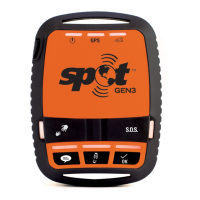
Explanation of the various lights that indicate device status and operation.
Indicates whether the SPOT sees GPS satellites and has acquired a location.
Notifies if the most recent message was transmitted successfully.
Indicates when the SPOT CONNECT device is in SOS mode.
Shows the status of the Bluetooth connection to a smartphone.
The device performs a self-test upon powering on to check for failures.
Factors affecting GPS accuracy and message transmission due to environmental blockage.
Anticipated battery life based on mode and clear view of the sky.
Global coverage details and limitations, including in Russia.
Guidelines for operating temperature, altitude, and protection against elements.
Instructions for safely cleaning the exterior of the SPOT device.
Recommendations for resolving issues, including performing system tests before trips.
List of recommended web browsers for accessing the SPOT user account.
Details of the SPOT device's limited warranty period and coverage.
Information regarding FCC certification, RF exposure limits, and other regulatory compliance.
Contact information and resources for additional questions or support.
 General
| Waterproof Rating | IPX7 |
|---|---|
| Type | Satellite communicator |
| Satellite Coverage | Globalstar Satellite Network |
| Check-in/OK Message | Yes |
| Tracking | Yes |
| Weight | 4.9 ounces |
| Operating Temperature | -4°F to 140°F (-20°C to +60°C) |
| Bluetooth Range | Up to 30 feet (10 meters) |
| Bluetooth | Yes |
| SOS Button | Yes |
| Tracking Interval | 10 minutes |
| Compatibility | iOS and Android devices |


 To Next Page