EN
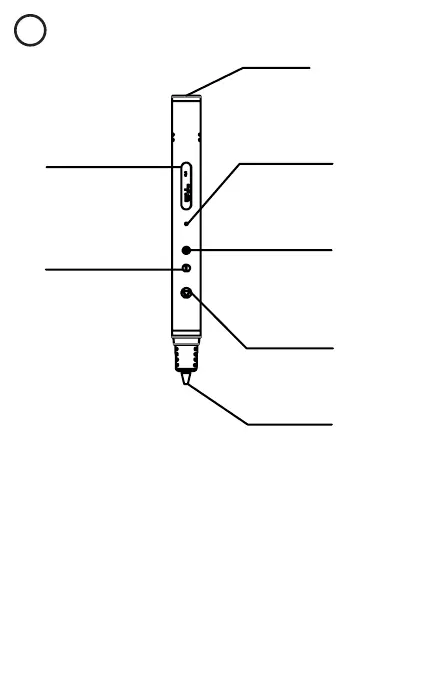
Filament feed port & Power
jack
Display shows current
settings
Indicator light
Button 1: Start heating
/ load filament. Double
click to activate automatic
loading of filament.
Button 2: Decrease
temperature and speed
Button 3: Increase temp-
erature or speed. Long
press to reverse filament.
Nozzle
SPECIFICATIONS
• Warm-up time before use: roughly 30 seconds
• Connects to a standard power socket, 100V-240V (power adapter
included)
• Can also be connected to standard USB port
• Cable length roughly 1 m
• Output 7.5 W
• Temperature range: 90°C - 100°C
• Pen tip temperature: max 40°C
• Nozzle diameter: 0.75 mm
• Pen dimensions: 17 x 1.5 x 1.5 cm
• Weight: 39 grams (without the plastic strands)
• Material: aluminium casing
• Suitable for those aged 5 and up
• Package contains: 3D pen, USB cable, power adapter, PCL filament
strands (3 meters each of red, white and black)



 To Next Page