Need help?
Do you have a question about the SprintRay Pro S and is the answer not in the manual?
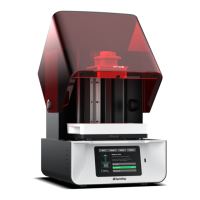
The SprintRay Pro S is a desktop 3D printer designed specifically for digital dentistry, offering a comprehensive solution for dental practices to produce models in-house. This quick start guide outlines the setup, operation, and maintenance of the device, emphasizing ease of use and reliable performance.
The SprintRay Pro S is engineered to create high-quality 3D models for various dental applications. It utilizes resin-based additive manufacturing technology, where liquid resin is cured layer by layer by a light source to form a solid object. The printer is designed to be user-friendly, allowing dental professionals to quickly and efficiently produce accurate models. Its integration with SprintRay RayWare software facilitates seamless preparation and printing of dental designs. The device supports a range of SprintRay resins, each tailored for specific dental applications, ensuring versatility and precision.
The SprintRay Pro S printer operates within a recommended temperature range of 21°C (70°F) to 29°C (85°F). It requires a flat and level surface for optimal performance and should be situated in a well-ventilated area, away from extreme temperatures, windows, bright UV light sources, and direct sunlight. The printer is equipped with a built-in heater for the print platform, which helps improve print reliability. The resin tank and print platform come pre-installed, though protective films must be removed before first use. The size of the print platform and resin tank may vary depending on the specific model (Pro 55S or Pro 95S). The printer connects to a network, allowing for remote monitoring and software updates.
 General
| Brand | SprintRay |
|---|---|
| Model | Pro S |
| Category | 3D Printers |
| Language | English |


 To Next Page