76
Operating Instructions Adding Water
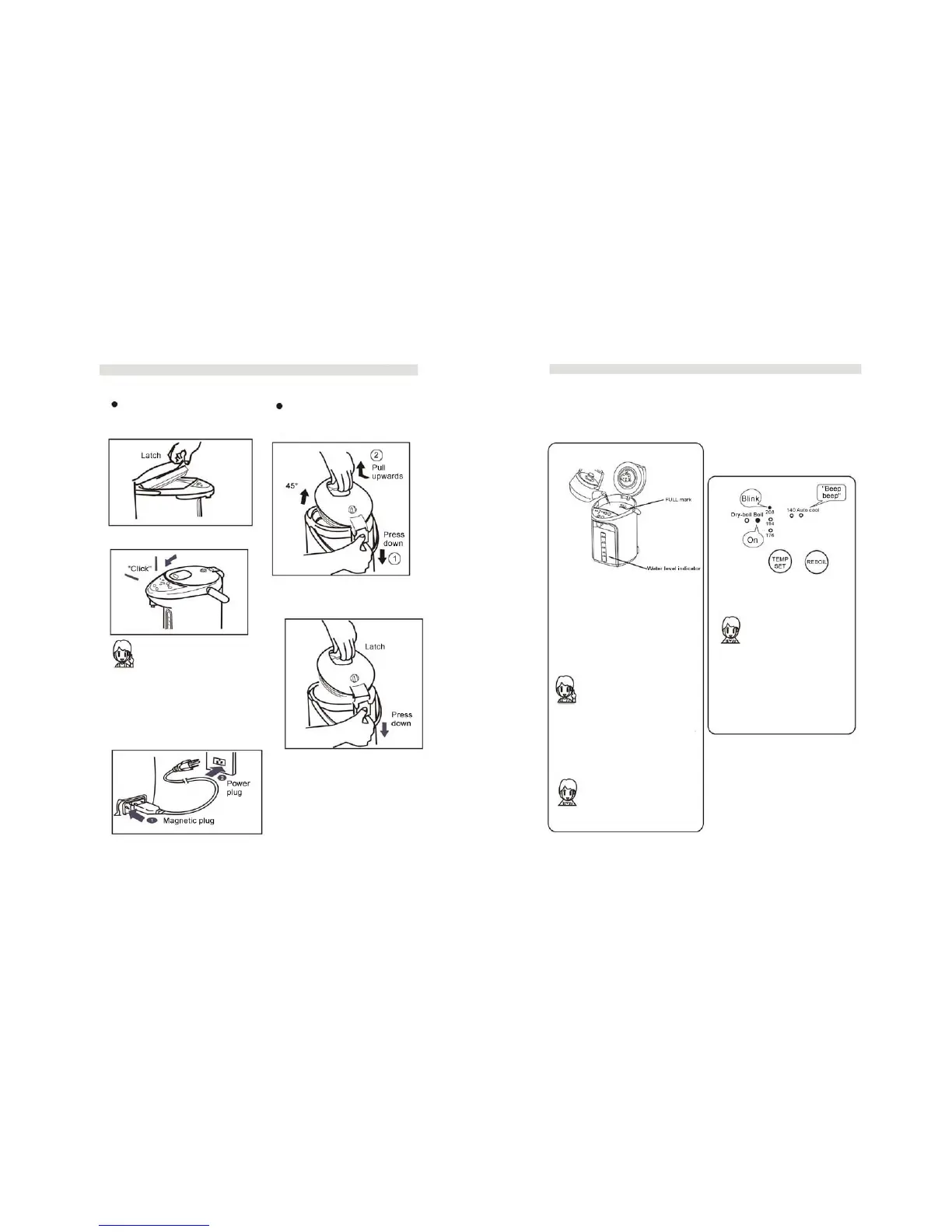
Opening and closing the lid
To open: press down with thumb
and pull latch upwards.
Removing and attaching the lid
To remove: press down on the Release
button, pull latch and open lid to 45°.
To close: press lid down firmly.
Make sure lid is securely
closed or water will not reach
set temperature and boil
continuously. Make sure you
hear a “click” when closing.
Connecting Power
To attach: press down on the
Release button and place lid in
the groove.
To conform the lid is correctly
attached, press any of the buttons
on the control panel – you should
hear a “beep”.
1. Open lid and add water.
NOTE: Do not add water
above the FULL mark.
• Add water when water
level falls below the
“low” indicator.
• Do not attempt to Reboil
when water level is below
the “low” indicator.
• Do not add water directly
under a faucet, to prevent
wetting the control panel.
• Be cautious the control
panel does not get wet.
• Clean unit frequently
when using tap water.
• Make sure the “click”
sound is heard when
closing the lid.
2. Close lid firmly.
3. Connect power.
4. Press TEMP SET button.
• Once TEMP SET
button is pressed, unit
will begin to boil
water. During the
boiling cycle, it is
normal to hear sound
of water boiling.
Dry-Boil Alarm
If there is no water or if
water is too low, you will
hear 12 beeps and the Dry-
boil indicator will blink.



 To Next Page