3.6 Video detection:
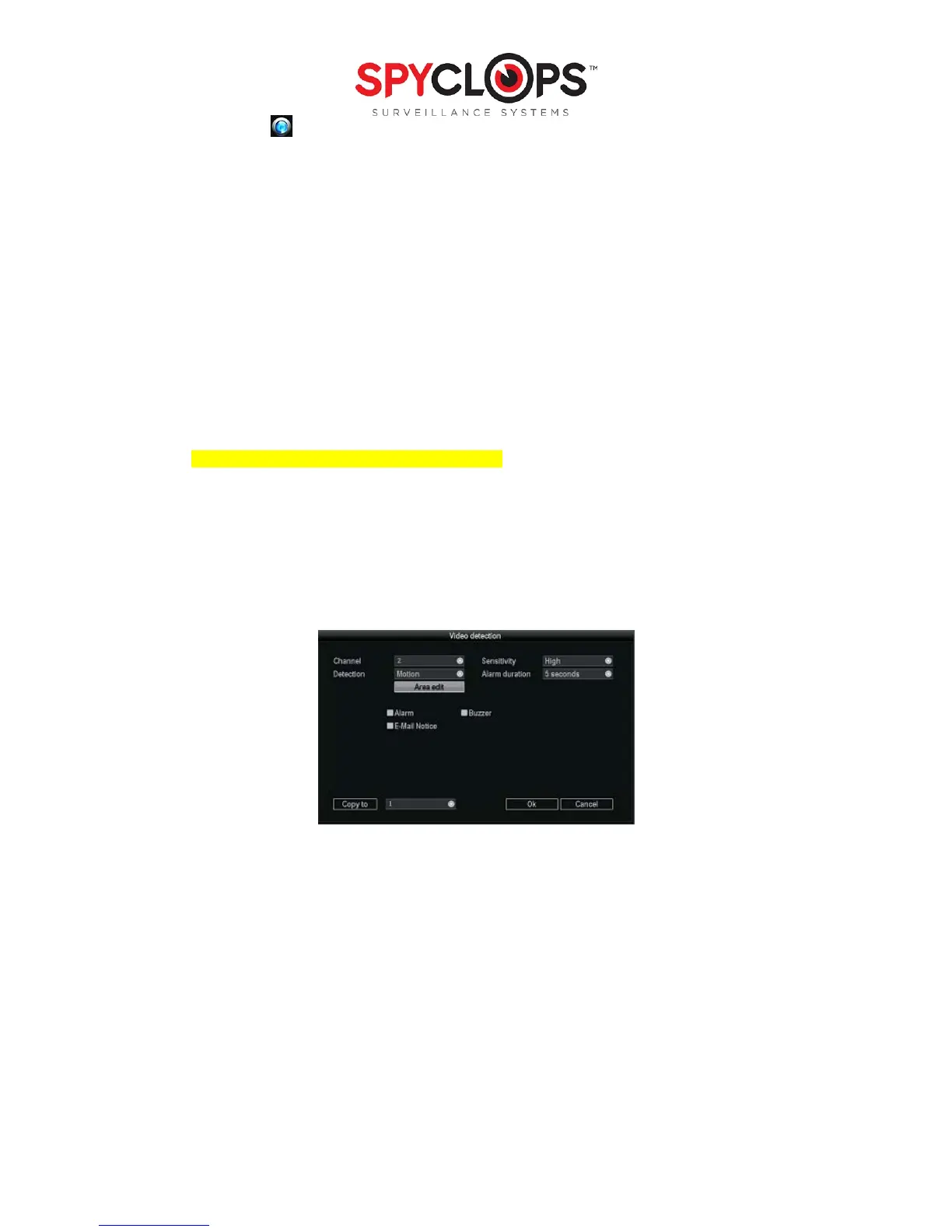
Select “Setup”, select “System setup”, select “Video detection”
• Channel: Choose which camera view you want to set up detection on
• Sensitivity: Choose the right trigger video detection sensitivity. “Highest” is very sensitive, while
“Lowest” lets some movement occur before recording
• Detection: Set this option to alert you if there is “motion” on the camera, if there is “video loss” (the
camera gets unplugged) or “video Cover” (if the camera view is covered)
• Alarm duration: you can choose the duration for which the alert sounds
• Area edit: You can use this option with “motion” or “cover”.
• With “motion” the recording will start when something moves within the selected area
• With “cover” the DVR will insert a black box in the selected area to cover the video in that area
*Note: First right click and select “Clear all” then either click each individual box, or you can left click and
drag to select an area
• Alarm: This Option is not available in current models
• Buzzer: When this option is selected, the DVR will sound a buzzer (the duration of which you will select on
alarm duration) when it detects motion, loss or cover
• Email Notice: An email will be sent as an alert when motion, loss or cover is detected
*Note: You have to complete the Email setup in “Network setup” to enable this option


 To Next Page