Output Setup for Humidity Control
From the initial menu screen select an output using the Plus and Minus button and press Enter.
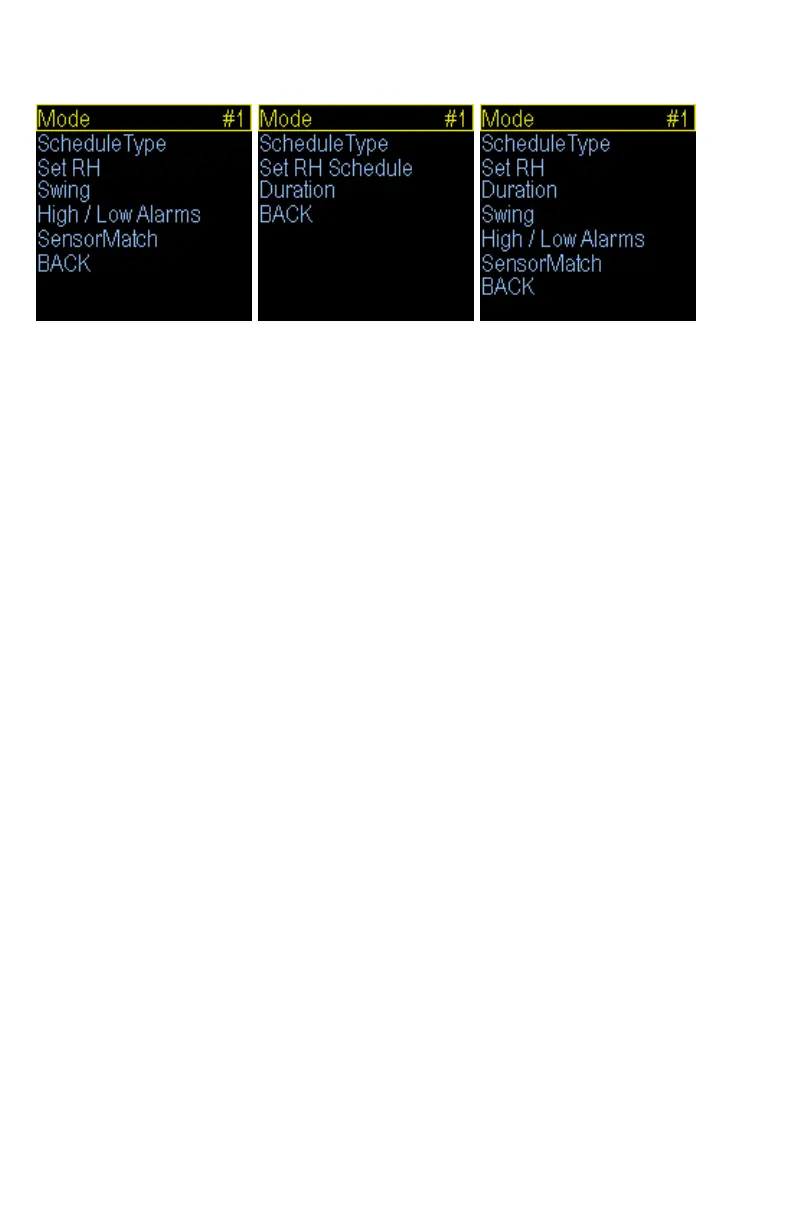
Humidity (Sensed) menu. Humidity (Scheduled) menu. Humidity (Hybrid) menu.
Humidity (Dehumidfy) menu.
Mode: Humidity (Sensed), Humidity (Dehumidify), Humidity (Scheduled), Humidity (Hybrid)
Note: When the Mode is changed all settings for selected output will be set to the defaults for that
particular mode. Humidity Sensed, Dehumidify, and Hybrid modes require the optional Herpstat
Humidity Sensor sold separately.
Select the Mode option and set it to the desired function. Humidity Scheduled can be used to set up to ten
separate scheduled times when a humidity device will power up and does not require a sensor. Humidity
Sensed and Dehumidify use sensor feedback to determine if a humidity device will power on. Humidity Hybrid
mode combines Sensed and Scheduled which allows you to select up to ten scheduled times when it will check
the humidity sensor and if the measured humidity is below your settings the humidity device will power on. If
the level is within range the power will not be applied.
ScheduleType:
This setting selects how many different time periods you would like to use. If you want one RH setting all the
time use the Constant option. If you want a separate day and night RH level choose 2 periods. More advanced
setups can use up to 4 periods for Sensed and Dehumidity and up to 10 periods for Scheduled and Hybrid
modes.
Set RH:
This is where you will set the RH level and the time at which the unit will switch to this RH level if you have
multiple periods selected in the ScheduleType option. Use the Enter button to progress through the options.
Swing: (Note: Sensed and Dehumidify modes only.)
This setting controls the range of humidity before the output is re-enabled after it has made it to the RH% level.
For example: If the RH% level is set to 80% and the Swing is set to 5% the output will be powered until the
humidity level reaches 80%. The output will then shut off and not power back on until the humidity level has
dropped 5% (Swing).
Duration: (Note: Scheduled or Hybrid modes only.)
This setting is the length of time the output will be powered during a humidity session. In Hybrid mode the
power will be shut off if the humidity exceeds the RH% setting.
High / Low Alarms:
This menu will allow you to enable the High and Low humidity alarms and set the level at which the alarm will
be triggered.
SensorMatch:
The SensorMatch setting is used to alter the humidity level read by the humidity probe to match other
equipment. Note: The sensor used in the Herpstat Humidity Probes are typically more accurate than most
other equipment. Adjustments to this setting are usually not necessary initially. However, over time any
humidity sensor can drift and may need to be replaced and should be thought of as a consumable product.


 To Next Page
 Loading...