Need help?
Do you have a question about the Spyder Robotics SpyderWeb Herpstat 2 and is the answer not in the manual?
Lists the various modes the Herpstat outputs can be configured for.
Provides advice for proper installation and operation of the device.
Configuration options for system-wide settings like display, time, and resets.
Defines the operational mode for temperature control outputs.
Configures the number of daily temperature periods.
Sets specific temperatures and their activation times.
Selects between ON/OFF or Dimming for lighting outputs.
Configures the number of daily lighting periods.
Sets light intensity and activation times for periods.
Configures humidity control modes, schedules, and setpoints.
Adjusts swing, duration, alarms, and sensor matching for humidity.
Defines actions for error conditions and controls the built-in safety relay.
Configures safety behavior for individual or all outputs during errors.
Enables or disables all Wi-Fi operations on the device.
Guides on scanning for networks and entering passwords to connect.
Displays signal strength, SSID, IP address, and MAC address.
Instructions for setting up your router for Herpstat connectivity.
Steps to access and log into the Herpstat web interface.
Sets up email alerts, intervals, and numbered emails.
Guides on testing probes, outlets, and clock, and general troubleshooting.
Addresses temperature stabilization, probe placement, fuse replacement, and error messages.
The Herpstat 2 SpyderWeb is a digital proportional thermostat designed for precise environmental control, primarily for reptile enclosures. It offers a comprehensive suite of features for managing heating, cooling, lighting, and humidity, ensuring a stable and safe environment for animals. The device is Wi-Fi enabled, allowing for remote monitoring and control via a web browser on a PC, phone, or tablet.
The core function of the Herpstat 2 is proportional heating, which continuously monitors and adjusts the heat output to maintain a target temperature within a usable range of 40°F to 150°F (4°C to 65°C). This proportional control ensures smooth temperature regulation, preventing large temperature swings. A "soft startup" feature gradually applies power during initial warm-ups, reducing stress on heating elements.
Beyond heating, the Herpstat 2 is highly configurable for various environmental controls. It can be set for cooling, which activates an output when the temperature breaches a set point and deactivates it when the temperature drops below a "Swing" setting. For lighting, it offers both ON/OFF style control for standard fluorescents and dimming style for incandescent, dimmable fluorescents, and transformerless LED lights. The dimming mode can simulate natural sunrise and sunset transitions, as well as moonlight. Humidity control is also a key feature, supporting both "Sensed" (using an optional humidity sensor) and "Scheduled" modes, as well as "Dehumidify" and "Hybrid" options. The "Hybrid" mode combines sensed and scheduled control, checking the humidity sensor at scheduled times.
The device supports up to four scheduled temperature settings per day per output, allowing for complex diurnal and nocturnal cycles. Similarly, lighting and humidity can be programmed with multiple periods. A "Ramping" feature enables slow transitions between scheduled periods for temperature, lighting, and humidity, mimicking natural environmental changes.
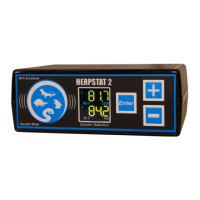
The Herpstat 2 boasts a user-friendly interface with an easy-to-read backlit color LCD display. Temperature and settings can be displayed in tenths of a degree, in either Fahrenheit or Celsius. The menu system is navigated using Plus and Minus buttons to alter options and an Enter button to select or advance through settings. Holding the Enter button activates the main menu, while the Minus button toggles between different display screens in normal operation.
For remote access, the Wi-Fi connectivity is a significant advantage. Users can connect their phone, tablet, or computer directly to the Herpstat via its Access Point Mode for initial setup. Once configured with the home network's SSID and password, the device can be accessed through its assigned IP address in a web browser. This web interface provides access to device configuration, status monitoring (including temperature, humidity, high/low readings), and charts displaying sensor readings and power output history. The "Web Upload" feature allows the Herpstat to upload its status and charts to herpstat.com for online viewing, eliminating the need for complex router configurations for basic monitoring.
The device includes a robust alarm system. Users can set individually selectable High/Low temperature and humidity threshold alarms, which trigger an audible alert if breached. A "30 Min Mute" option is available for low temperature alarms, useful during initial warm-ups or when an enclosure door is open. Emergency email notifications can be configured to alert users during error conditions, such as probe errors, high/low temperature alarms, or device resets. Scheduled email status updates can also be set up.
Other notable features include "Sensor Matching," which allows digital calibration of the sensor output to match other equipment, and "Auto Power Matching," which constantly adjusts the power output curve to match the enclosure's efficiency. A "Basking Assist" option is available for heating, providing reduced power even after the target temperature is reached, which can be beneficial for basking lights or ceramic heat elements. "MaxPower" allows limiting the maximum power sent to heating devices for safety.
The Herpstat 2 is designed with several features to aid in maintenance and ensure long-term reliability. All settings are retained in memory even if power is lost, preventing the need for re-configuration after an outage. The device includes "Power Outage detection/tracking" to monitor power interruptions.
For security, a "Security Passcode" option deters unauthorized access to the menu system. If the passcode is forgotten, a "Master Reset" can restore factory defaults. The device also has internal error detection that shuts off heat if a sensor fails or is disconnected, enhancing safety. An internal safety relay cuts power to all outputs if user-settable conditions are met, such as specific high/low alarm breaches or any error condition, depending on the "Safety" setting.
The Herpstat 2 features user-replaceable sensors, simplifying maintenance if a probe needs replacement. It also has a user-replaceable fuse (8.0 amp 5x20mm fast acting fuse), with a spare included, to protect against voltage spikes or overloads. This allows for easy repair in case of fuse damage, minimizing downtime.
Troubleshooting tools are integrated into the device, including a test sequence for probes, outlets, and the internal clock. The manual provides guidance on probe placement and addressing issues like insufficient heating or electrical interference with probe wires. It advises against using aluminum tape on probe tips, as this can cause false readings.
The device is designed for indoor use in a dry location and requires a 120V AC power supply. It has vent holes for proper cooling, and it's normal for the enclosure to be warm to the touch during operation. Using a good quality surge suppressor is recommended to protect the thermostat from electrical surges.
Overall, the Herpstat 2 SpyderWeb offers advanced, precise, and user-friendly environmental control with robust safety and maintenance features, making it a comprehensive solution for managing reptile habitats.
 General
| Display Type | LCD |
|---|---|
| Number of Outlets | 2 |
| Warranty | 1 year |
| Type | Thermostat |
| Outputs | 2 |
| Temperature Resolution | 0.1°F or 0.1°C |

 To Next Page