The Datacolor Spyder Checkr 24 is a color calibration tool designed to help photographers and videographers achieve accurate and consistent color across their workflow. It consists of a physical target color card and accompanying software, working in conjunction with a monitor calibrator like the SpyderX.
Function Description:
The primary function of the Spyder Checkr 24 is to enable precise color calibration for cameras and lenses. By photographing the Spyder Checkr 24 target under specific lighting conditions, users can create custom camera profiles that correct for color shifts and inconsistencies introduced by their camera sensor and lens combination. This ensures that the colors captured by the camera are true to life and consistent across different shooting scenarios and equipment. The software analyzes the captured image of the target and generates a calibration preset that can be applied within various RAW conversion and editing software. This process helps to establish a neutral starting point for color grading, reducing the need for extensive manual color corrections in post-production. Furthermore, the system emphasizes the importance of a calibrated monitor, ensuring that the colors seen on screen accurately represent the colors in the image file.
Important Technical Specifications:
- Target Color Card: The Spyder Checkr 24 includes a physical target color card with 24 color patches. These patches are specifically chosen to represent a wide range of colors, including skin tones, primary colors, and grayscale values, which are crucial for accurate color profiling. The card is designed to be durable and resistant to fading, ensuring long-term accuracy.
- Software Compatibility: The accompanying Spyder Checkr software is compatible with both Windows and Mac operating systems.
- Windows: Windows 7 (32/64-bit), Windows 8.0, 8.1 (32/64-bit), Windows 10 (32/64-bit).
- Mac OS X: 10.7 or higher.
- System Requirements:
- Monitor Resolution: 1280x768 or greater.
- Video Card: 16-bit video card (24-bit recommended).
- RAM: 1GB of available RAM.
- Hard Disk Space: 500MB of available hard disk space.
- Internet Connection: Required for software download and activation.
- Monitor Calibration: While the Spyder Checkr 24 focuses on camera calibration, it is designed to be used in conjunction with a monitor calibrator, such as the Datacolor SpyderX. This ensures that the display used for editing accurately represents the calibrated colors.
Usage Features:
The workflow for using the Spyder Checkr 24 is straightforward and involves several key steps:
- Taking Photos: The first step involves taking at least one photo of the Spyder Checkr 24 target in RAW format. It is crucial to ensure the target is evenly lit, ideally from each side at 45-degree angles, to avoid shadows and reflections that could skew the color readings. The target can be held or placed within the frame.
- Software Installation and Activation: Users need to download and install the Spyder Checkr software from the Datacolor website. The software requires activation using a provided serial number, which also initiates the product warranty.
- Monitor Calibration: Before proceeding with camera profiling, it is essential to calibrate the monitor using a colorimeter like the SpyderX. Regular monitor calibration (at least every four weeks) ensures that the colors displayed on the screen are accurate.
- Adjusting in Editing Software: The RAW image of the Spyder Checkr 24 target is then uploaded to a RAW conversion software (e.g., Adobe Lightroom, Adobe Photoshop, Hasselblad Phocus). Within this software, the image should be straightened, distortion corrected, and the target image cropped.
- Saving and Applying Preset:
- Integration with Editing Software: The Spyder Checkr software can integrate directly with Lightroom (via "Edit In SpyderCHECKR") or work with uncompressed .tiff files from Camera Raw or 16-Bit .tiff files exported from Phocus.
- Target Grid Adjustment: Within the Spyder Checkr software, users adjust a patch grid to align precisely with the color patches on the captured image of the Spyder Checkr 24. The entire grid can be moved by dragging its center, and individual sides can be adjusted by dragging within the blue half-circles.
- Calibration Preset Creation: Once the grid is aligned, users select their preferred color mode and the application for export, then click "Save Calibration." A descriptive file name (e.g., "D810_85_portrait_24" for a Nikon D810 with an 85mm lens in Portrait Mode using Spyder Checkr 24) is recommended.
- Applying the Preset: After creating the preset, users launch their editing software, adjust the white balance using the gray side of the Spyder Checkr 24 (or a Spyder Cube/other gray reference), and then apply the newly created preset to all photos taken with that specific camera and lens combination. This ensures consistent and accurate color rendition across an entire shoot.
Maintenance Features:
While the manual does not explicitly detail maintenance features for the physical Spyder Checkr 24 card, the emphasis on its durability and resistance to fading suggests it is designed for long-term use with minimal degradation. General best practices for maintaining color targets would include:
- Cleanliness: Keeping the target clean and free from dust, fingerprints, or smudges to ensure accurate color readings.
- Storage: Storing the target in its sleeve or a protective environment to prevent physical damage, scratches, or exposure to harsh light that could cause fading over time.
- Handling: Handling the card by its edges to avoid transferring oils or dirt to the color patches.
The software itself is maintained through updates provided by Datacolor, which users can access via an internet connection. Regular monitor calibration is also a crucial aspect of maintaining an accurate color workflow, as monitors can drift over time.

 Need help?
 General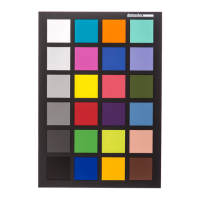

 To Next Page