15
Troubleshooting/ Error messages
TROUBLESHOOTING
Problem Possible solutions
Impossible to
turn on the
camera
• Verify if there are batteries in the camera.
• Verify if the batteries are correctly installed (p.7)
• Verify if the battery switch position is positioned
according to the power source (p.7).
• Install the latest update (available on
www.spypoint.com under SUPPORT section).
• Replace alkaline batteries or recharge the lithium
battery pack.
The screen of the
camera turns off
• The camera may be set to PHOTO or VIDEO mode
and the screen turns off after a period of 60 seconds
in order to preserve battery life.
• To return to the screen, turn off the camera and turn
it on again.
The camera does
not respond
• Remove the batteries and reinstall them (p.7).
• Replace alkaline batteries or recharge the lithium
battery pack.
The camera
works, but is
losing its time
and date settings
• The time battery must be replaced (p.8).
Impossible to
take photos/
videos
• Verify if there are batteries in the camera.
• Replace alkaline batteries or recharge the lithium
battery pack.
• Memory card is full.
• Verify if the camera is turned on.
No person/animal
on photos
• Sunrise or sunset can trigger the sensor. Camera
must be re-orientated.
• At night, the motion detector may detect beyond the
range of the IR illumination. Reduce distance setting
(p.12).
• Small animals may trigger the unit. Reduce distance
setting (p.12) and/or raise height of camera.
• Motion detector may detect animals through foliage.
• If a person or animal moves quickly, it may move out
of the camera’s eld of view before the photo is
taken. Move the camera further back or redirect the
camera.
• Make sure the mounting post or tree is stable and
does not move.
Red light in front
of the camera
blinks
• MODE switch is in SET/TEST.
• MODE switch is in PHOTO or VIDEO. The red light in
front of the camera ashes for 60 seconds to allow
the user to leave without being photographed or
recorded.
The photos/
videos do not
appear on the
television
• Verify if the camera is correctly connected to the
television using the RCA cable (p.11).
• Verify if the memory card contains photos/videos.
The computer
does not
recognize the
camera
• Verify if the camera is properly connected to the
computer using the USB cable (p.14).
The computer
can’t play videos
• The .MP4 video format requires the use of a video
player software compatible such as VLC, Windows
Media Player or QuickTime.
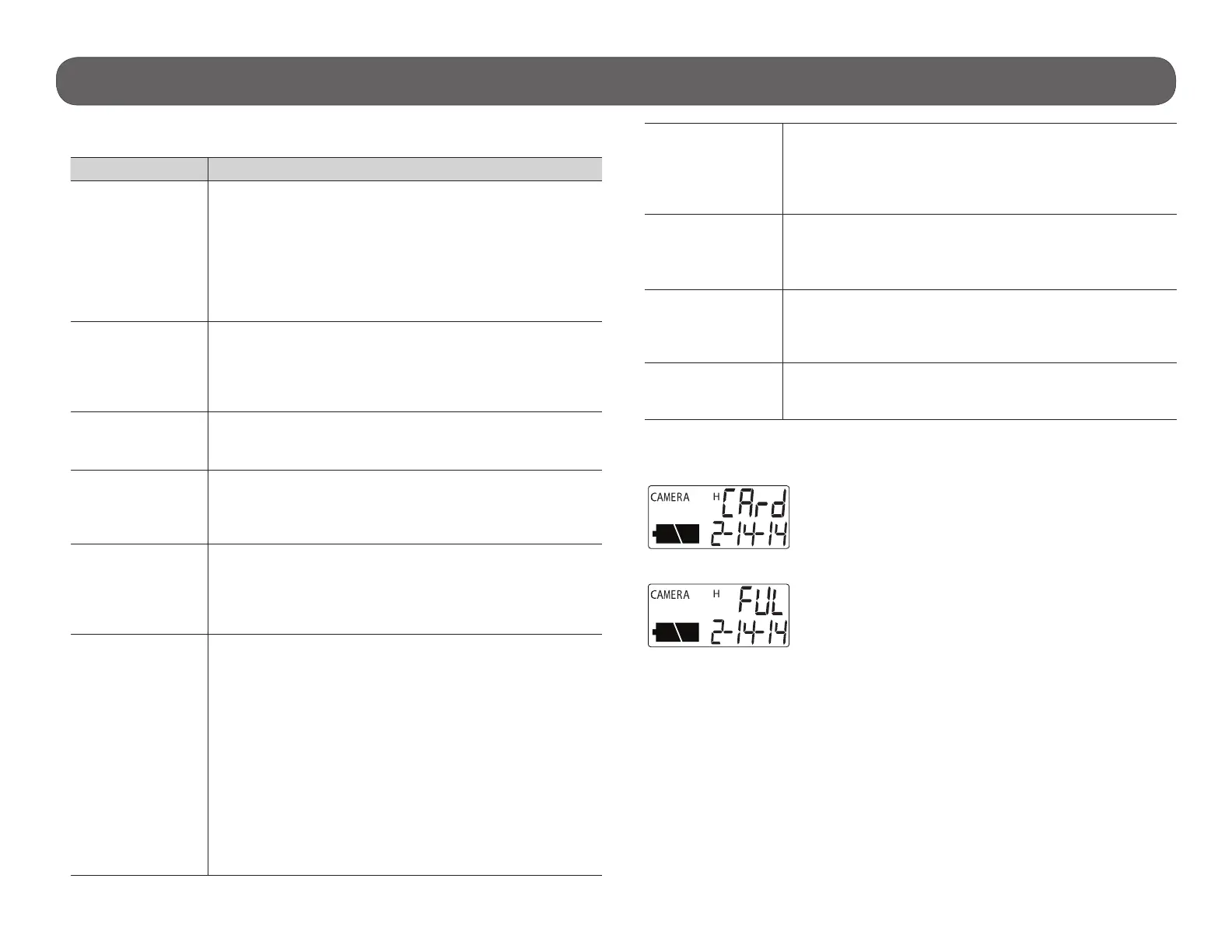
ERROR MESSAGES
There is no memory card in the camera, insert a card.
The memory card is full, delete the les or use a new
memory card.


 To Next Page