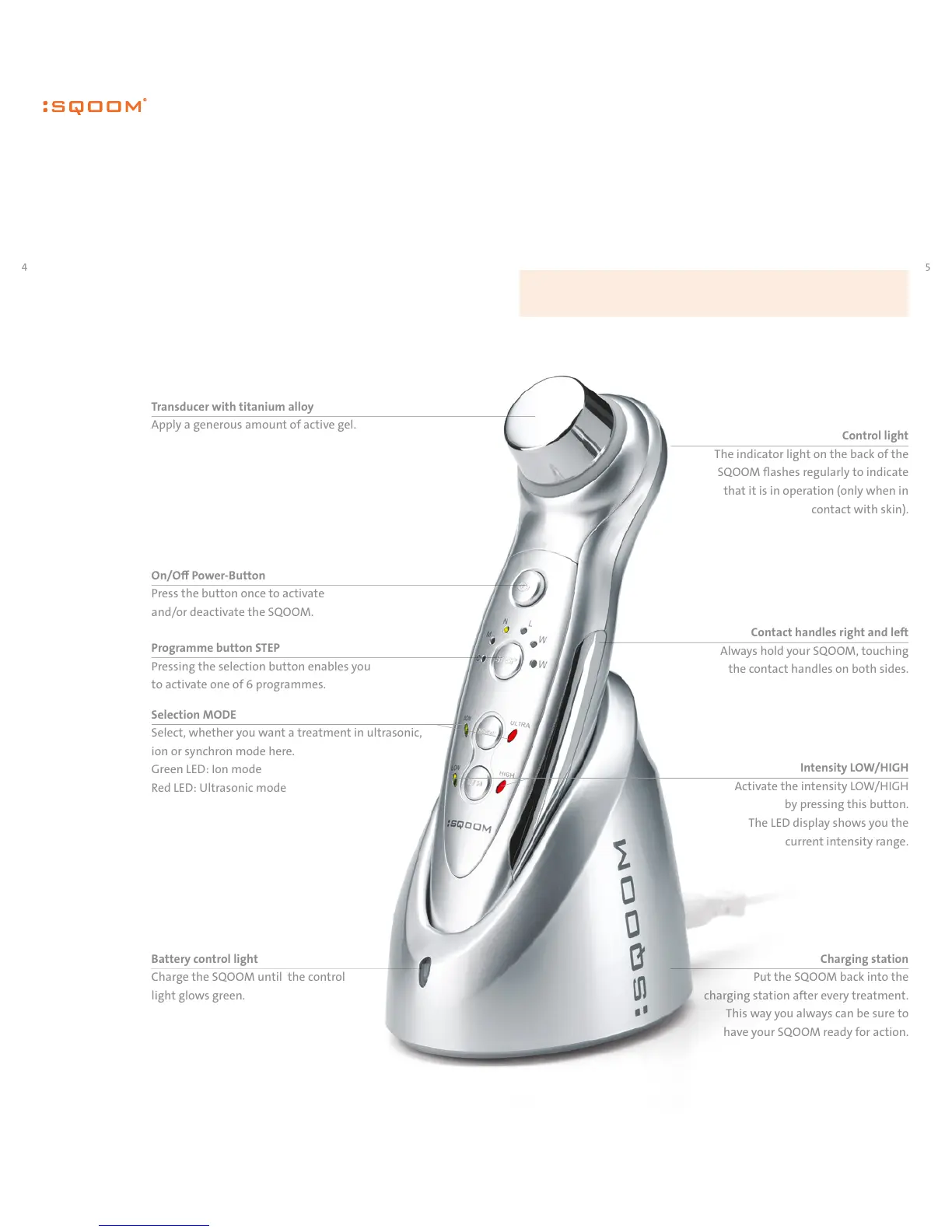
Control light
The indicator light on the back of the
SQOOM flashes regularly to indicate
that it is in operation (only when in
contact with skin).
Contact handles right and left
Always hold your SQOOM, touching
the contact handles on both sides.
Charging station
Put the SQOOM back into the
charging station after every treatment.
This way you always can be sure to
have your SQOOM ready for action.
Please use the SQOOM with the treatment gels developed by us. We accept no
liability for results when using cosmetics or medicines produced by others.
Battery control light
Charge the SQOOM until the control
light glows green.
Transducer with titanium alloy
Apply a generous amount of active gel.
On/O Power-Button
Press the button once to activate
and/or deactivate the SQOOM.
Selection MODE
Select, whether you want a treatment in ultrasonic,
ion or synchron mode here.
Green LED: Ion mode
Red LED: Ultrasonic mode
Programme button STEP
Pressing the selection button enables you
to activate one of 6 programmes.
Intensity LOW/HIGH
Activate the intensity LOW/HIGH
by pressing this button.
The LED display shows you the
current intensity range.
Please read this summary overview to get
acquainted with your SQOOM. It provides a
first impression of the device’s operation.
Summary overview


 To Next Page