Page 6
BREW DAY OPERATIONS (CONTINUED)
IMPORTANT
eCONTROLLER ACTIVATION
ACTIVATION BUTTONS
It is recommended to perform a “water brew” on the system before using real ingredients. This will
allow you to familiarize yourself with the controller’s operation, processes, temperature ramp rates, and
temperature losses during transfers. Record data and observations carefully so that you can calculate
or adjust water volumes and temperatures based on recipe prole, ambient grain temperatures and
any other outside variables.
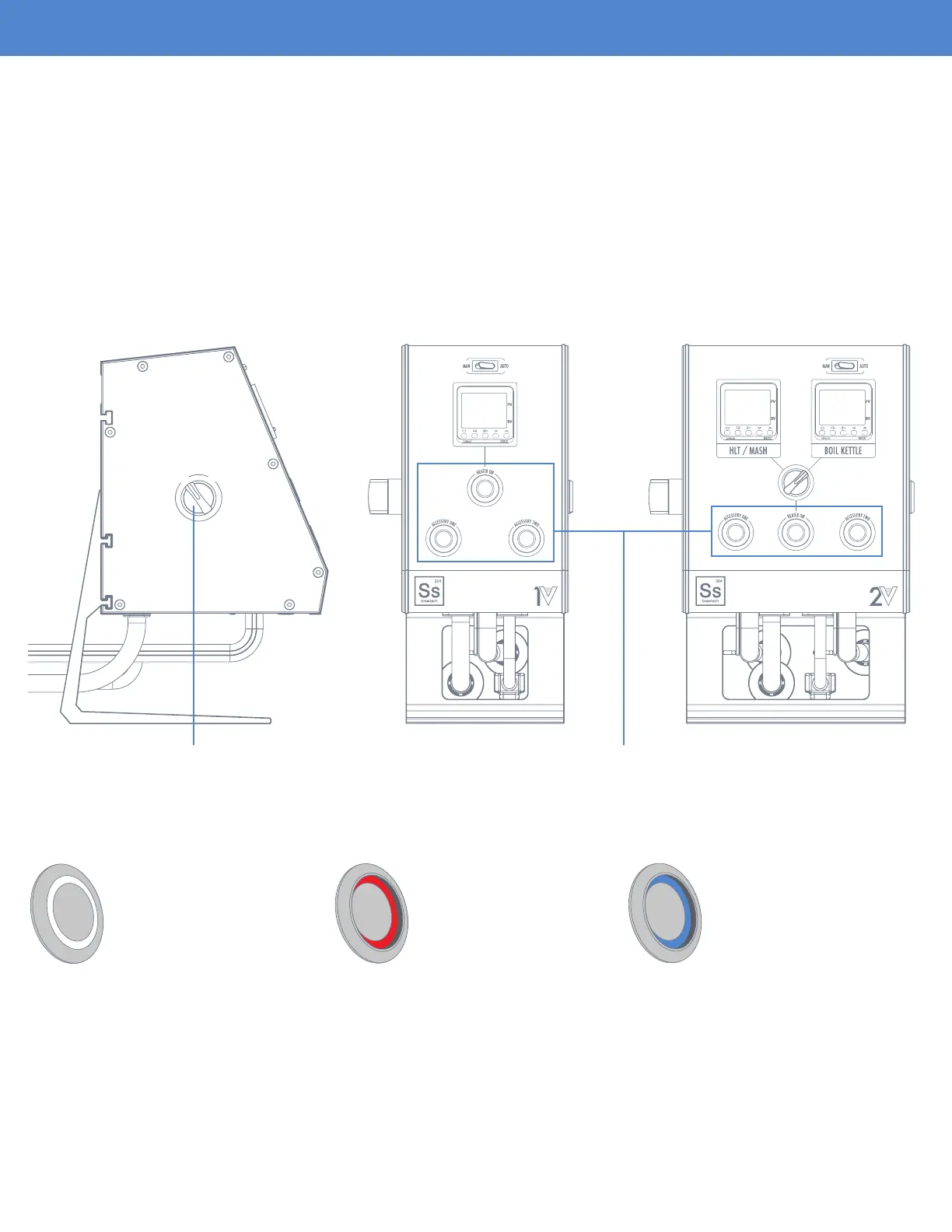
After ensuring all the rear electrical connections have be made, the unit can be powered on via the side
mounted “ON/OFF” switch. Make sure that both the heater activation button as well as the accessory
buttons are in the “OFF” position as shown in the graphic above.
O
F
F
O
N
O
F
F
O
N
Off Position
- Button is not recessed
- No indicator light
Heater On Position
- Button is recessed
- Red indicator light
Accessory On Position
- Button is recessed
- Blue indicator light
Side Mounted “ON/OFF” Switch Heater and Accessory Activation Buttons


 To Next Page