11
6
MENU
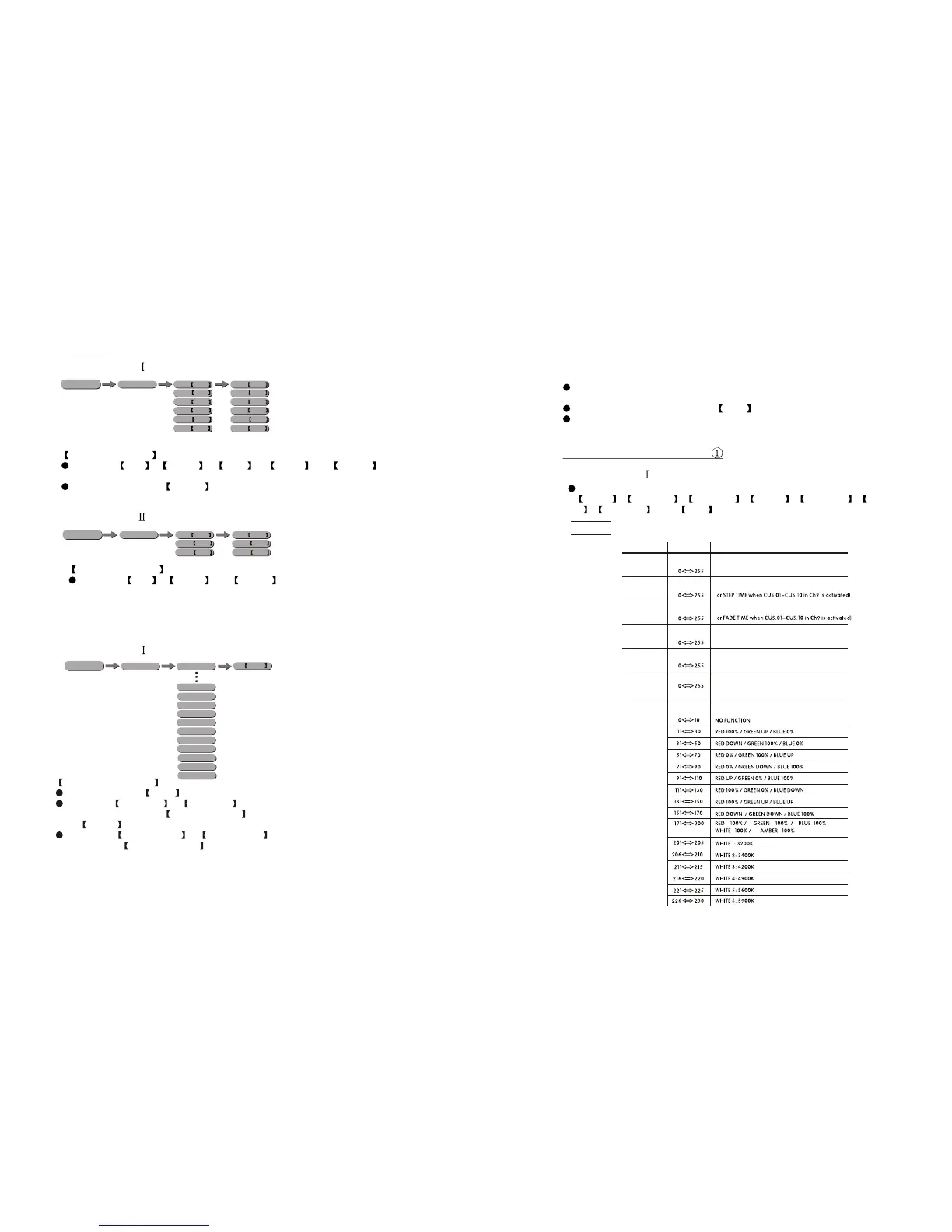
AUTO PLAY MODE
Select the target Auto program .
Programs AUTO 01 to AUTO 10 are fully pre-programmed and will not be
altered by changes in EDIT CUSTOM mode. The auto speed can be set from
SP 1~255 .
Programs CUSTOM 01 to CUSTOM10 are fully pre-programmed and can
be edited in EDIT CUSTOM mode.
AUTO AUTO 01
AUTO 10
CUSTOM 01
CUSTOM 02
CUSTOM 03
CUSTOM 04
CUSTOM 05
CUSTOM 06
CUSTOM 07
CUSTOM 08
CUSTOM 09
CUSTOM 10
SP 0~255
3.4 AUTO PLAY MODE
3.3 STATIC
STATIC COLOUR
Combine Red , Green , Blue , White and Amber to create
an infinite range of colors (0-255)
Set the value of the Strobe (0-20Hz)
STATIC
GREN 0~255
RED 0~255
BLUE 0~255
WHIT 0~255
AMBE 0~255
STRB 0~020
GREN 0~255
RED 0~255
BLUE 0~255
WHIT 0~255
AMBE 0~255
STRB 0~020
MENU
STATIC
COOL 0~255
DIM 0~255
WARM 0~255
COOL 0~255
DIM 0~255
WARM 0~255
MENU
STATIC COLOUR
Combine DIM , COOL and WARM
to createan infinite range of colors (0-255)
TOUR
Note: This product have three DMX512 channel configuration:
TOUR , BLOCK1 , , ARC 1 , ARC 1+D ,
2, 2 and HSV
BLOCK2 ARC
ARC +D
4.1 BASIC ADDRESSING
Connect all of the units in series using standard DMX512 signal cable or
the IP65 rated cable provided.
Set the DMX512 address in the DMX menu.
It is possible to have the same DMX address or independent
addresses for each fixture.
4.21 CHANNEL ASSIGNMENT
4 USING A DMX512 CONTROLLER
1
2
3
4
COLOR MACRO + WHITE BALANCE
5
6
BLUE
MASTER DIMMER
RED
GREEN
VALUE
FUNCTION
WHITE
AMBER
CHANNEL
7
APPLY :(Type- )
APPLY:(Type- )
APPLY:(Type- )
APPLY:(Type- )


 To Next Page