EasyManua.ls Logo

St. Croix DHC3000 - User Manual

St. Croix DHC3000
8 pages
Print Icon
To Next Page IconTo Next Page
Loading...
1
Discontinued Models DHC3000 Control Boards
These instructions are only intended for customers who are replacing one of the
discontinued control boards listed below
The
Company that manufactures the St. Croix Control Boards has reached the point of
discontinuing another older model Control Board. They will be replaced with the
DHC4000 Series Board that we introduced about 3 years ago with some of our newer
models.
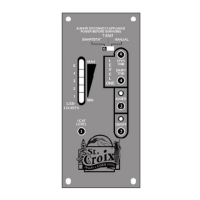
Please take a look at the 2 control boards below. If your Control Board looks like one of
these or is even older and it doesn’t have the Thermostat Slide switch, then your board
has been discontinued.
80P52632B 80P22348B
Auburn, Lancaster, Greenfield Afton Bay, Prescott, Hastings, York
The new Control Board is backwards compatible with the DHC3000 and plugs directly
into the old wiring harness. The Part Number for your replacement board is
80P30523-R
Question and Answer IconNeed help?

Do you have a question about the St. Croix DHC3000 and is the answer not in the manual?

Overview

The provided manual describes the Discontinued Models DHC3000 Control Boards for St. Croix stoves and their replacement with the DHC4000 Series Board (Part Number 80P30523-R). The DHC4000 board is backwards compatible and plugs directly into the old wiring harness.

Function Description:

The control board serves as the central control unit for St. Croix pellet and multi-fuel stoves, managing various operational parameters to ensure efficient and safe burning. It regulates fuel feed rate, combustion fan voltage (draft), igniter operation, and monitors safety switches such as the vacuum switch and proof of fire switch. The board supports different operational programs tailored for specific stove models and fuel types. It also incorporates safety shutdown features in case of operational anomalies.

Important Technical Specifications:

  • Replacement Board Part Number: 80P30523-R (DHC4000 Series Board).
  • Compatibility: Backwards compatible with DHC3000 series boards.
  • Power Requirement: Fuse on the back of the control board is a 125 Volt, 5 Amp fuse.
  • Programs: The DHC4000 board has 4 distinct programs:
    • Program 1: 11.5 second cycle time. For current Ashby models, Auburn, Lancaster, and Greenfield. Designed for Pellets, Corn, Wheat, Rye, Cherry Pits, or Distiller Grain Pellets. (Not for pellet stoves).
    • Program 2: 13.0 second cycle time. For "tweaking" Program 1 for higher Air to Fuel Ratio. Designed for Pellets, Corn, Wheat, Rye, Cherry Pits, or Distiller Grain Pellets. (Not for pellet stoves).
    • Program 3: 11.5 second cycle time. For Afton Bay, Prescott EXL, Prescott EXP, Hastings, and York. Designed for Pellets & Cherry Pits, with Self-Ignition and Versa Grate System. (Not for multi-fuel stoves).
    • Program 4: 10.0 second cycle time. For Cherry Pits only, with Self-Ignition and Versa Grate System. (Not for multi-fuel stoves).
  • Feedrate Adjustment: 5 levels, indicated by LED flashes. Default is center LED. Each adjustment increases or decreases ON time by 0.25 seconds.
  • Combustion Fan Voltage Adjustment (Draft): 5 levels, indicated by LED flashes. Default is center LED. Each adjustment increases or decreases voltage by 2.5 volts.
  • Cycle Time: Varies by program (10.0 to 13.0 seconds). Longer cycle time results in lower BTU rating.
  • Safety Features: Monitors vacuum switch and proof of fire switch. Initiates "Safety shutdown" if conditions are not met.

Usage Features:

  • Installation: The new DHC4000 board plugs directly into the old wiring harness.
  • Program Selection:
    • Stove must be OFF and completely cooled down (Proof of Fire Switch Open).
    • Thermostat slide switch must be in "Manual" mode.
    • Press and hold the "Auger Feed" button.
    • Simultaneously press and release the "Trim High" and "Trim Low" buttons.
    • LED lights will flash to indicate the currently running program (1 flash for Program 1, 2 for Program 2, etc.).
  • Starting the Stove (Pellet Stoves - 80P22348B equivalent):
    • Ensure pellets in hopper, viewing door and ash pan door closed.
    • Push "On/Off" button.
    • Start-up program sequence:
      • Combustion fan and Room fan on high speed; vacuum switch checked.
      • Vacuum switch locks in: Combustion fan drops to #1, Room fan shuts off.
      • Igniter and Auger (2 minutes) come on. Stove typically lights in 3-4 minutes.
      • After 5 minutes, board checks for "Proof of Fire" and starts feeding pellets at #1.
      • P.O.F. sensed: Igniter shuts off, stove started.
      • P.O.F. not sensed: Repeats feeding pellets at #1 for 5 more minutes.
      • Still no P.O.F.: "Safety shutdown".
  • Starting the Stove (Multi-Fuel Stoves - 80P52632B equivalent):
    • Ensure fuel in hopper.
    • Add one cup of pellets to burn pot (not corn/small grains). Add generous starter gel.
    • Optional: Crumple half newspaper, light gel, toss paper in burn pot.
    • Close door, push "On/Off" button.
    • Set controls to Heat Level #1.
    • Once Proof of Fire switch locks in and Power Light stops blinking, adjust heat level.
    • Start-up program sequence:
      • Combustion fan on high speed; vacuum switch checked.
      • Vacuum switch sensed: Exhaust fan drops to lower start-up speed until Proof of Fire Switch locks in.
      • After 5 minutes, board checks for "Proof of Fire" and starts feeding fuel at #1.
      • P.O.F. sensed: Stove started.
      • P.O.F. not sensed: Repeats feeding corn at #1 for 5 more minutes.
      • Still no P.O.F.: "Safety shutdown".
  • Shutting Off the Unit:
    • Press "On/Off" switch once. Lights go off, fire goes out. Board enters "Safety shutdown".
    • Fans continue to run if stove temperature is above 110°F.
    • P.O.F. switch drops out: Room fan shuts off, Combustion fan runs for 10 more minutes, then shuts down.
    • NEVER unplug the stove to shut it off to avoid smoke.
  • Thermostat Slide Switch:
    • For Pellet Stoves, all three positions (Manual, T-Stat, SmartStat) work the same as the discontinued board.
    • For Multi-Fuel Stoves, only Manual and T-Stat positions work. SmartStat is incompatible.
  • Adjusting Fuel Feed Rate (while stove is running):
    • Press and hold "Auger Feed" button.
    • Press "Heat Level High" to increase feedrate, or "Heat Level Low" to decrease.
  • Adjusting Combustion Fan Voltage (Draft) (while stove is running):
    • Press and hold "Auger Feed" button.
    • Press "Trim High" to increase voltage, or "Trim Low" to decrease.

Maintenance Features:

  • Troubleshooting Guide: The manual includes a section for frequently asked questions and solutions for common issues:
    • Stove not starting (empty auger tube): Prime burn pot using "Auger Feed" button.
    • Stove overloading burnpot: Check fuel moisture (should be 15% or less), ensure clean fuel, check gaskets/doors/latching for air leaks, adjust damper (refer to Operations Manual).
    • Stove not burning, #2 LED blinking (vacuum switch issue):
      • Causes: Door/ash pan door left open > 60 seconds, combustion fan not running, defective vacuum switch, disconnected vacuum hose, plugged vent system.
      • Solution: If fire out, re-light. If fire burning, hold "On/Off" button for ~5 seconds to restart in start-up program.
    • Stove not burning, #3 LED blinking (Proof of Fire Switch issue):
      • Causes: No pellets in hopper, power failure, too much combustion air on low setting, auger quit feeding fuel (obstruction or loose set screw).
      • Solution: Fill hopper, re-light stove. Remove auger obstruction or tighten set screw.
    • Stove not burning, #4 LED blinking (High Limit switch tripped): Convection Blower may be defective/dirty, or High Limit switch defective. Contact dealer for support. Do not use if High Limit switch frequently trips.
    • Stove on, nothing happens: Check if stove is plugged in, check receptacle power, check/replace 125 Volt, 5 Amp fuse on control board.
    • Dirty glass: Normal light build-up is common. Heavy black build-up indicates a problem.
      • Solution: Adjust combustion air damper or fan voltage. Ensure clean out cover plates are installed. Stove may need good cleaning (refer to Daily, Periodic, Yearly Maintenance section of manual).

St. Croix DHC3000 Specifications

General IconGeneral
BrandSt. Croix
ModelDHC3000
CategoryControl Panel
LanguageEnglish