!
Display Functions
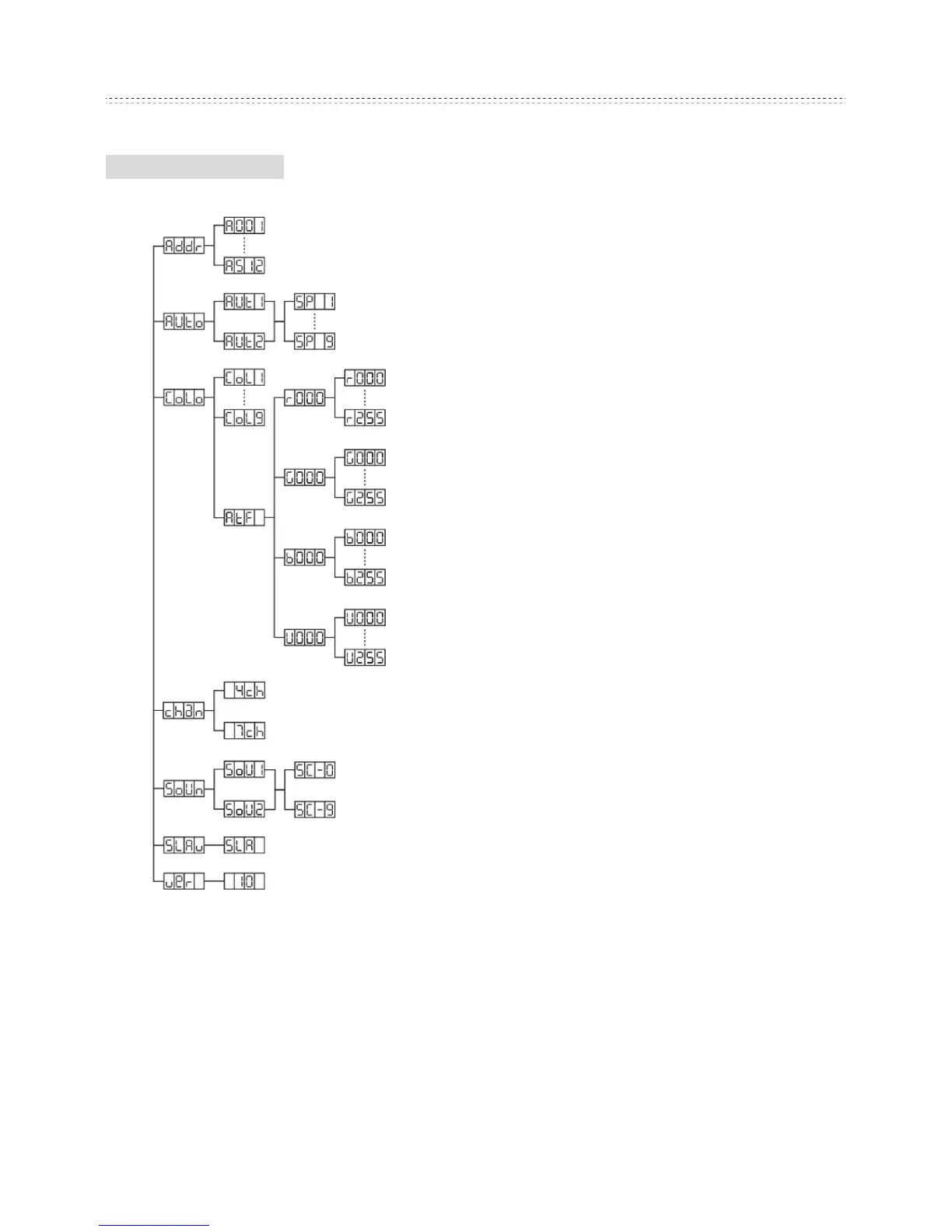
Addr - DMX Address Setting via
control board
1. Tap the MENU button and UP or
DOWN button until “Addr” is displayed,
then press ENTER.
2. “Axxx” will now be displayed, “x”
represents the displayed address.
Press the UP or DOWN buttons to find
your desired address.
Auto - This menu will let you select
your desired auto mode
1. Tap the MENU button and UP button
or DOWN button until “Auto” is
displayed, then press ENTER.
2. “Autx” will now be displayed. You
can confirm two modes by pressing UP
or DOWN for auto mode.
3. Again press ENTER, appear SPx.
By using UP and DOWN adjust the
auto speed (SP1-SP9)
Colo - This menu will let you select your desired fixed colour
1. Tap the MENU button and UP or DOWN button until “CoLo” is displayed,
press ENTER.
2. Either “CoL X” (“X” representing a number between 1- 9) or “AtF” will be
displayed. Press the UP or DOWN button to select either a static colour or “AtF”
mode. If you select a static colour, press ENTER and it will be confirmed.
3. “AtF” Make your own colour by mixing and adjusting the red, blue, green and


 To Next Page
 Loading...