
 Need help?
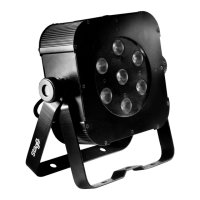
Do you have a question about the Stagg SLI-FLATPAR2 and is the answer not in the manual?
Warning to prevent electrical shock or fire by avoiding rain and moisture.
Caution against looking directly into the light source to prevent severe eye damage.
Ensures proper placement for safety and stability, requiring steady mounting.
Verification of the unit's power requirements matching local voltage and frequency.
Details on connecting the DMX controller using 3-pin XLR sockets, including pinout.
Guide to setting the DMX address for individual fixture control via the control board.
Instructions for selecting and configuring the automatic operating modes and speed settings.
Process for selecting static colours or creating custom colours via RGBW mixing.
Steps to choose between 4 or 7 DMX channel configurations for control.
Procedure for selecting and adjusting the sound-activated operating mode and sensitivity.
Instructions for configuring the master/slave operational setup.
How to view the current software version of the lighting fixture.
 General
| Light source | LED |
|---|---|
| Power Consumption | 60W |
| LED Color | RGBW |
| Beam Angle | 25° |
| DMX channels | 7 |
| Weight | 1.3 kg |
| Protection Rating | IP20 |
| Control | DMX |
| Input Voltage | AC 100-240V, 50/60Hz |

 To Next Page