•
r
=
rolling
code
receiver
indicator
•= the upper line indicates the operation
of
the encoder
of
the first motor, while the
lower
indicates the
second
•
00
= registered
transmitters
r=00
Í
Î
add transmitter
Ï
1ch
2ch
•
add
transmitter
=
me-
morisation
radio controls
•
1ch
=
memorisation
of the
radio control key on the
first
channel
(START
impul-
se)
•
2ch
=
memorisation of
the radio control key on
the second channel (PEDE-
STRIAN impulse)
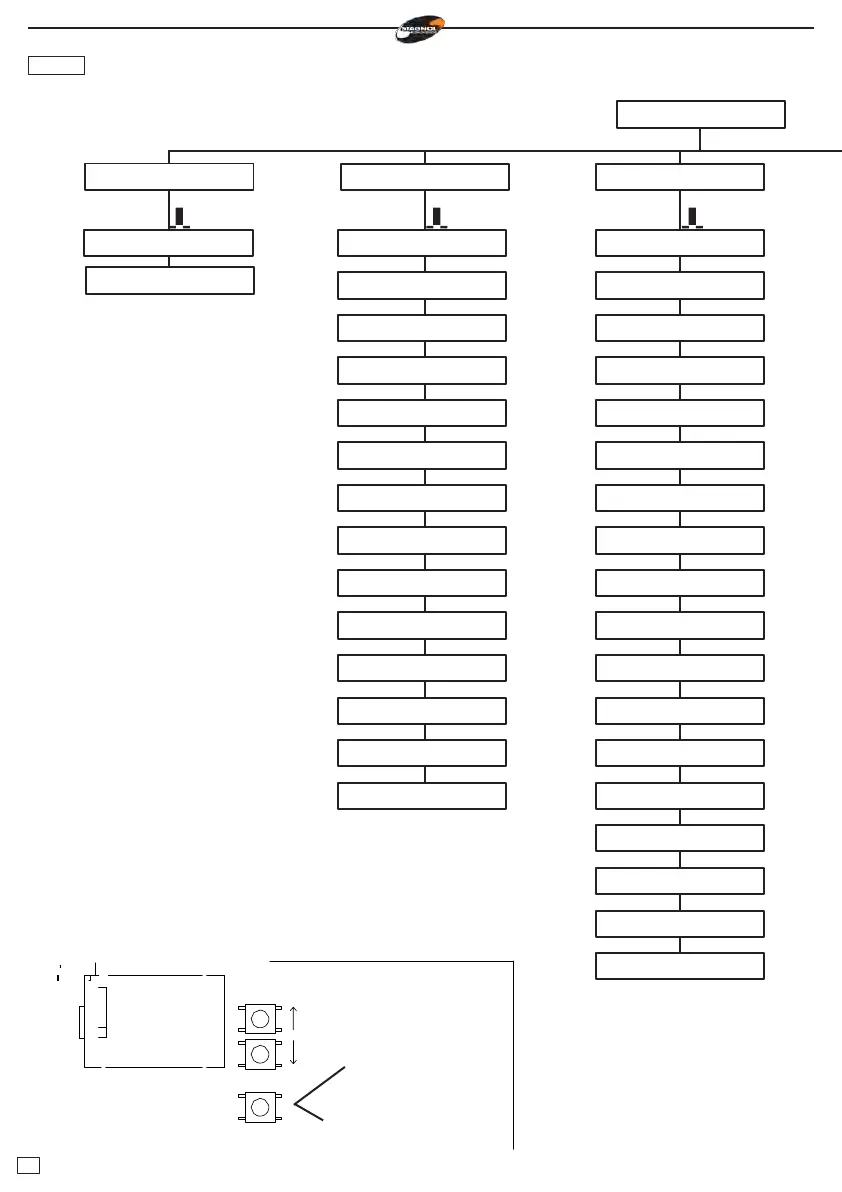
To access the menus or to un-
dertake an operation, press
ENTER (E) and release
imme-
diately. Keeping the same but-
ton
pressed,
it will be possible
to
return
to the upper
menu
or
cancel
the
operation requested
(ESC).To
navigate in the
menus
use the
up and down arrows.
adjustement
Ï
ttca
aped
sfaa
sfac
rlap
rlch
sbat
v
rl
fm1a
fm1c
fm2a
fm2c
tser
fend
function
Ï
ca
ba
bp
cr
2p
pl
sv
ar
re
1m
en
ss
oc
it
2b
cf
al
te
ENTER -
press and
release
E
ESC - press
for two
seconds
WARNING: When navi-
gating in the
menus,
the
control
board will ignore
any
command
to START.



 To Next Page