EasyManua.ls Logo

Stahl 9440/15 Series - User Manual

Stahl 9440/15 Series
55 pages
Go to English
Print Icon
To Next Page IconTo Next Page
Loading...
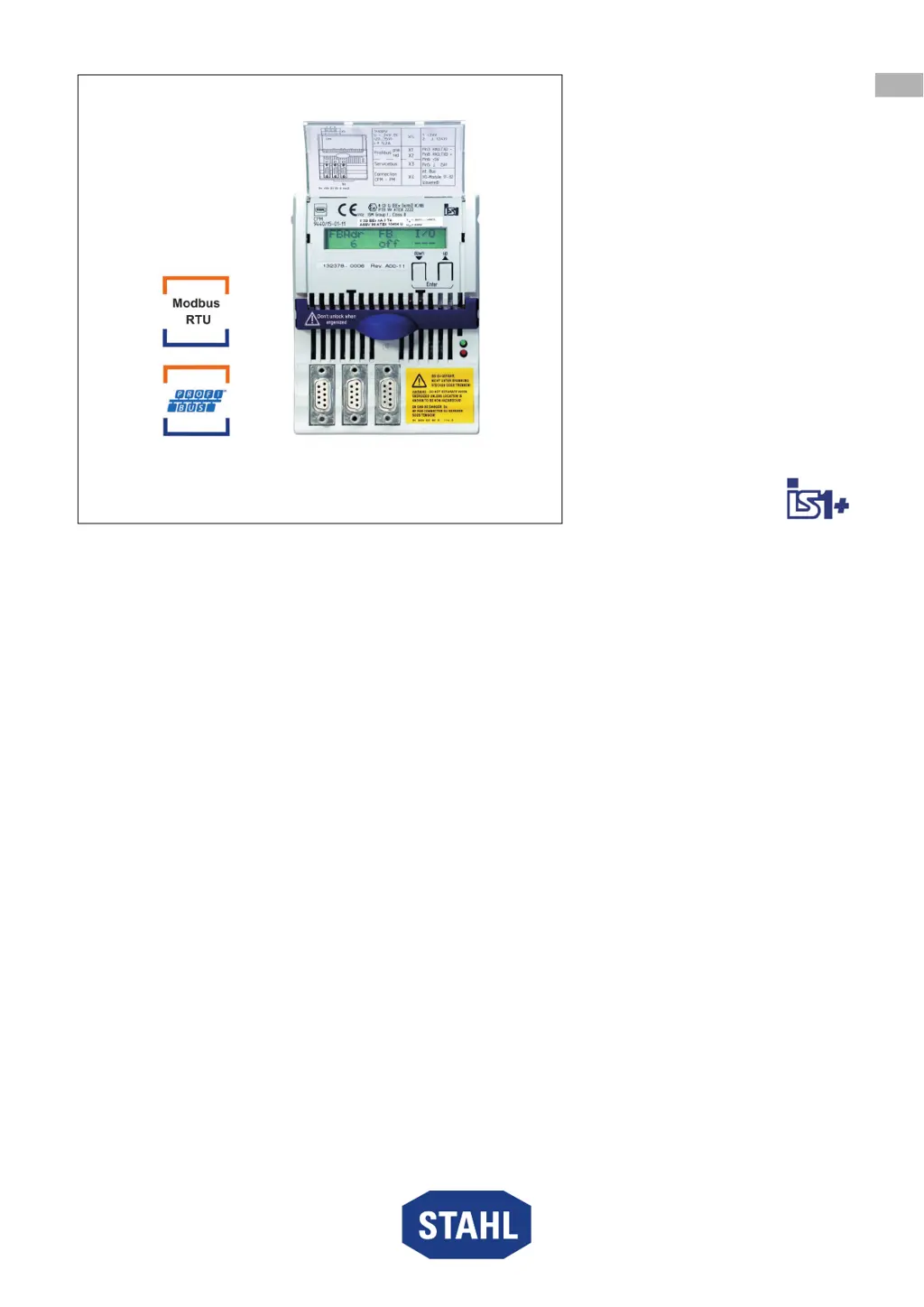
CPU & Power Modul
für Zone 2 / Class I, Div. 2
Reihe 9440/15
Betriebsanleitung
Additional languages r-stahl.com
DE
EN
FR
IT
ES
RU
NL
DK
SE
FI
PT
GR
PL
CZ
SK
HU
SL
RO
BG
LV
LT
EE
CH
KR
CN

Questions and Answers

  • K
    Kimberly BurchAug 18, 2025
    What to do if the "RUN" LED is off and the "ERR" LED is off on Stahl Control Unit?
    • J
      john19Aug 18, 2025
      If the "RUN" LED and the "ERR" LED are both off, it indicates that there is no supply voltage at the CPM or the CPM is defective. To resolve this: * Check the CPM's power supply. * Check the CPM and the BusRail. * Ensure the CPM is correctly engaged on the BusRail. * Replace the CPM if necessary.
  • F
    francisco02Aug 21, 2025
    Why is the "RUN" LED flashing and the "ERR" LED is flashing on my Stahl 9440/15?
    • Z
      Zachary GrantAug 21, 2025
      If the "RUN" LED and the "ERR" LED are both flashing, it means data exchange has been quit, and the outputs are in a safety position because cyclic data transfer with the master has been interrupted. To fix this: * Activate the cyclic data transfer with the master. * Check the master and bus connection to the CPM.
  • T
    Theodore LarsonAug 23, 2025
    What does it mean if the "RUN" LED is lit and the "ERR" LED is flashing on Stahl Control Unit?
    • E
      Emily HooverAug 23, 2025
      If the "RUN" LED is lit and the "ERR" LED is flashing, it indicates a common module alarm, a defective module, a module that is not available, or a wrong module plugged in. The suggested solutions are: * Replace the module. * Plug in the module. * Plug in the correct module.
  • W
    William JordanAug 26, 2025
    What to do if the "RUN" LED is off and the "ERR" LED is lit/flashing on Stahl 9440/15 Control Unit?
    • A
      Austin MorrisAug 26, 2025
      If the "RUN" LED is off and the "ERR" LED is lit or flashing, this indicates a CPM hardware error such as a hardware check error, Eprom error, or EEprom error. The suggested solution is to replace the CPM.
  • C
    Christopher JuarezAug 28, 2025
    What to do if the "RUN" LED is flashing and the "ERR" LED is lit on Stahl 9440/15 Control Unit?
    • S
      Scott BrowningAug 28, 2025
      If the "RUN" LED is flashing and the "ERR" LED is lit, it indicates a configuration error, meaning the current configuration is not correct. To resolve this, change the configuration of the master.
  • M
    Mrs. Andrea Martinez PhDAug 30, 2025
    What does it mean if the "RUN" LED is flashing and the "ERR" LED is off on Stahl 9440/15 Control Unit?
    • J
      Joshua RichardsonAug 31, 2025
      If the "RUN" LED is flashing and the "ERR" LED is off, it means the system is in standby, switched on but without data exchange with the master. To solve this: * Activate the cyclic data transfer with the master. * Check the master and bus connection to the CPM.
  • G
    Gregory HicksSep 2, 2025
    What to do if RUN and ERR LEDs are off on Stahl 9440/15 Control Unit?
    • P
      Patricia SmithSep 2, 2025
      If the RUN LED is off and the ERR LED is off on your Stahl Control Unit, it indicates either no power supply to the CPM or a defective CPM. Ensure the CPM's power supply is working, check the CPM itself and the BusRail, ensure the CPM is correctly snapped into place on the BusRail. If problems persist, consider replacing the CPM.
  • B
    Brittany ByrdSep 5, 2025
    What does it mean when RUN LED is off, ERR LED is lit/blinking, and display shows "Supply: fail" on Stahl Control Unit?
    • T
      Teresa LopezSep 5, 2025
      If the RUN LED is off and the ERR LED is lit or blinking with the display showing "Supply: fail" on your Stahl Control Unit, this indicates a CPM hardware error such as a hardware check error, EPROM error, or EEPROM error. The suggested solution is to replace the CPM.
  • Z
    zmorrisonSep 7, 2025
    Why are RUN and ERR LEDs blinking on my Stahl Control Unit?
    • A
      alexanderhernandezSep 7, 2025
      If the RUN LED is blinking and the ERR LED is blinking on your Stahl Control Unit, it means the data exchange mode has been exited, and the outputs are in a safety position because the cyclical data exchange with the master has been interrupted. To resolve this, activate the cyclical data exchange with the master and check the master and bus connection to the CPM.
  • K
    Karen GraySep 10, 2025
    What to do if RUN LED is blinking and ERR LED is lit on Stahl 9440/15 Control Unit?
    • H
      Hunter SantiagoSep 10, 2025
      If the RUN LED is blinking and the ERR LED is lit on your Stahl Control Unit, it indicates a configuration error, meaning the current configuration is not correct. To fix this, change the configuration of the master.

Summary

Safety Notes

Personnel Qualification

Specifies the required qualifications for personnel performing tasks.

Safe Use

Guidelines for safe operation before and during mounting/installation.

Modifications and Alterations

Warning against unauthorized modifications and their consequences.

Technical Data

Explosion protection

Details explosion protection ratings like IECEx and ATEX.

Project Engineering

Terminal Assignment of pluggable Terminal X5

Shows the pinout and function of the pluggable terminal X5 for auxiliary power.

Terminal Assignment of Sub-D Sockets X1, X2 and X3

Details the pinout and function of Sub-D sockets for data interfaces.

Mounting and Installation

Mounting;Dismounting, Operating Position

Explains how to mount, dismount, and the correct operating positions.

Requirements for Dismounting;Module Replacement

Lists prerequisites and steps for safely removing or replacing modules.

Installation

General notes and specific instructions for connecting auxiliary power, fieldbus, and service bus.

Parameterisation and Commissioning

Parameterisation

Explains how to set the fieldbus address and view device information via the LCD.

Start-up

Describes the initial booting process and display after power connection.

Setting the Fieldbus Address

Step-by-step guide to setting the fieldbus address directly on the module.

Operation

Operation

States when the module is ready for operation after installation and commissioning.

Troubleshooting

Provides a guide to diagnose and resolve common errors using LEDs and descriptions.

Maintenance, Overhaul, Repair

Maintenance

Guidelines for routine inspections and checks during maintenance.

Stahl 9440/15 Series Specifications

General IconGeneral
Series9440/15
CategoryControl Unit
Input Voltage24 V DC
Output Voltage24 V DC
IP RatingIP66
CertificationATEX, IECEx
Current Rating2A
Operating Temperature-20°C to +60°C

Related product manuals