Need help?
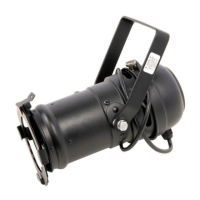
Do you have a question about the Stairville PAR 36 and is the answer not in the manual?
Explains the symbols and signal words used in the manual for clear communication.
Defines the proper application of the LED PAR device and prohibits misuse.
Details the 3-pin XLR connections for DMX input and output.
Explains how to connect the device in DMX mode for daisy-chaining.
Identifies and describes the various connectors and controls on the device's rear panel.
Provides instructions on how to connect the unit to the power grid to begin operation.
Details settings for automatic color change modes via DIP switches or sound control.
Explains how to set fade times for automatic shows using DIP switches.
Describes how to operate the device in manual mode using DIP switches for color and brightness.
Outlines the DMX channel assignments and settings for controller operation.
Instructions for cleaning the device's optical lenses to maintain light output.
Guidance on environmentally responsible disposal of packaging materials for recycling.
Instructions for proper disposal of the electronic device according to regulations.
 General
| Brand | Stairville |
|---|---|
| Model | PAR 36 |
| Category | Lighting Equipment |
| Language | English |

 To Next Page