17
COMPUTER INSTRUCTIONS
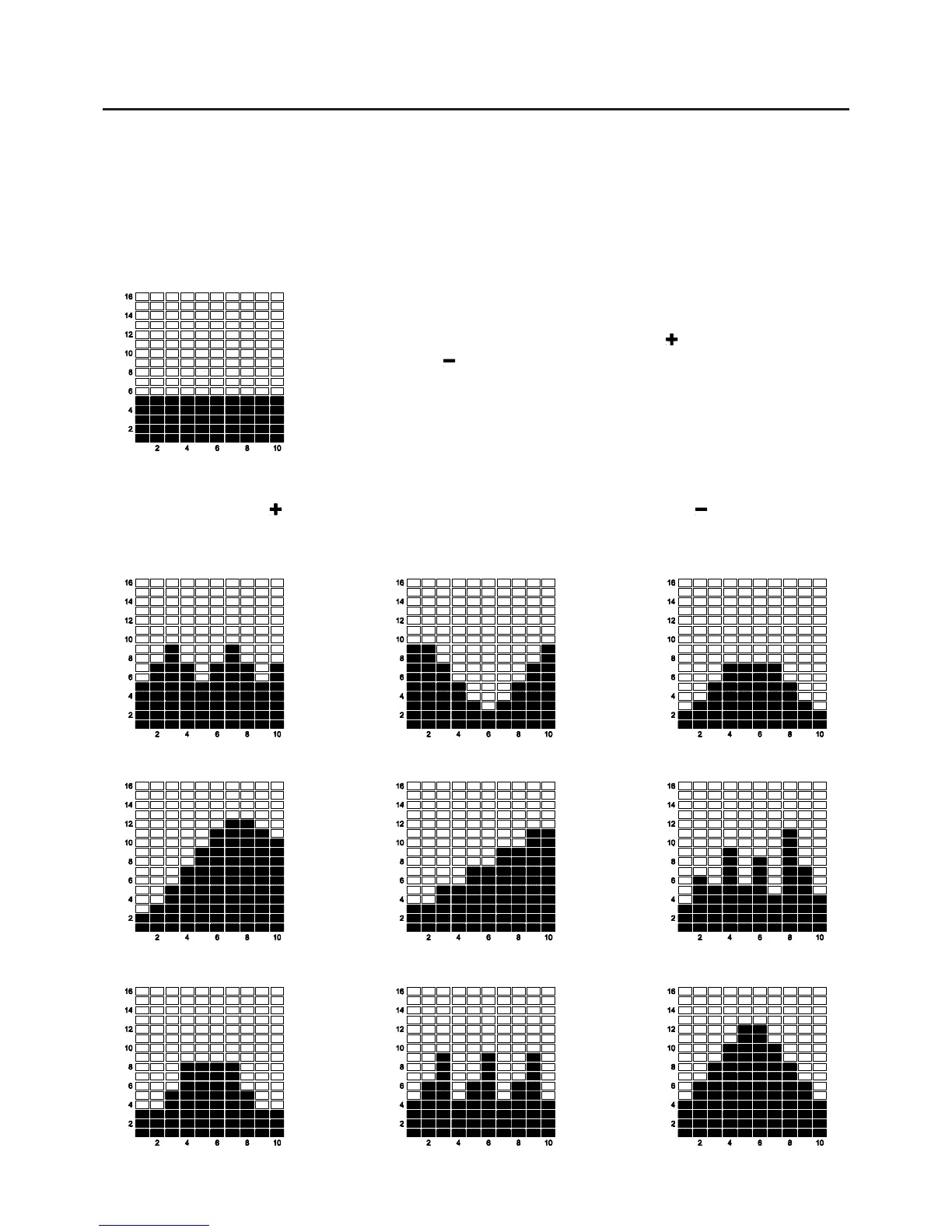
PROGRAM DESCRIPTIONS
(P1) MANUAL
PRESET PROGRAMS: P2 to P10 are preset automatic programs. The profiles are shown on the face of
the computer. Use the "
" button to increase the load level of the program. Use the " " button to decrease
the load level of the program.
MANUAL PROGRAM: P1 is a manual program allowing the user to have
full manual control of the workload. Use the " " button to increase the
load. Use the " " button to decrease the load.
This computer contains 12 different programs. You can preset the program time and the computer will
divide the time chosen into 10 intervals. If you do not set the program time in advance, the computer will
default to a 30 minute workout time.
(P2) ROLLING (P3) VALLEY (P4) FAT BURN
(P5) RAMP
(P6) FITNESS (P7) RANDOM
(P8) PLATEAU
(P9) INTERVAL (P10) MOUNTAIN




 To Next Page