-6-
The Fastener Depth Control Adjustment feature provides control of the nail drive
depth, from flush with or just above the work surface to shallow or deep
countersink.
TO ADJUST THE FASTENER DEPTH CONTROL:
DISCONNECT TOOL FROM AIR SUPPLY BEFORE
ATTEMPTING ANY PARTS DISASSEMBLY AND BEFORE
CHANGING THE WORK CONTACTING ELEMENT
ADJUSTMENT.
1. With air pressure set, drive a few fasteners
into a representative material sample to
determine if adjustment is necessary.
2. If adjustment is required, disconnect air
supply.
3. If adjustment to the drive depth is required,
measure the difference in depth between the
nail as driven in the sample material and the
desired drive. The depth control should be
changed by the same amount. To reduce the
drive depth, the work contacting element
should be lengthened. To obtain a deeper
drive, the work contacting element should be
shortened.
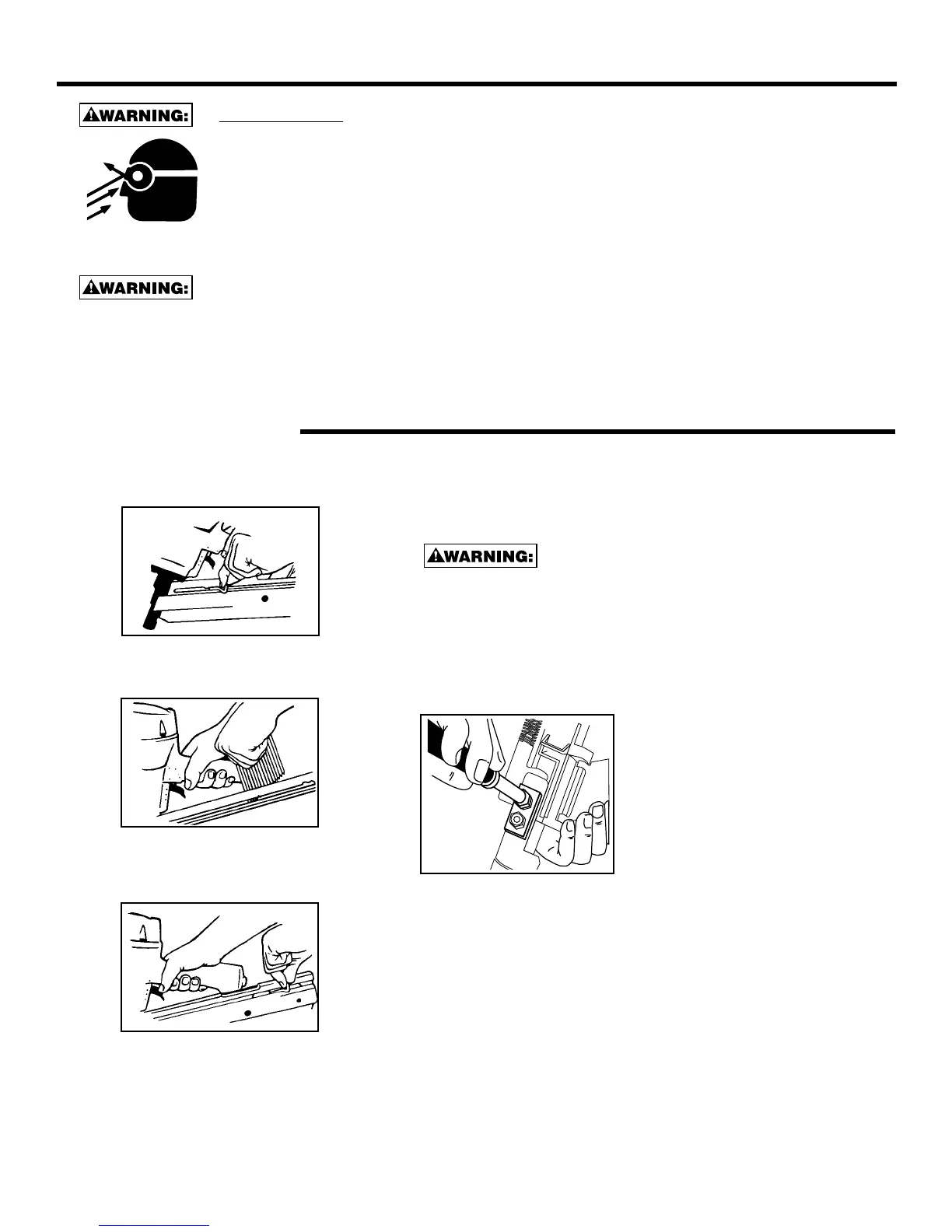
4. To make the adjustment, use a 10mm wrench or nut driver to loosen
the (2) elastic stop nuts on the depth control approximately 2 full
revolutions. It is not necessary to remove these nuts. Move the lower
portion of the depth control to the desired height and tighten the nuts.
Do not overtighten. Check that the work contacting element operates freely
without sticking or binding.
5. Reconnect air supply and drive a few fasteners in a sample of
material to determine if adjustment is correct. If further adjustment is
necessary, disconnect air and repeat above.
EYE PROTECTION which conforms to ANSI specifications and provides protection
against flying particles both from the FRONT and SIDE should ALWAYS be worn by the
operator and others in the work area when loading, operating or servicing this tool. Eye
protection is required to guard against flying fasteners and debris, which could cause
severe eye injury.
The employer and/or user must ensure that proper eye protection is worn. Eye protection
equipment must conform to the requirements of the American National Standards
Institute, ANSI Z87.1-1989 and provide both frontal and side protection. NOTE: Non-side
shielded spectacles and face shields alone do not provide adequate protection.
LOADING THE SDN11RH SERIES STICK NAILER
FASTENER DEPTH CONTROL ADJUSTMENT
TO PREVENT ACCIDENTAL INJURIES:
• Never place a hand or any other part of the body in nail discharge area of the tool while the air supply is connected.
• Never point the tool toward anyone else.
• Never engage in horseplay.
• Never pull the trigger unless nose is directed toward the work.
• Always handle the tool with care.
• Do not pull the trigger or depress the trip mechanism while loading the tool.
1. Open the magazine:
Pull pusher back to engage latch.
2. Load Nails:
Hold nailer with magazine tilted downward.
Insert stick of nails.
3. Close Magazine:
Release latch by pulling latch tab and pusher
together slightly to disengage, slide pusher
against nails.
NOTE: Use only nails recommended for use in Stan-Tech
SDN11RH series nailers or nails which meet Stan-Tech
specifications.


 To Next Page