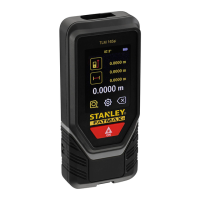
The STANLEY FATMAX TLM165S, TLM165SI, and TLM330S are laser distance measurers designed for a variety of measurement tasks. These tools emit a visible Class 2 laser beam and are intended for professional and DIY use, providing accurate and efficient measurements.
Function Description
The primary function of these devices is to measure distances using a laser. This is achieved by pointing the tool's laser at a target wall or object and activating the measurement. The device then calculates and displays the distance. Beyond simple distance measurement, the tools offer a range of advanced functions:
- Continuous Measurement: This mode allows for a series of measurements as the user moves the tool, continuously updating the distance displayed on the screen. This is particularly useful for tracking changes in distance or finding minimum/maximum values.
- Area Measurement: Users can measure the width and length of a room or object to calculate its area. The tool guides the user through taking two sequential measurements (width and length) and then automatically computes the area.
- Volume Measurement: Similar to area measurement, the tool can calculate the volume of a room or object by taking three sequential measurements: width, length, and height.
- Adding/Subtracting Measurements: The device supports basic arithmetic operations on measurements. Users can add or subtract two individual distance measurements, two area measurements, or two volume measurements to obtain a combined or differential value.
- Indirect Height Measurement (Pythagorean Theorem): For situations where direct measurement of height is not possible, the tool can calculate height using the Pythagorean theorem.
- Distance to 1 Point: This method determines height based on the distance to a single point on a wall or object. The user positions the tool opposite the bottom of the vertical height and aims the laser at the highest point to measure the distance, from which the height is calculated.
- Distances to 2 Points (Double Indirect Height): This method calculates height using distances to two points on a wall or object. The tool is positioned opposite the approximate center of the vertical height, and measurements are taken to both the lowest and highest points.
- Measuring Partial Height: This function allows users to determine the height of a section of a wall or object, such as the distance from the ceiling to the top of a TV or window. Measurements are taken to the highest point, the top of the obstruction, and a horizontal line straight ahead.
- Measuring Height of Obstructed Object: This feature addresses scenarios where a tall building or object is blocked by other structures. The tool measures the distance to the highest point of the obstructed object to determine its height.
- Measuring from a Tripod: For enhanced stability and accuracy, especially when measuring the height of tall buildings, the tool can be mounted on a tripod. The device has a 1/4-20" hole for tripod connection, and the tool position setting can be adjusted to account for measurements taken from the tripod.
- Positioning Studs (Stakeout Feature): This function assists in framing walls by allowing users to easily mark the position of each stud. The user sets a desired stud distance, and the tool guides them to mark the locations.
- Measuring an Angle: The tool can determine the angle at which something is positioned. The user positions the tool at the desired angle and takes a measurement. For overhead angles, the measurement can be locked on the screen.
- Level Function: The device can also be used as a digital level. By placing the tool on a surface, a white bubble on the screen indicates whether the surface is level, similar to a traditional spirit level.
- Bluetooth® Connectivity (STANLEY® Smart Connect™™): The TLM165S, TLM165SI, and TLM330S models feature Bluetooth® capability, allowing them to pair with the STANLEY® Smart Connect™™ application on a cell phone or tablet. This enables users to record measurements directly onto floor plans or room photos captured within the app, save them, and share them via print or email.
Usage Features
The devices are designed for user-friendly operation with a touchscreen interface and clear visual feedback.
- Loading Batteries: The tool requires three AAA batteries. The battery compartment is accessed by pulling up the endpiece and latch on the back of the tool. Correct polarity must be observed during insertion. A battery level indicator is displayed on the screen when the tool is on.
- Turning the Tool On/Off: The tool is turned on by clicking a designated button, which also activates the red laser dot. To turn off, the button can be pressed and held for 10 seconds, or the tool will automatically power down after a set period of inactivity (30, 60, 90, or 300 seconds, configurable by the user). An "infinity" setting keeps the tool on until manually turned off.
- Settings Configuration:
- Automatic Turn Off: Users can customize the inactivity period after which the tool automatically turns off.
- Screen Brightness: The display brightness can be adjusted to 25%, 50%, 75%, or 100% to suit different lighting conditions.
- Sound On/Off: The audible beep that accompanies each measurement can be toggled on or off.
- Unit of Measure: The tool supports various units of measure, including meters (0.0000 m), fractional feet (0'00" 0/00), inches (0" 0/00), decimal feet (0'00" ft), and decimal inches (0.00 in).
- Tool Position: Measurements can be taken from different points on the tool: the bottom (default), the top, the tripod connection, or from the end of the endpiece when it is flipped open for hard-to-reach locations. This flexibility ensures accurate measurements regardless of the tool's placement.
- Memory Function: The tool stores up to the last 20 measurements. These can be viewed by scrolling through the memory.
- Error Codes: The device provides specific error codes (e.g., 101 for weak signal, 201 for too much background light, 301 for temperature issues) to help users diagnose and resolve operational problems.
Maintenance Features
Proper maintenance ensures the longevity and accuracy of the device.
- Battery Management:
- Always remove batteries if the device will not be used for several months to prevent leakage and damage.
- Use only recommended batteries and ensure they are inserted with correct polarity.
- Do not short, charge, mix old and new, or mix different chemistries of batteries.
- Dispose of batteries properly and keep them out of reach of children.
- Calibration: The tool can be calibrated to maintain accuracy. The calibration process involves placing the tool on a flat, level surface and performing a series of rotations and presses as guided by the on-screen instructions. An "A" in red will appear if the tool is not positioned correctly during calibration.
- Clearing Memory: Individual measurements or the entire memory (up to 20 measurements) can be cleared from the tool's storage.
- Troubleshooting: The manual provides a comprehensive list of error codes and corresponding corrective actions, guiding users through common issues like signal problems, environmental interferences, and temperature-related errors. For hardware errors or unknown issues, users are advised to contact a service center.
- Warranty: The product comes with a two-year limited warranty covering material and workmanship deficiencies. This warranty excludes improper use, abuse, alteration, or repair. Stanley also offers a 30-day money-back guarantee for lasers if the user is not completely satisfied.

 Need help?
 General





 To Next Page