5
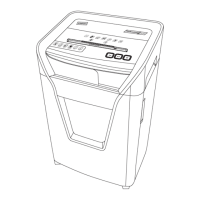
START MODE
± When pressing the Power On button, the Green LED
activates and the machine is ready for use.
STOP MODE
± When pressing the Stop button, the machine stops.
The Green LED deactivates and the machine is off.
REVERSE MODE
± When pressing the Reverse button during Auto Mode
operation, the motor enters the Reverse mode. Press
and hold the Reverse button in order to keep the motor
running in reverse. When the Reverse button is released,
the machine returns to Auto mode.
FORWARD MODE
± When pressing the Forward button, the motor enters the
Forward mode. Press and hold the Forward button
in order to keep the motor running in forward. When
the Forward button is released, the machine stops and
returns to Auto mode.
OVERLOAD MODE
± When the shredder overloads during shredding,
the motor will stop. The LED will light Overload.
Pressing the Reverse button will start the motor
reversing. Remove the overloaded paper and
continue in Reverse mode for 3 seconds to
clear any remaining paper particles.
• If user cannot remove the paper from the slot by
pressing the Reverse button, tear off the remaining
paper and press Forward button to start shredding
again and clean out the paper. Repeat the above
process until the paper is completely removed.
• If a paper jam occurs, press and hold the “Reverse”
button to back paper out of the paper entry. Try
gently pulling on the paper to remove it from the
shredder. Alternate between forward and reverse, as
needed, until the jam clears.
• Turn off the shredder, then unplug the power cord.
Open the cabinet door and remove the waste bin.
Carefully clear any paper shreds that have collected
on underside of paper entry. Use care when
removing paper shreds.
DOOR OPEN MODE
± When the wastebasket is opened while shredding,
the motor will stop immediately. The LED will light
Door Open. To resume normal function, the door must
be closed. The LED will light Power again.
OVERHEAT MODE
± If the shredder overheats, the LED will light Overheat.
All functions will stop. When the shredder overheats,
user may press Stop button to place the shredder in
Stand by mode. The shredder will not resume normal
functioning until the temperature of the motor cools
down to a safe temperature and LED will light Power.
BIN FULL MODE
± If the wastebasket is full, the motor will stop and the
LED will light Bin Full. All shredder functions will stop.
If the cabinet door is open, the LED will light Door Open.
After the bin is emptied, place it back into the cabinet
and close the doors. The LED will light Power and
resume normal function.
Caution: The machine has exposed blades on
underside of paper entry. Use care when removing
waste bin and keep fingers away from cutting blades.
OVERHEATING
± The motor overheat circuit has been tripped
when the LED lights Overheat. This circuit terminates
power automatically. The shredder will not resume
normal functioning until the temperature of the motor
cools down to a safe temperature.
Make sure to periodically empty the waste bin to avoid
overloading it and damaging the cutting mechanism.
CARE AND MAINTENANCE:
FEED ROLLERS
The 8 black inlet belts should be cleaned every time the
shredder bin is full. In case the paper is not drawn in
completely, although the feeding belts have been cleaned,
the complete feeding unit can be replaced. Please call
customer support for further instructions and information.
BLADE LUBRICATION
To keep your Staples
®
Brand shredder running smoothly
and dispose of shreds quickly, use Staples
®
Brand shredder
lubricant sheets (Model# 12434) and Staples
®
Brand
shredder bags (Model# 22403). Apply lubricants after
30 minutes of shredding or a minimum of twice per month.
OPERATING INSTRUCTIONS


 To Next Page