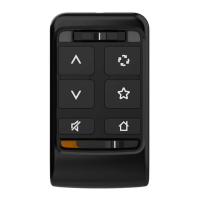
This document is a user manual for the StarLink Remote Control, an accessory designed for use with wireless hearing aids. The remote control enhances the user's hearing experience by providing easy and discreet adjustments to their hearing aids and allowing them to connect with the world around them.
Function Description
The StarLink Remote Control serves as a user-friendly interface for managing wireless hearing aids. It allows users to:
- Adjust volume: Independently control the overall volume of sounds coming through the hearing aid microphone (short press) or the audio stream volume from a wireless accessory (long press).
- Mute/Unmute: Temporarily turn off or on the sounds coming through the hearing aid microphone. Muting can be undone by pressing any other button.
- Change memory: Cycle through multiple memories (configurations) created by a hearing care professional within the hearing aid.
- Access favorite settings: Quickly access a pre-set "Favorite" configuration, if one has been set by a hearing care professional.
- Reset to default: Reset the hearing aids to memory one and the default volume level.
- Lock/Unlock: Prevent unintended hearing aid changes by locking the remote control, which also helps extend battery life.
Important Technical Specifications
The StarLink Remote Control is classified as a Type B applied part under the IEC 60601-1 medical instrument standard. It is designed to comply with the most stringent standards of international electromagnetic compatibility.
Wireless Technology:
- Operates in the 2.4 - 2.4835 GHz band with a maximum effective radiated power of 3 dBm.
- Modulation type: 1M06F1W.
- Receiver section of the radio has a bandwidth of 2 MHz.
Environmental Operating Conditions:
- Temperature range: -20°C to 60°C (-4°F to 140°F).
- Relative humidity range: 10%-95%, non-condensing.
- Altitude range: 1,200 ft (380 m) below sea level to 10,000 ft (3,000 m).
Environmental Transport and Storage Conditions:
- Temperature range: -40°C to 60°C (-40°F to 140°F).
- Relative humidity range: 10%-95%, non-condensing.
- Altitude range: 1,200 ft (380 m) below sea level to 10,000 ft (3,000 m).
Battery:
- Contains a Lithium-ion polymer battery.
- The battery in the Remote Control is not replaceable by the user.
Expected Service Life:
- The expected service life of the Remote Control is 3 years.
Regulatory Compliance:
- FCC ID: EOA-24WR
- IC: 6903A-24WR (Model 610)
- Complies with part 15 of the FCC rules and with ISED Canada license-exempt RSS standard(s).
- EMC Emissions: IEC 60601-1-2 radiated and conducted emissions requirements for a Group 1 Class B device as stated in CISPR 11.
- EMC Immunity: RF radiated immunity at a field level of 10 V/m between 80 MHz and 2.7 GHz, as well as higher field levels from communications devices as stated in Table 9 of IEC 60601-1-2. Immunity to power frequency magnetic fields at a field level of 30 A/m and to proximity magnetic fields as stated in Table 11 of IEC 60601-1-2. Immunity to ESD levels of +/- 8 kV conducted discharge and +/- 15 kV air discharge.
Usage Features
Overview of Controls:
- Indicator lights: Blue (left) and red (right) lights blink to indicate commands sent to the left or right hearing aid, respectively.
- Ear Selection switch: Allows adjustments to be made to one hearing aid or both.
- Set of hearing aids: Position the switch in the center to adjust both hearing aids simultaneously.
- Single hearing aid: The switch is ignored, and the Remote automatically sends the appropriate left or right-side command.
- Volume up (∧): Increases volume.
- Volume down (∨): Decreases volume.
- Mute/Unmute (␡): Toggles mute function.
- Memory Change (␡): Cycles through programmed memories.
- Favorite (☆): Activates a pre-set favorite configuration.
- Home (⌂): Resets hearing aids to default settings.
- Lock/Unlock switch: Prevents accidental adjustments.
- Lanyard (optional) housing: For attaching a lanyard for portability.
Pairing with Hearing Aids:
- Put the Lock/Unlock switch in the Unlock position (to the left).
- Turn your hearing aids OFF and ON. For CROS hearing aid systems, turn OFF hearing aids and CROS transmitter, then turn ON hearing aids but leave the CROS transmitter OFF.
- Place hearing aids within 12 inches of the Remote.
- Press and hold the Home button for 5 seconds until both indicator lights (blue and red) start rapidly blinking.
- Successful pairing (set of hearing aids): Both blue (left) and red (right) indicator lights become solid for 2+ seconds.
- Unsuccessful pairing (set of hearing aids): Indicator lights do not become solid for 2+ seconds. Repeat steps 1 and 2.
- Successful LEFT hearing aid pairing (single hearing aid): Blue (left) indicator light becomes solid for 2+ seconds.
- Successful RIGHT hearing aid pairing (single hearing aid): Red (right) indicator light becomes solid for 2+ seconds.
- Check successful setup by pressing Volume up or Volume down and confirming volume adjusts.
Lock/Unlock Switch:
- Locked position (left): Move switch to the left when not using the Remote to prevent unintended changes and extend battery life.
- Unlocked position (right): Move switch to the right to adjust hearing aids.
Lanyard (optional) housing:
- Insert a thin cord on the lanyard into the end of the Remote lanyard housing until the loop is exposed.
- Thread the lanyard through the loop and pull the lanyard.
Maintenance Features
Troubleshooting Guide:
- Indicator lights do not illuminate when button is pressed:
- Possible cause: Remote is in locked state.
- Solution: Move Lock/Unlock switch from Lock (right) to Unlock (left) position.
- Possible cause: After moving lower switch to Unlock position, it may take a brief time to wirelessly "locate" your hearing aids.
- Solution: Wait for about a second after unlocking before pressing a button.
- Indicator lights illuminate, but hearing aids do not respond to a button press:
- Possible cause: Hearing aids are not paired with the Remote.
- Solution: Perform pairing process with your hearing aids and Remote (refer to p. 9).
- Possible cause: Battery level in hearing aid can no longer support wireless activity.
- Solution: Install new hearing aid battery.
- Set of hearing aids fail to pair with the Remote:
- Possible cause: Less than two hearing aids were found during pairing process.
- Solution: During pairing process, make sure both hearing aids are available.
- Only one hearing aid is receiving commands:
- Possible cause: Ear Selection switch is in the left or right position.
- Solution: Move Ear Selection switch to center (both) position.
Cleaning:
- The Remote Control is designed to be cleaned with a damp cloth moistened with soapy water.
Battery Replacement:
- The battery in the Remote Control is a Lithium-ion polymer battery and is not intended for user replacement. To remove the battery, pry apart the housing halves with a small screwdriver, cut the battery wires from the circuit board to prevent accidental shorting, and pry the battery away from the housing using a wide flat blade. Such modifications could void the user's authority to operate the equipment.
Disposal:
- Waste from electronic equipment must be handled according to local regulations.
- Consult the user manual for disposal instructions.
- Starkey Laboratories, Inc. encourages the EU requires, and your local community laws may require, that your Remote Control be disposed of via your local electronics recycling/disposal process.
- The instructions provided are for the benefit of disposal/recycling personnel. Please include this manual when disposing of your Remote Control.

 Need help?
 General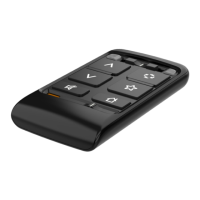

 To Next Page