18
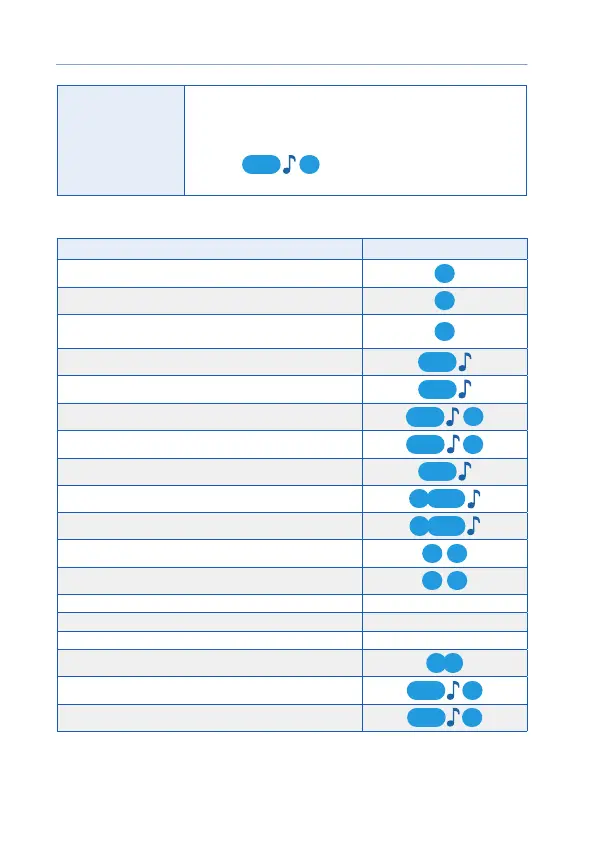
Successive pressing
Two pressings of one or dierent buttons. The rst pressing
shall be long (of the rst or second level), the second
pressing shall be short. The rst button should be released
before the second pressing.
Example:
12
— successive pressing of buttons
2 and 1.
Main control commands from the remote key:
Command Combination of buttons
Activate security
1
Deactivate security
2
Request passenger compartment temperature, engine
temperature and storage battery voltage
3
Start the engine
1
Stop the engine
2
Switch on the pre-start engine heater
1
2
Switch o the pre-start engine heater
22
Car search on the parking lot
3
Switch on/o the shock sensor
1 2
Switch on/o the tilt and motion sensor
1
3
Activate the «Panic» mode
1 1
Unlock the trunk
2 2
Activate automatic starting Cursor menu
Activate/deactivate the service mode Cursor menu
Activate/deactivate the «Hands free» mode Cursor menu
Activate/deactivate button blocking
2 3
Activate the remote key vibration signal only
33
Activate the remote key sound and vibration signal
13



 To Next Page