19
Tags and smartphones registration
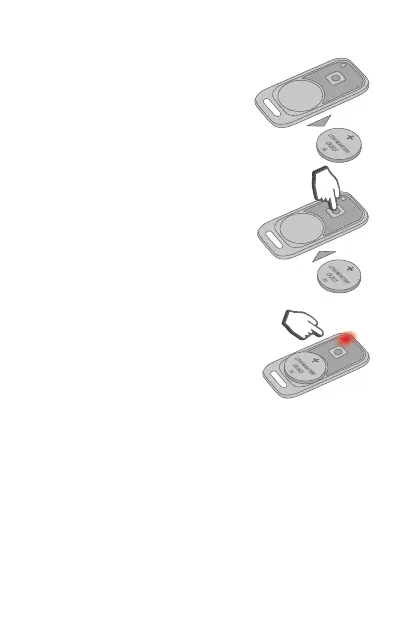
1) Remove battery from tag.
2) Push and hold the tag
button and install battery
back. The tag LED will light
up red.
3) Release the button and
check presence of a
red ashes series for 10
seconds.
4) Successful paring shall be conrmed with one
green LED ash and SMS message. If tag pairing
failed then LED lights up red.
5) Repeat steps 1 to 3 for the remaining tags.
6) Pair a smartphone with use of StarLine mobile
App. Paring code is 000000. Successful paring
shall be conrmed with SMS message.


 To Next Page