EasyManua.ls Logo

STARLINK Remote Control 2.0 - Troubleshooting Guide

STARLINK Remote Control 2.0
20 pages
Print Icon
To Next Page IconTo Next Page
To Previous Page IconTo Previous Page
Loading...
12
|
Get to know your Remote Control 2.0
Troubleshooting guide
Problems with your Remote? Try these
tips. If issues continue, contact your
hearing care professional.
Symptom
Possible
causes
Solutions
Indicator
light
does not
illuminate
when
button is
pressed.
The Remote is in
locked state.
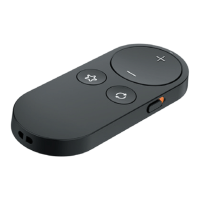
Move Lock/
Unlock switch
from Locked
(down) to
Unlocked (up)
position.
Indicator
light
illuminates,
but
hearing
aids do not
respond to
a button
press.
After moving
Lock/Unlock
switch to
Unlocked
position, it may
take a brief time
to wirelessly
“locate” your
hearing aids.
Wait for about
a second after
unlocking
before pressing
a button.