EasyManua.ls Logo

Statesman TVM07W - Appliance Overview; Control Panel

Statesman TVM07W
16 pages
Print Icon
To Next Page IconTo Next Page
To Previous Page IconTo Previous Page
Loading...
7
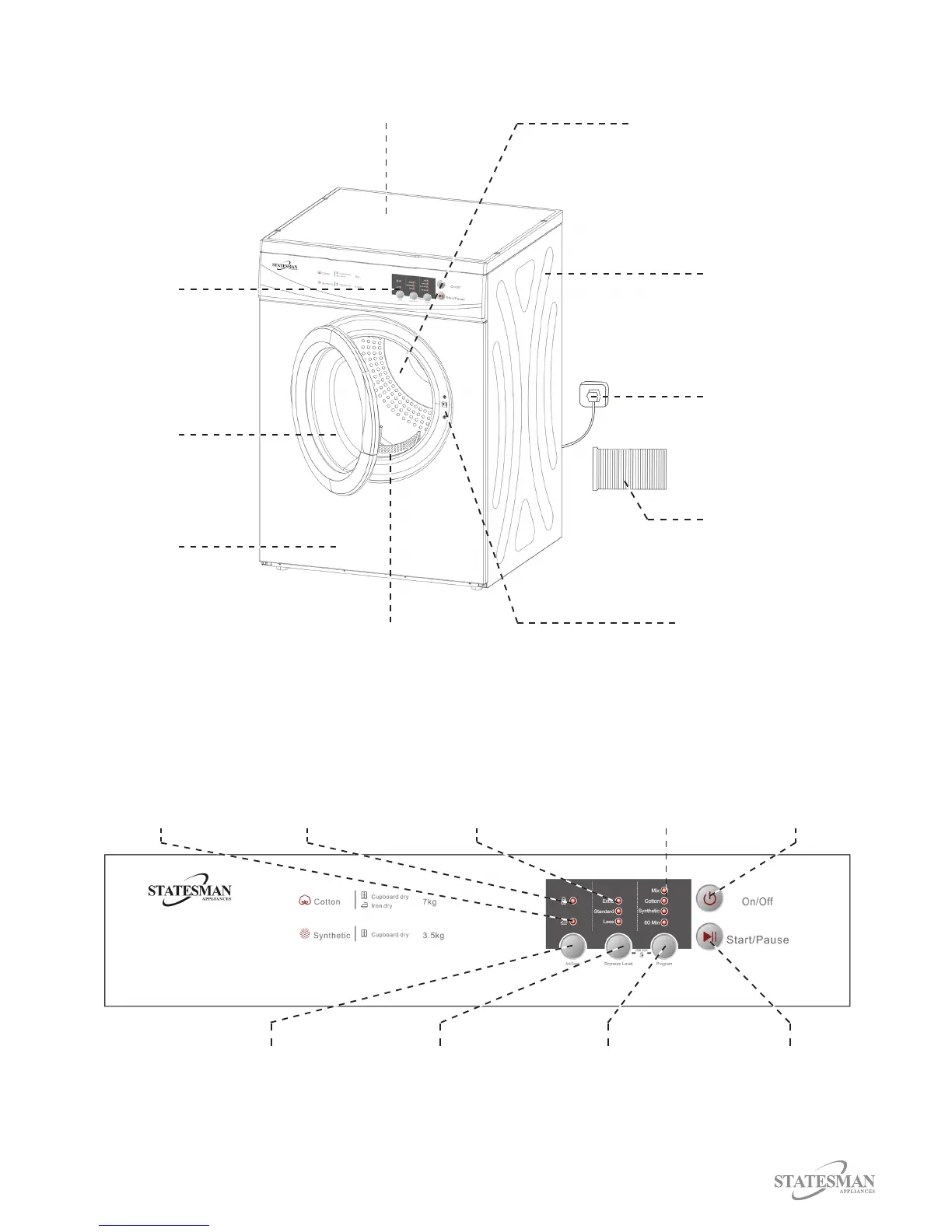
APPLIANCE OVERVIEW
Top Board
Door
Control Panel
Side Panel
Filter
Front Panel
Flexible Vent Hose
Power Plug
Drum
Switch
Control Panel
On/O Button
Press to switch
appliance between
‘On’ and ‘O.’
Start/Pause Button
Press to start or
pause drying cycle.
Program Button
Press repeatedly
to select desired
program
Dryness Level Button
Press repeatedly to
select desired dryness
level
Anti-Crease Button
Press to turn Anti-
Crease function on
or o.
Program Indicator
Illuminates to
indicate which
program is selected
Dryness Level Indicator
Illuminates to indicate
which dryness level is
selected
Child Lock Indicator
Illuminates to indicate
that Child Lock
function is active
Anti-Crease Indicator
Illuminates to indicate
that Anti-Crease
function is selected