2 PROsine 2.5/3.0 Advanced Control System (ACS) Owner’s Manual
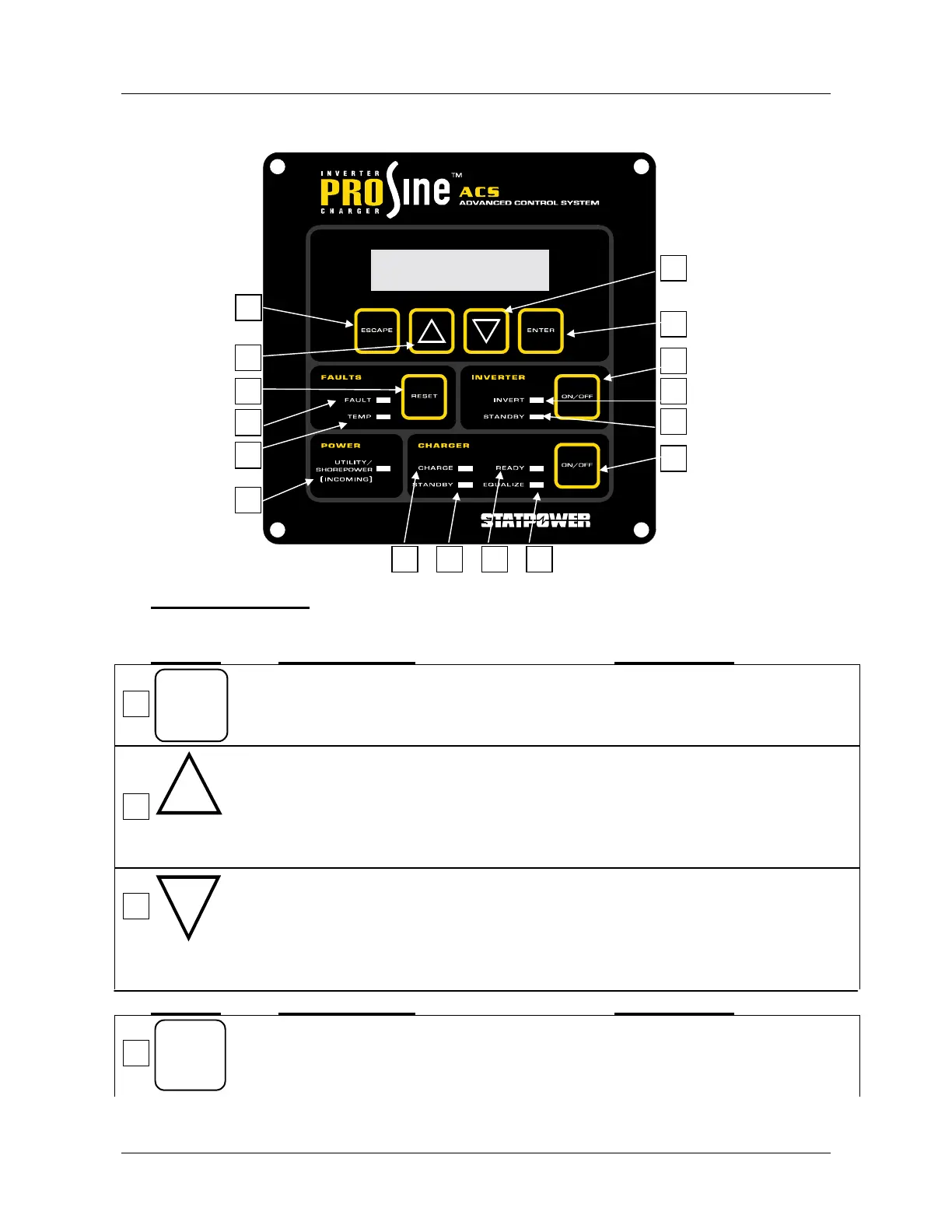
Control Buttons:
Button What it does: Comments:
ESCAPE
Moves up one level in the menu tree. In a screen with settable values to
be changed, does not change the
last value set.
1. Moves up one option in the selected
menu, or
2. Selects the next higher value (or previous
choice) in a screen that allows the user or
installer to scroll through settable values.
This button is shown as ▲ in the
following instructions.
For some menus, if you hold the
button down, it will scroll rapidly
through the numerical values.
1. Moves down one option in the selected
menu, or
2. Selects the next lower value (or next
choice) in a screen that allows the user or
installer to scroll through settable values.
This button is shown as ▼ in the
following instructions.
For some menus, if you hold the
button down, it will scroll rapidly
through the numerical values.
Button What it does: Comments:
ENTER
1. Selects the menu level, or You can then use the ▲ or ▼
buttons to move through the
screens at that level.
1
1
2
3
4
2
3
4
5
6
7
8
9
10
11
12
13 15 14 16


 To Next Page