PROsine 2.5/3.0 Advanced Control System (ACS) Owner’s Manual 3
2. If editing of the displayed value is
permitted, this key places the value in edit
mode, allowing you to scroll through the
allowed values, then
3. When pressed again, the current value
displayed will be the new value for that
menu item.
If the screen has selectable
options, you can then use the ▲
or ▼ buttons to move through the
options.
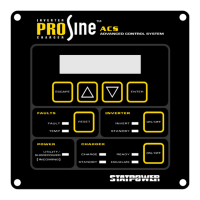
INVERTER
ON/OFF
1. Press the ON/OFF button to switch the
PROsine inverter to standby mode if AC
power is available, or to ON if no AC
power is available. In standby mode, the
inverter switches on automatically when
AC power fails or is disconnected and
conditions are suitable for inverting.
2. Press the
ON/OFF button again to switch
the inverter off.
The inverter
STANDBY LED is lit
when the inverter is in standby
mode.
The
INVERT LED is lit when the
inverter is in invert mode.
When the inverter is switched off,
both the
INVERTER STANDBY and
INVERT LEDs are off. Incoming
AC power will still be passed
through to the load terminals.
CHARGER
ON/OFF
1. Press the ON/OFF button to switch the
PROsine charger to standby mode if no
AC power is available, or to ON if AC
power is available. In standby mode, the
charger switches on automatically when
AC power becomes available and
conditions are suitable for charging.
2. Press the
ON/OFF button again to switch
charger off.
3. Hold the charger
ON/OFF button down for
5 seconds to enter Equalize mode.
CAUTION: Equalizing the batteries
improperly can lead to battery damage.
Refer to the PROsine Owner’s Manual.
The charger
STANDBY LED is lit
when the charger is in standby
mode.
The
CHARGE LED is lit when the
charger is on.
Both the
STANDBY and CHARGE
LEDs are off.
The
EQUALIZE LED is lit.
FAULTS
RESET
Press this button to silence an audible
alarm and clear a warning from the
screen.
Note:
This button does not reset the
system, nor does it remove the
condition that led to the alarm.
Indicator LEDs
The function of the indicator LEDs on the PROsine ACS panel are as follows:
LED Status Description: Comments:
FAULTS
6
8
7
5


 To Next Page