- Standard connection
Factory default
LOUD SPEAKER
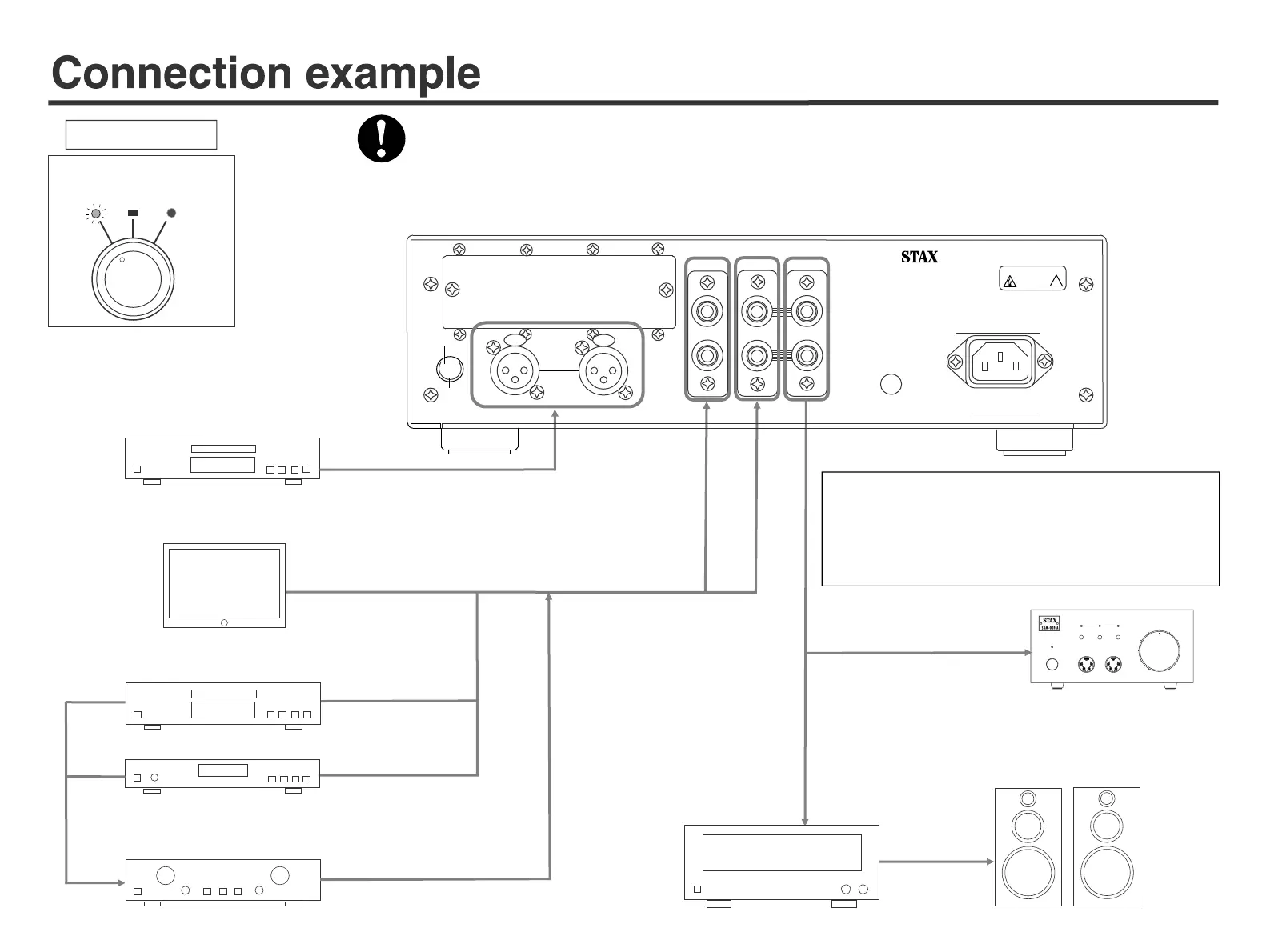
●Usage example of PARALLEL OUT:
① When adding another SRM-series driver unit
② When also using loudspeaker:
Connect PARALLEL OUT to AUX input terminal of an amplifier.
Adjust the volume controller of amplifier.
When adding another SRM-series
driver unit
LINE outputs of personal computer, digital audio, etc.
LINE3: XLR connection
Use XLR cable
When using a loudspeaker in combination:
Connect to the pre / pre-main amplifier from the parallel out terminal.
PRE-MAIN AMP.
MAIN AMP with Volume control
● Other connection than shown below: when connecting to source equipment with mini stereo jack.
The jack is connectable using a commercially available stereo mini plug / RCA plug conversion cable or a conversion plug.
First set the volume of source equipment to the usual headphone listening level, and then adjust the volume of the driver unit.
When connecting source equipment directly to LINE1 or LINE2 input:
Connect REC OUT terminal of your amplifier to LINE1 or LINE2.
Connect REC OUT terminal of your amplifier to LINE1 or LINE2.
VACUUM TUBE INPUT
DRIVER UNIT FOR EARSPEAKERS
SRM-T8000
DO NOT OPEN
RISK OF ELECTRIC SHOCK
CAUTION
!
PARALLEL OUT
LINE
1 LINE2
LINE
4
LINE
3
L
L
R
R
R
L
XLR INPUT
STAX LTD. MADE IN JAPAN SERIAL No.
GND
50/60Hz 95W
PUSH
PUSH
①
③
②
HOT
SHIELD
COLD
-6-
INTERNAL MUTE EXTERNAL
(BYPASS)
LEVEL CONTROL
GREEN
LED
Lights
LINE output equipments such as DVD, SACD/CD/BS/TAPE/
VIDEO, etc.
6
Before connecting, make sure that "Power switch" is off.


 To Next Page
 Loading...