INTERNAL MUTE EXTERNAL
(BYPASS)
LEVEL CONTROL
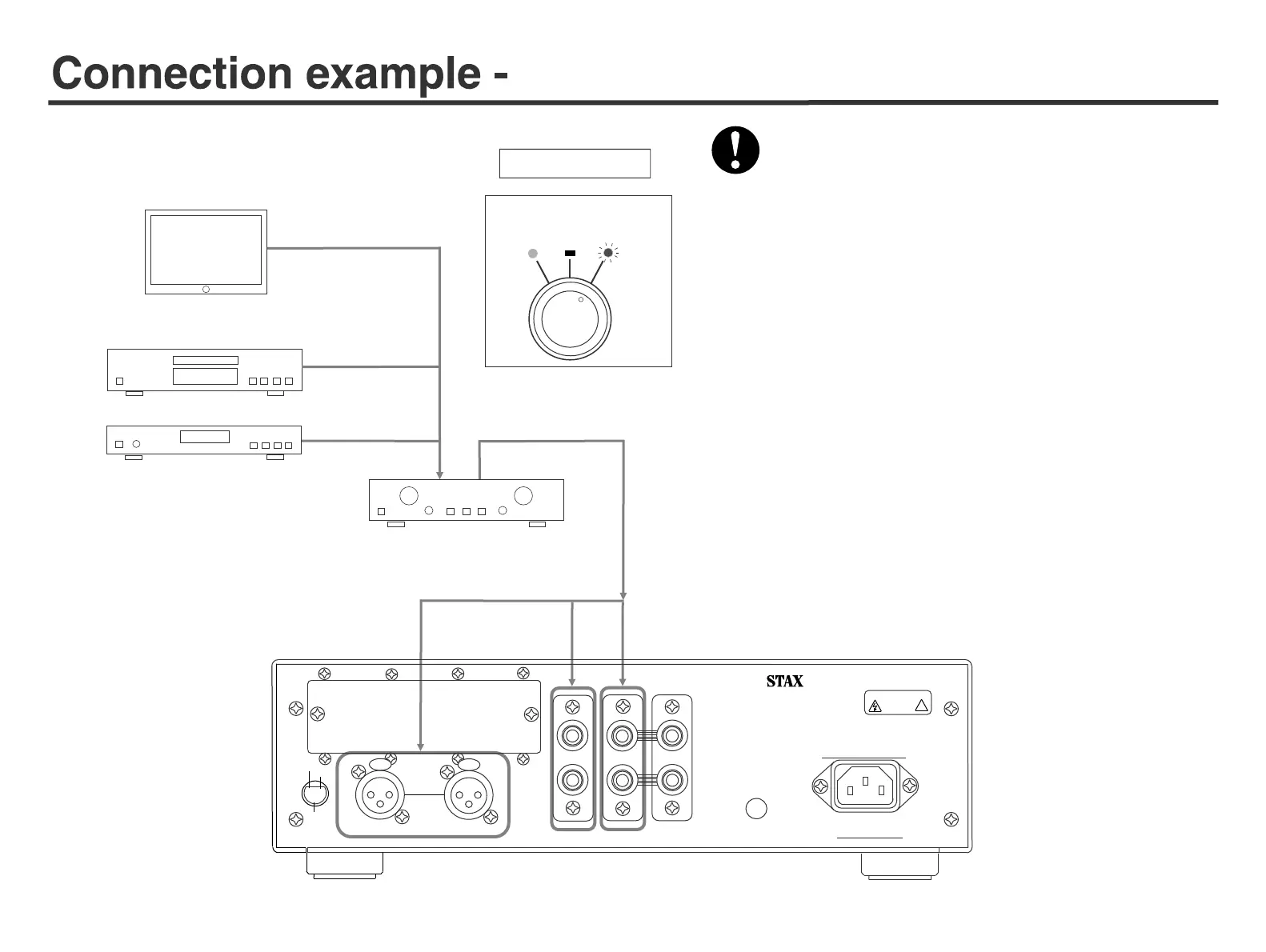
1. When using volume controller of amplifier or attenuator, connect to
either one of RCA (LINE1, LINE2) or XLR
(LINE3). Use XLR cable to connect to LINE3.
2. In this mode do not connect any source equipment with no volume
control, otherwise sound at full volume comes out when you switch
over carelessly.
3. Select SOURCE according to connected input.
Page 4 “Switches and functions Front panel
⑥”
Set “LEVEL CONTROL” knob to “EXTERNAL”.
When using preamplifier or attenuator
LINE output equipments such as DVD, SACD/CD/BS/TAPE/
VIDEO, etc.
Connect the driver unit to PRE OUT terminal of amplifier or attenuator.
Pre- or Integrated amplifier or attenuator
RED LED
Lights
LINE outputs of personal computer, digital audio, etc.
AUX in etc. OUT PUT
Direct input
7
Before connecting, make sure that "Power switch" is off.
VACUUM TUBE INPUT
DRIVER UNIT FOR EARSPEAKERS
SRM-T8000
DO NOT OPEN
RISK OF ELECTRIC SHOCK
CAUTION
!
PARALLEL OUT
LINE
1 LINE2
LINE4
LINE
3
L
L
R
R
R
L
XLR INPUT
STAX LTD. MADE IN JAPAN SERIAL No.
GND
50/60Hz 95W
PUSH
PUSH
①
③
②
HOT
SHIELD
COLD


 To Next Page