Step 5 Continued
! Sometimes the controller does not blink amber.
In this case, residual memory is blocking the wifi.
Please follow these steps.
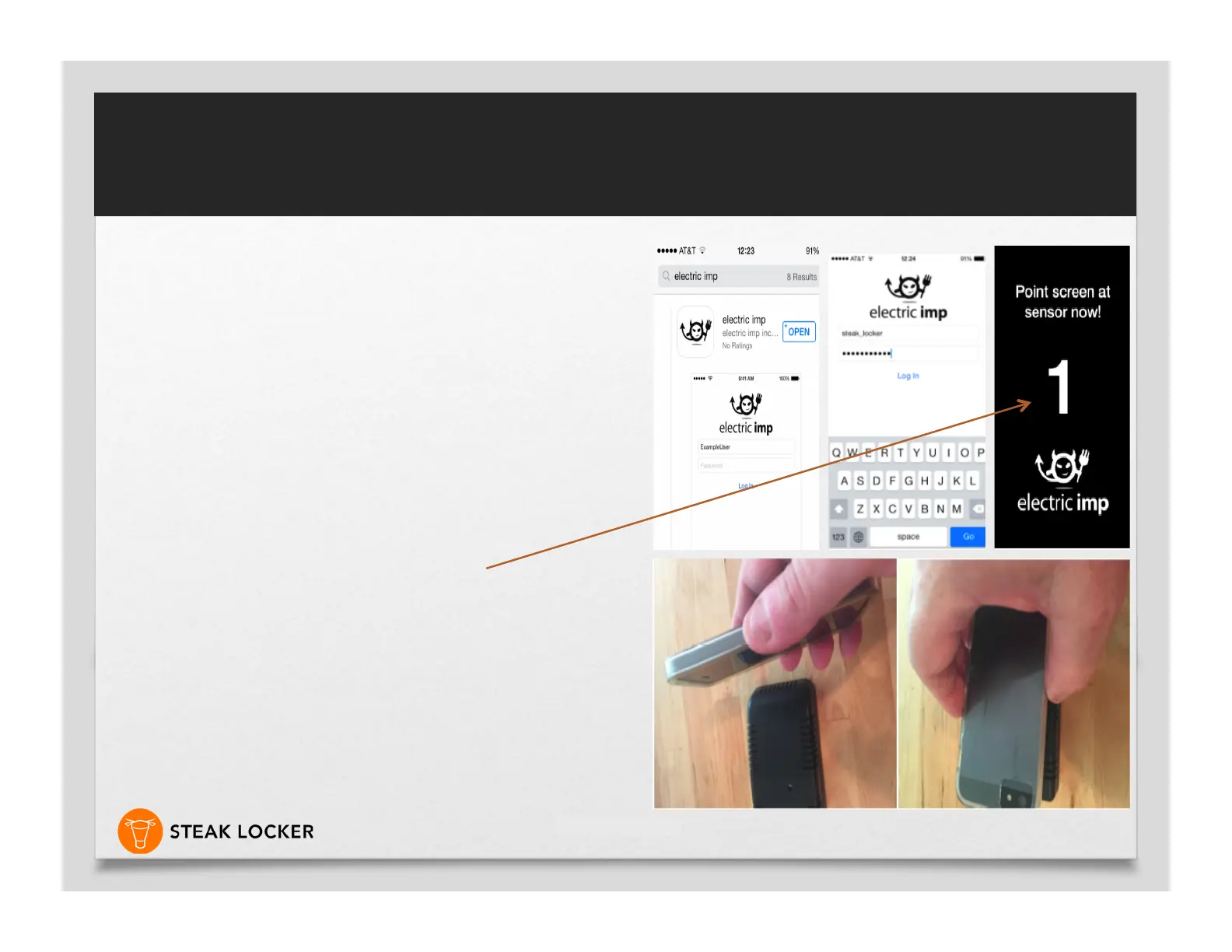
! Go to Apple and download the ELECTRIC IMP
app, same for Google Play
! log in – steak_locker, Password – steaklocker
! Once logged in, unplug your BBC for 15 sec. and
reconnect the 12V power cord.
! Press clear wireless configuration on the Electric
Imp app, the screen will turn black.
! Turn the face of your phone over the face of the
(LED sensor area) of your BBC.
! It will bleep for 3 seconds and then blink over the
BBC (this clears the current configuration). After
the process finishes, unplug your BBC for 15 sec.
and re connect. Your BBC should blink AMBER.
! Now re-sync the BBC with the Steak Locker app
as before. Try a couple of times if not successful.
Non-Sync Issue
The Art of Dry-Aging Steak


 To Next Page