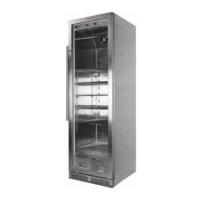
The Steak Locker is a specialized dry-aging refrigerator designed to facilitate the dry-aging of steak. It is controlled via a digital front panel and a smartphone application, allowing users to monitor and manage the dry-aging process.
Function Description:
The Steak Locker's primary function is to create and maintain optimal conditions for dry-aging steak. This involves precise control over temperature and humidity within the unit. It utilizes a Germicidal UV Light to prevent bacterial growth and an Atomizer to add moisture when humidity levels fall below a set threshold. The device connects to a home Wi-Fi network, enabling remote monitoring and control through a dedicated smartphone app.
Important Technical Specifications:
- Power: Requires a dedicated 15 amp circuit.
- Wi-Fi Connectivity: Operates on a 2.4 GHz Wi-Fi frequency (not 5 GHz) and requires a wireless router that is 802.11n standard or 802.11b/g.
- Temperature Control: Adjustable via the digital front panel, with the ability to toggle between Celsius and Fahrenheit.
- Humidity Control: Automatically maintained by the Atomizer, which activates when humidity drops below 55% and adds moisture for 10 seconds. Humidity levels are recalculated every minute.
- Atomizer Water Capacity: Requires distilled water only, with a maximum fill of 200 ml.
- Controller: Utilizes a Black Box Controller (BBC) with an LED indicator for status (amber for connection, green for normal operation/firmware reception, red for errors).
- Shelves: Food-grade chrome shelves that are re-positionable.
Usage Features:
- Initial Setup:
- After unpacking, the unit should run for 4-6 hours to ensure even Freon distribution.
- The digital front panel (Steak Locker Control Panel) is used to set temperature and light controls. The default setting is Celsius (EU), which can be changed to Fahrenheit.
- To change temperature units: Press the Lock sign (rightmost button) for 5 seconds until a beep is heard, then simultaneously press the Lock and 'O' buttons for 5 seconds.
- The germicidal light (UV bacterial light) is operated by a toggle switch on the far right of the panel and should always be on when dry-aging steaks. The blue UV light is operated by the bulb button on the far left.
- Handle Bar Installation: The handle bar is attached by wire to the second shelf. It is installed by gently peeling back the black rubber gasket where the screws are located, placing the handle bar over the emerging screws, and tightening gently with a Phillips head screwdriver. Users are cautioned not to overtighten the screws.
- Shelf Repositioning: Shelves can be re-positioned by pushing up small, thin release levers inside the runners of the roller bracket. The front hooks are released by pushing up about an inch, then pulling towards the user to release the back hooks. Shelves and side brackets slide out together. The process is reversed for insertion.
- Controller & Atomizer Setup:
- The Black Box Controller (BBC) connects to a 6V connector inside the Steak Locker. Its top LED should light up amber when connected.
- The Atomizer is unpacked and filled with no more than 200 ml of distilled water. It is then placed at the bottom of the Steak Locker and connected to the BBC using a provided USB cable (small end to atomizer, larger end to BBC).
- The Atomizer is controlled entirely by the BBC and will not blink independently. It can be tested by plugging its USB into a computer (after filling with water), where it will run uninterrupted.
- Smartphone App (Smart App):
- Downloadable from Apple or Google Play.
- Blink Up/Sync Process:
- Select the Wi-Fi network and enter the password in the app.
- Press "SYNC" on the device screen, then place the phone screen over the LED-Open sensor light on top of the BBC.
- The SYNC screen will turn black, and the BBC should sync to the Steak Locker Cloud Services via Wi-Fi. This process takes approximately 15 seconds.
- The BBC's LED should turn green, indicating successful firmware reception and normal operation.
- Initial measurements will appear in the app.
- Calibration Period: The sensor takes 4-6 hours to calibrate, so initial data in the app may vary or appear irrational. Patience is advised during this validation and calibration period.
- Dashboard: Displays temperature and humidity measurements. Users can toggle (touch) the bars for Temperature and Humidity.
- Adding Items: Touch "ADD TO MY LOCKER" or the "+" symbol on the top right of the dashboard to add a new steak.
- Deleting Items: Move an item left on the dashboard to reveal a delete option.
- Nickname Suggestion: Use the date the meat was placed in the Steak Locker as a "nickname" for accurate start date tracking.
- Instructional Videos: The app includes videos on dry-aging, safety, butchery, and culinary skills, as well as information on butchers and markets for primal cuts. Informative videos are updated weekly.
Maintenance Features:
- Atomizer Water Level Check: The controller is programmed to check water levels and diagnostics once every 24 hours to ensure proper working conditions.
- Troubleshooting (Smart Phone Application):
- LED not blinking: Ensure the refrigerator is plugged in.
- LED blinks amber, syncs, then blinks red: Verify correct Wi-Fi password and ensure connection to a 2.4 GHz Wi-Fi network (5 GHz is not supported).
- Changing Wi-Fi/Steak Locker account: Configure the app with the new ID, power cycle the datalogger, send Sync to the BBC. If still not getting data, unplug the Wi-Fi router, leave unpowered, send Blink to the datalogger, then plug the router back in and power cycle the BBC. The LED should turn green, and data should appear.
- Mister connected, LED on, but no mist: Check if the white foam straw is missing or if the top is not seated correctly. Rotate the top until it fits correctly on the water reservoir.
- Non-Sync Issue (Controller not blinking amber):
- Download the "ELECTRIC IMP" app.
- Log in using "steak_locker" as username and "steaklocker" as password.
- Unplug the BBC for 15 seconds, then reconnect the 12V power cord.
- Press "clear wireless configuration" in the Electric Imp app (screen will turn black).
- Turn the phone face over the BBC's LED sensor area. It will beep for 3 seconds and blink over the BBC (clearing current configuration).
- After the process, unplug the BBC for 15 seconds and reconnect. The BBC should then blink amber.
- Re-sync the BBC with the Steak Locker app. Repeat if unsuccessful.
For further assistance, users can email info@steaklocker.com or call 619-363-2830.

 Need help?
 General

 To Next Page