29
Set the time pre-setting
With this function you can chose at which time a program e.g. steaming should start
(e.g. 2 hrs, 20 min).
Press
and . The hour setting flashes, set the desired hours (2 hours) with the
buttons and confirm with . 30 min flashes.
Set the desired minutes (20 minutes) with the
buttons and confirm with .
Then, select the desired program out of the main menu, e.g. steaming code E – 4 and
confirm with
.
After the pre-set time run out, the device starts the desired program steaming E – 4.
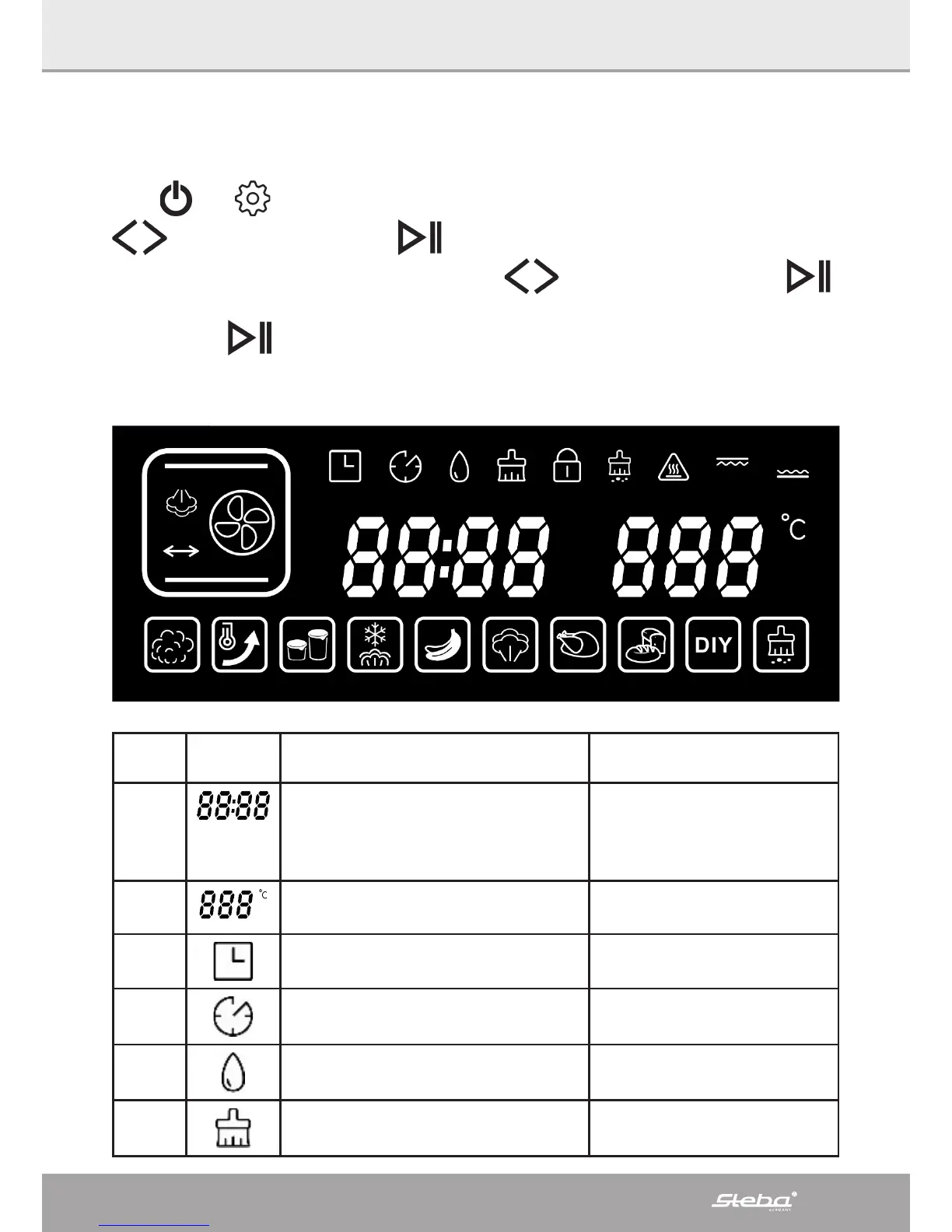
Symbol Function Description
1
Time The first two LED show
the hours (0-12)
The second two LED show
the minutes (0-59)
2
Temperature Adjustable scope 30 –
230°C
3
Delay-function
4
Working time prolongation
5
Water tank Amount of water max.
1,2 ltr.
6
Prompt to clean the water tank



 To Next Page