1110
DONGLE PAIRING
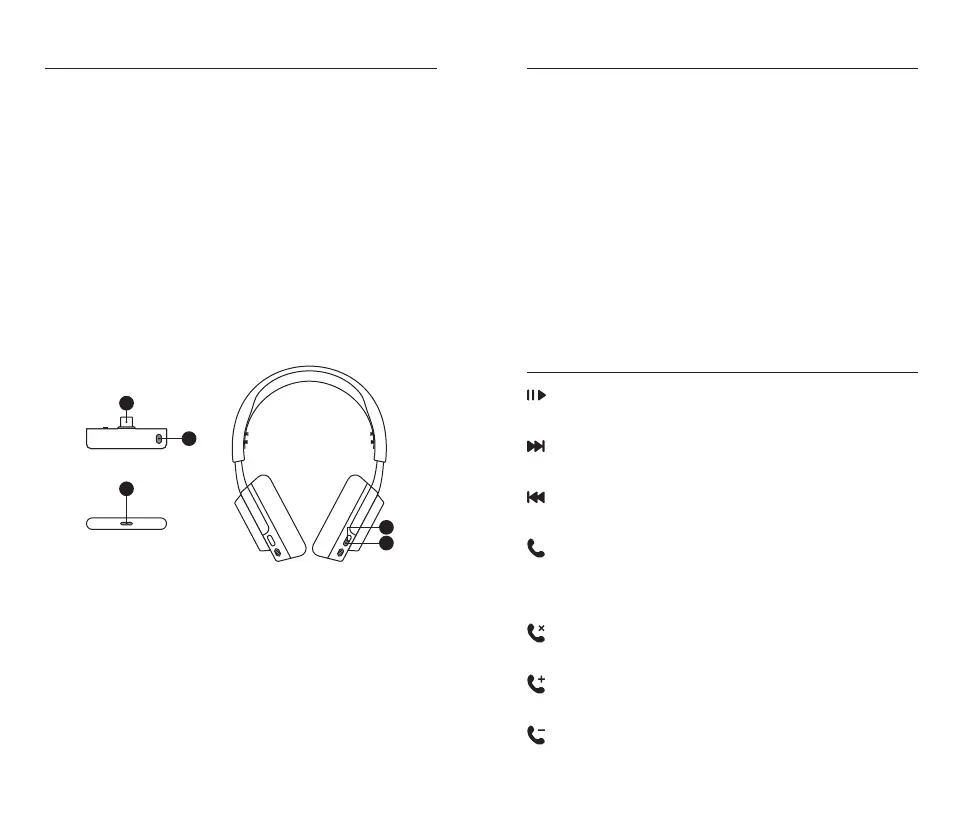
Note: The headset and dongle come paired
If you need to re-pair:
1 Connect the USB-C Wireless Dongle (12) to your gaming device
2 Press and hold the Dongle’s Pairing Button (14) for 4s until the
Dongle’s Status LED (15) blinks rapidly
3 Headset On – Press and hold the Quick-Switch Button (11) for
2 seconds until you hear “Dongle Pairing Mode” and the Headset’s
Power Indicator LED (10) blinks rapidly
Headset O – Press and hold the power button for 4s until the
Headset’s Power Indicator LED (10) blinks rapidly
4 When pairing is successful you will hear “Dongle Connected”, and the
Dongle’s Status LED (15) will turn solid
14
15
12
9
10
BLUETOOTH
Bluetooth can be used independently from 2.4 GHz Wireless by pressing
the Quick-Switch Button (11) and hearing “Bluetooth Mode”.
PAIRING
Headset on – Press & hold the Quick-Switch Button (11) for 2 seconds
until you enter pairing mode and the Headset’s Power Indicator LED (10)
blinks rapidly blue. To switch between dongle and BT pairing mode, press
the QuickSwitch button.
Headset o – Press and hold the Power Button (9) for 4s until the
Headset’s Power Indicator LED (10) blinks rapidly. If the headset is in
dongle pairing mode, press the Quick-Switch Button (11) to switch to
Bluetooth pairing mode.
MULTIMEDIA CONTROLS
Play / Pause Music
Single · press the Power Button (9)
Skip Track
Double · · press the Power Button (9)
Previous Track
Triple · · · press the Power Button (9)
Answer / End Voice Call
Single · press the Quick-Switch Button (11)
(If call is answered in 2.4 GHz mode, you will return back to 2.4 GHz
mode after the Bluetooth call is over.)
Ignore Call
Double · · press the Quick-Switch Button (11)
Increase Call Volume
Single · press the Power Button (9)
Decrease Call Volume
Double · · press the Power Button (9)




 To Next Page