TO LEFT SPEAKER
HEADSET AUX DC
1
3
2
PCPC
5s
TO LEFT SPEAKER
PC DCAUXAUXHEADSETHEADSET
TO LEFT SPEAKER
HEADSET PC DCAUXAUX
8
EXTRA CONNECTIONS
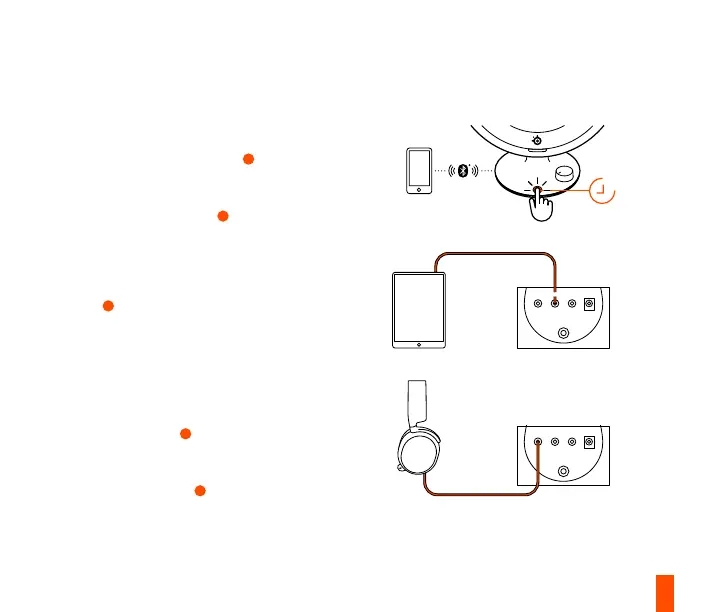
BLUETOOTH
Hold the Multifunctional Button
11
for 5 seconds
to pair with your Bluetooth enabled device. Please
note Bluetooth audio will mix with other audio
sources. The LED Indicator
9
will appear Blue.
AUXILIARY AUDIO INPUT
Plug a 3.5 mm Audio Cable into the AUX Audio
Input
4
on Arena 3 from your audio device. Please
note: Auxiliary audio will mix with other audio
sources.
HEADSET AUDIO JACK*
Plug your headset audio cable into the Arena3
Headset Audio Jack
3
. The speakers will
automatically mute and activate your headset
audio. To toggle back to speakers, press the
Multifunctional Button
11
.
* Some PCs may require a dual 3.5 mm adapter for
separate headphone and mic usage (not included).


 To Next Page