- Never use a stabilizer - using commercially available CD stabilizers with this unit will damage the mechanisms and
ensure that they no longer function properly.
- Do not use CD’s made into unconventional form (e.g. octagonal, heart-shaped, business card size, etc.) as they
can seriously damage the unit.
RECORD CARE
- Before playing a record, make sure it is clean, not dusty or misshapen
and has no scratches to avoid damage to the needle. Keep your record
free of dust and store it in a cool, dry place.
- To avoid dust and scratches, leave your records in their cases or covers if they are not needed.
- Store records upright on their edges. Mounted horizontally, the panels could bend and this could
cause warping.
- Exposing records to direct sunlight or high humidity or excessive temperature can cause
warping.
- If the record is dirty, gently wipe the surface in a circular motion with a soft anti-static cloth.
- Do not touch the plate grooves. Hold the vinyl discs by the edges or the label.
- Make sure that your hands are clean. Oils of clean hands can leave a residue on the disk surface and thus
gradually degrade the quality.
STYLUS
A universal Sapphire Stylus is supplied and fitted to the Tone Arm. This is suitable for playing records of all 3
speeds (33/45/78rpm). A replacement Stylus and a special stylus for playing 78rpm records are available directly
from the Manufacturer and some Dealers.
You should get many hours of use out of the stylus supplied. However, it is recommended that, once you notice a
change in the sound quality, the stylus is replaced. Prolonged use of a worn or bent needle could cause damage
to the record or malfunctioning of the turntable. The wear of the needle is accelerated by playing records at
78rpm. Higher speeds than 78rpm lead to an even higher wear.
REPLACING THE STYLUS
The unit is fitted with a universal stylus, suitable for playing 33/45/78rpm records.
When the stylus eventually needs replacing, follow the procedure below:
Removing a Stylus
Turn off the power before replacing the Stylus.
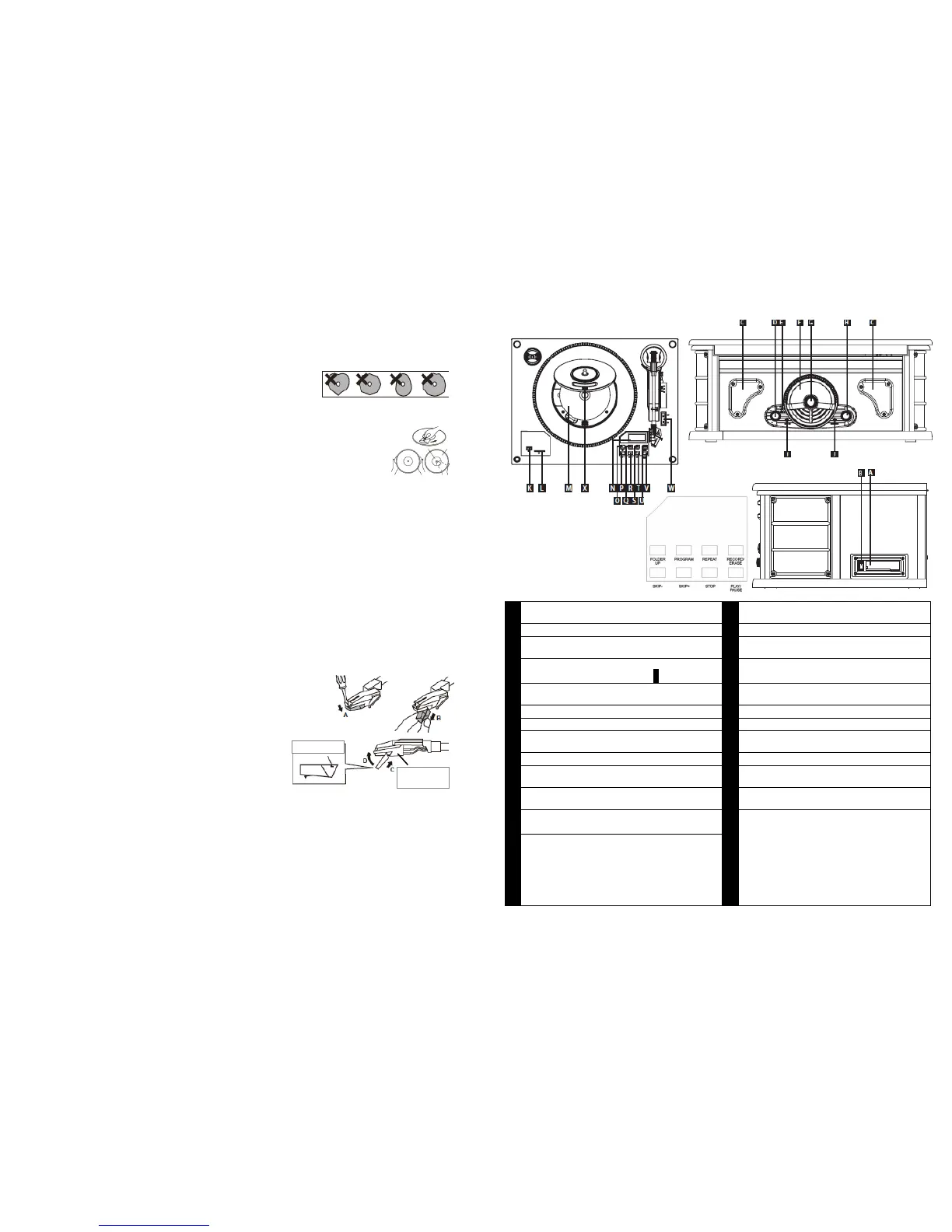
To remove the Stylus from the Tone Arm, hold the Tone Arm head steady while grabbing the plastic Stylus Holder
with two fingers - then gently pull the complete Red stylus holder straight
towards you and off the silver cartridge.
It may be easier with the help of a fine screwdriver, apply this to the tip of the
stylus, as shown in the diagram, and gently press it down in the direction of
the arrow A.
Pull out the needle in the direction of the arrow B, as shown in the line
drawing.
Refitting a Stylus
To re-fit the Stylus, hold the sides of the Red plastic stylus holder, ensuring the needle part is facing downwards.
Hold the tip of the holder, and insert the back edge of the stylus holder at a slight angle, in the direction of the
arrow C in the line drawing, against the silver cartridge at the end of the Tone Arm and gently push the front of
the needle holder up in the direction of the arrow D until it clips into position and you are sure it is securely fitted.
Refit the white protective needle guard, if so required.
Consult a trained professional if you have problems changing the needle.
Always handle the Stylus with care as the Sapphire needle tip is easily damaged.
When removing or re-fitting the Stylus, always be careful not to put too much pressure on the Stylus Holder and
the Tone Arm silver cartridge to avoid any possible damage to them.
When transporting the turntable it is advisable to re-fit the white protective needle cover and the Tone Arm Hold-
down Clip until the unit is going to be used again.
( 13 )


 To Next Page
 Loading...