7
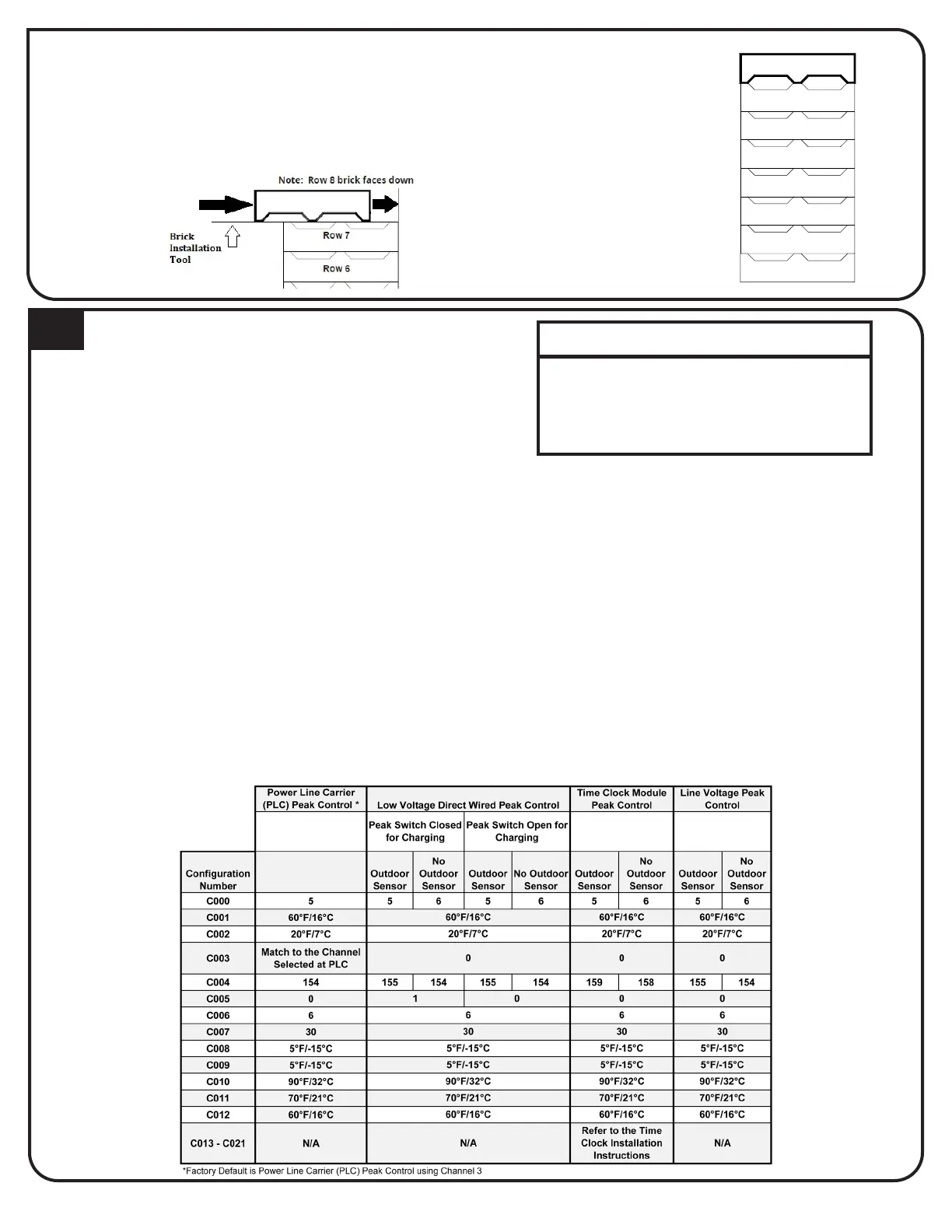
Row 7
Row 6
Row 5
Row 4
Row 3
Row 2
Row 1
Note: Row 8 brick faces down
SIDE VIEW
with the grooved side of the bricks facing down.
BRICK LOADING, CONTINUED
10
CONFIGURATION MENU
Menu, which allows the heaters to be customized for the
equipment installed and the power company consumers’
IMPORTANT
If access to Conguration Menu times
out, the heater must be powered o
at the circuit breaker and back on to
re-enter the menu.
To access the Conguration Menu:
two (2) minutes of operation. If the heater
has been energized for over two (2) minutes,
Step 2 Press and release the M button until the
Step 3 Press the up arrow once and the faceplate
pressing and holding the M button while
using the up or the down arrow button to
change the value.
Step 5 Once the value is correct, release the buttons
and press the up arrow button to go to the
the desired values.



 To Next Page